


Creators: Due to background reprocessing of files, approvals and file security checks may be delayed. Thanks for your patience.


LukeD
Friends of LSPDFR
-
Joined
-
Last visited
Everything posted by LukeD
-
You've definitely installed it incorrectly as LSPDFR is loading NAudio.dll (which it shouldn't do) and is not loading CalloutsV.dll Double check you put everything in the correct place. CalloutsV.dll, CalloutsV.ini and CalloutsV folder inside Plugins/ LSPDFR/ NAudio.dll in Grand Theft Auto V/ (root directory where the exe and RPH files are)
-
Each of the new callouts is set to a "Medium" spawn chance so should happen fairly regularly. If they NEVER happen after 30 minutes or so of gameplay then the plugin may not be working correctly. You say it initialized properly, does it register the callouts?
-
If you go into the pause menu, click brief and then click the notifications on the side bar it will display all notifications printed in game, including vehicle licence plates, callouts and ped ID's
-
The plugin has been officially RELEASED!!! That's right, alpha version 0.2.2a is available for download! Enjoy!
-
Released a new update to work with RPH 0.16 along with some other features Changelog: @Hugo_Agante I wont change the keybinds by default simply because you can change them yourself. And it doesn't matter what keys you change it to, when using LSPDFR's police computer those keys will go through still, same with the siren when you hit J etc.
-
This topic has been moved to the appropriate forum. Please post in the correct location in the future.
-
It would make absolutely no sense at all to release before the major content updates by Rockstar. Not only do you put strain on us for getting a release done by that date, but you then can guarantee the majority will forget to backup the old files and suddenly the mod and their game is broken by the update. We then get a shitstorm of people saying LSPDFR broke their game and everyone on the Community Team here then has to spam the words "did your game auto update, it's not our fault it's broken now" over and over again like a broken record. It does make perfect sense to release the mod AFTER we have gotten modding working on the latest GTA patch as this means you've got the full length of that patch to enjoy the mod. Whereas releasing before means we then have to make a minor update to fix the mod when it breaks (basically meaning 2 releases per patch update rather than 1) which takes time and effort. And as for having a notice on the forum, realistically none of you will read that. Just like the realms of you who ignored the "RagePluginHook currently does not support the latest GTA V patch" notice, or any of the other notices we put up. Come to think of it....the only things you guys ever notice is imaginary countdowns and logo changes. :P
-
That's exactly what it will be.
-
They wont be the sort of timers you're thinking of. Cause I can't stand them. "drive your taxi to this place within 2 minutes" Yeah no fuck that right off. They will be very carefully implemented to make slight alterations to the callout. There will absolutely never in a million years be a timer that says "you have X minutes to go somewhere or you fail".
-
I knew I forgot to add something! Yes I plan to remake my store/location based callouts. Thanks for reminding me I've added it to the list. :)
-
I believe this is heavily related to LCPDFR based on what you've said so I've moved it the GTA IV modding support/requests. This topic has been moved to the appropriate forum. Please post in the correct location in the future.
-
As some of you may recall I made a status update about how I planned to recreate Callouts+ for GTA V. Today I am pleased to inform you all that this is definitely the case and that CalloutsV will be made. This thread will offer you a rough idea as to the callouts and features I plan to create as of now, and once in development this thread will act as my WIP forum area to give you updates and respond to support requests and suggestions. I hope to make CalloutsV the biggest and most comprehensive callouts plugin possible. Planned Callouts Many of the callouts from Callouts+ will be making there way over to the big city of Los Santos, for you to engage with. In addition to these there will be multiple paths to take with several callouts, including decisions to make and timers to race against. In Los Santos, your police training will be hit hard. Don't expect tutorials and easy callouts. You'll need to think on your feet. Below is a list of callouts I plan to make: I have assigned colours for indication of progress, red not done, orange in progress, green done. • Officer Down / Requesting Assistance • Illegal Street Races • Broken Down Vehicles / Highway Obstructions • Road Traffic Collisions / Motor Vehicle Accidents • EMS Requesting Escort • Injured Pedestrians • Vehicle Fitted With Tracker • Location based events (at stores etc) • Many more... Planned Features I originally said no features, however due to the way I plan on changing each callout means I will need some default functionality. Don't worry though! If you would rather use another plugins tow truck or paramedic, you can! I will be designing each callout to consider what happens if someone else repairs the car or heals the ped or takes them away from the scene. Downloads http://www.lcpdfr.com/files/file/7989-calloutsv-the-successor-to-callouts/ Suggestions, Ideas & Feedback Of course this is a plugin about what you guys want to see as much as what I would like to make. Suggestions will always be accepted, but not always implemented or used. Feel free to post ideas below as always. Developers, Have your say! CalloutsV will blatantly not be the only callouts plugin for LSPDFR, with time other developers will want to jump in on the action. If you do plan to release callouts, feel free to drop me a message via the PM system on the forum. With multiple different people working on callouts it's hard to ensure each plugin remains unique and fun, developers will often overlap ideas and that's where problems occur. To work around this, get in touch so we can discuss ideas, I'm already in conversation with FinKone and Straysify to ensure we don't tread on each other's toes. So don't hesitate to contact me. Warning: If you choose not to contact me, and then get pissy at me for "copying" your idea or you decide to copy mine. I will not take too kindly to this, make the effort to get in touch before trying to slate me for theft etc. I'm not a nasty person, and I will happily discuss things with other developers to peacefully resolve conflicts.
-
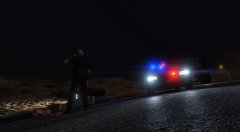 Early hours of the morning, on the scene of a motorcyclist who clipped the curb and became road paint. Officers blocked the single lane of traffic to ensure coroners could process the body safely.
 -
With a bit of effort on google you might be able to find said files, however for obvious reasons we can't allow users to share links to these downloads.
-
That's basically what I said a few posts up. Also LSPDFR doesn't rely on ScriptHook at all. Only RagePluginHook.
-
What I mean is Steam will handle the game's update if you have the steam edition. For everywhere else the GTA V launcher will handle the update (I believe anyway). I can only verify that the method I posted above works for the steam version, as I got my copy through steam.
-
This may not work for the Rockstar launcher edition of the game (I know it temporarily works for Steam) Before updating, save a copy of the GTAV.exe, GTAVLauncher.exe and the Update.rpf (inside the updates folder) somewhere else, recommended inside a folder named GTA BACKUP or something so you don't forget. When this is done let the game update to the latest edition. Then before launching the game replace the NEW downloaded files with the old ones you saved previously. And inside the commandline.txt file add -scOfflineOnly. Again This may not work for anything other than the steam version, I can only verify that it works for the steam version as this is what I have
-
When the RagePluginHook is fixed. "When will that be?" When it's done.
-
In theory the only thing you need to backup are the GTAV.exe, the GTAVLauncher.exe and the Update.rpf file. The when your game does update, you can simply replace the updated ones with the old ones and bam, you've just undone the patch. But if you have to storage space it wont hurt to backup the entire game directory.
-
It will more than likely continue until GTA V stops getting patches. Just the same as it does with minecraft modding, just the same as it does with Cities: Skylines modding, and just the same as it does with any game that gets frequent updates from the developers. Let's not forget we are modifying the game in it's current state. If the game's state changes, you have to modify it again.
-
Of course it's deliberate, they have to protect their GTA Online as it's a very managed game universe not just a roleplay server. They have every right to protect it. If protecting online causes mods for single player to be broken for a short while then so be it. Rockstar have never officially supported mods or modding.
-
That link was from 1st May 2015, we're now 2 months past that and mods we're all fixed within a few hours. Please read the actual article timestamp you're linking before posting it.
-
As long as it takes, there is no guarantee as to how much time is required to update it.
-
Not strictly true. They were fixed within a few hours last time. This cannot be guaranteed with every single update as Rockstar could easily make a change that locks us out for longer. There is no possible way to guarantee when the hooks will be fixed. Or how long it will take to then update any mods. I would therefore recommend that nobody makes assumptions and just waits for official information. :)
-
Let's try to keep the discussion here about LSPDFR 0.2 and not about people's holidays. Off-topic posts have been removed.


