


Jeffdadawg
Members
-
Joined
Everything posted by Jeffdadawg
-
Placing a required vehicles.meta and handling.meta are normal. It shouldn't be the problem. Are you saying the game crashes without RAGE? Please specify.
-
Can I confirm that the game loads without RAGE?
-
I need your RPH log.
-
In order to use GTAV with Epic, you have to Alt+Tab when the Blue Rockstar logo comes up and open RAGE.
-
Computer+ is outdated. Remove it. All of Albo's plugins are outdated. If you have any more of them, remove them.
-
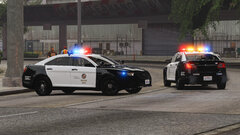 I'm waiting for this release! I'm updating my fleet and need something of this quality and detail. Keep it up! 🙂
 -
Nothing unusual in the log other than this: [10/30/2020 8:50:37 PM.757] LSPD First Response: [TRACE] No valid backup data found for area for StatePatrol in BlaineCounty in HIGHWAY using SpawnsAmbiently [10/30/2020 8:50:37 PM.757] LSPD First Response: [TRACE] TrySpawn: Failed to find loadout data [10/30/2020 8:50:42 PM.752] LSPD First Response: [TRACE] No valid backup data found for area for StatePatrol in BlaineCounty in HIGHWAY using SpawnsAmbiently [10/30/2020 8:50:42 PM.752] LSPD First Response: [TRACE] TrySpawn: Failed to find loadout data It seems to happen for other areas too though. Can you delete 'SpawnsAmbiently' and see if it helps? I'm not sure whether it is a plugin or not.
-
Have you looked at other topics or perhaps Google on why it is laggy? I'll do what I can to hopefully fix this issue. Go to the lspdfr.ini, and set Main.PreloadAllModels to False. Was there anything different between yesterday and today? Perhaps you have installed a high-poly vehicle or perhaps you have done something in-game that eats up memory such as leaving ELS lights on in AI vehicles while being somewhere else. Hope this helps! 🙂
-
I don't really know what's going on here. I have the same problem but I never actually solved it so I just left it alone. Just to confirm, can you get-all-weapons without LSPDFR running? You should be able to. The thing is, LSPDFR is somehow blocking you from getting all weapons. I don't know exactly why, but you might want to look into that.
-
Can you delete everything in the commandline.txt and add -windowed then save and close.
-
What do you need? I don't use Discord but here is a unofficial LSPDFR discord you can join: https://discord.gg/xsdAXJb I can help you here as well 🙂
-
Hello, Using all Caps is unnecessary. I understand that you are frustrated with the issue at hand but ensure that you do not use CapsLock. It is considered as shouting and rude. Can you go on duty in the city then teleport to Sandy? Does that work? Also upload your RPH log 🙂
-
Send me your RPH log!
-
The picture of the log that you sent is not complete. However I noticed that the crash was caused by UnitedCallouts. Remove it.
-
Hello, Have a look at the minimum requirements and recommended requirements for GTAV: https://support.rockstargames.com/articles/203428177/Grand-Theft-Auto-V-PC-System-Requirements
-
So it crashes every so often? The occasional crash happens now and then.
-
This is what you need: Try temporarily disabling your antivirus and see if the game runs.
-
I recommend you search for some other topics related to your situation. I remember I helped someone before with the same problem. Just to confirm, if you uninstall the pack, does the game crash?
-
Hello, Can you get me another log? Play again and then once it crashes upload another log. Thanks 🙂
-
Hello @Lee10, I don't know if you've solved the issue or not but you can check out this pinned post here: You will have to scroll down to the LSPDFR sync section. Any more issues please let me know! 🙂
-
The crash is caused by 'CrimesManager' I don't know what it is but I suggest you remove it. It caused the crash. Hope this helps! 🙂
-
You might be interested in some of these:
-
Go to the Compulite.ini and change the keybind from Q to E. Hope this helps! 🙂
-
Hello, I may not be able to assist here, but I'll do what I can. I am going to need your launcher.log from Documents/Rockstar Games/Launcher It is a note file. Also see if the reinstall helps 🙂
-
I think I know this problem. I had it once myself. It is caused by a bad vehicles.meta Replacing it with the default version should fix the problem.


