


Jeffdadawg
Members
-
Joined
Everything posted by Jeffdadawg
-
Delete SmartRadio and any other one of Albo's mods. Replace them with these:https://www.bejoijo.com/
-
Have you tried without RAGE? Does it work without it?
-
Well, Nothing works? Vehicles - Place it in Patchday 17-22. Trainer - Ensure you have ScriptHookV installed properly. You should look at the default keybinds. EUP - Ensure EUP and EUP Manu are installed. Do you have RageNativeUI installed?
-
Have you installed it correctly? I put my weapons in patchday 8.
-
Well, I'm afraid I can't helps you further. You might want to contact LSPDFR Staff and let them look into it. You can play without all-weapons. Cops don't have Flamethrowers 😂
-
This is a Crash Report. It is useless. I need your RPH log.
-
I'm afraid I can't help you here. You can reinstall the application and see if that helps. Reinstalling won't delete your files. The files stay in the main directory. OpenIV is just an application that helps you access the files.
-
Glad to hear! 🙂 Any more issues please let me know!
-
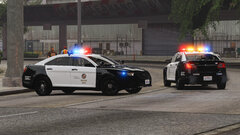 If the dev makes it an addon, use it as an addon. If the dev makes it a replace vehicle, use it as a replace vehicle.
 -
Hello, As I said, let's solve the main issue at hand. Then we'll get to the other issues. 🙂 If LSPDFR isn't loading with RAGE by default, you have to go into the RAGE settings, then go to plugins, then tick LSPD First Response.dll Also, I'm not 'from' the LSPDFR site. I'm an independent Tech Support Person. The Staff here don't do Tech Support. 🙂
-
Ok. Let's try to solve the first problem first. The 'LoadPlugin' issue. Then We'll get to the other issues later. So, what plugin are you trying to load? Are you trying to load LSPDFR?
-
Just noticed this as well: Can you Reinstall LSPDFR and add GTAV to the exceptions area in your antivirus? What plugin are you trying to load?
-
Wait. Do you realize that you have to add the plugin name after the command LoadPlugin? For example : LoadPlugin EUPMenu.dll as for your warning message, set your Plugin Timeout Threshold to 60000 in the RAGE settings.
-
Click 'Choose Files' from the bottom of the box and select your RPH log from your Main Directory.
-
Hello, As @ineseri said, It's a good idea but it's not allowed. Unfortunately you can't do that as it is against the Guidelines. People should have freedom of what they want to download. If your 'pack' has some Callouts and some ELS vehicles, some people might want the Callouts but not the ELS vehicles so they would look for the callouts themselves instead of downloading your pack. Once you actually put it on paper, it doesn't sound like it's a good idea. People would much rather select their own mods. 🙂
-
In your Main Directory.
-
Hello, Send me your RPH log. Not your Crash Report. 🙂
-
You can rename it to whatever you want. If it's an addon, you can make it patrol ambiently by editing the agency.xml
-
Renaming your mods folder to _mods will remove the vehicles and any other things in the mods folder. As I said, the issue shouldn't be with the vehicles. You can try it though. I recommend that you reinstall LSPDFR. Use Manual Install.
-
The issue isn't with the vehicles. If it was there would be an error message. The log looks normal. This shouldn't be the issue but can you rename your mods folder to _mods and see if it loads?
-
I don't understand. You have provided a screenshot of the loading screen proving that it's working fine but the title of the post is 'game crash before starting'. Have you reverted it correctly? You copy the vehicles.meta from the update folder and you paste it in the mods folder. Or if you have a backup use that.
-
Thanks. To be honest, this just seems like a random crash. Can you play again? I'm sorry to bother you like this 🙂 Also, can you delete the following:
-
Please send over your RPH log. I don't see it 🙂
-
That's interesting. Can you send over a log where it crashes on duty?
-
I assure you that it doesn't 'usually' crash when you go on duty. It either does or it doesn't. Please specify.


