


Jeffdadawg
Members
-
Joined
Everything posted by Jeffdadawg
-
Yikes. Lets solve this problem first. Does the game load without RAGE?
-
Nothing unusual in the log other than this: I don't know what it is but it has occurred more than once in the log with different first lines: It seems like a random crash. Can you get into another game and try again?
-
The occasional crash happens every so often. It shouldn't be common though. Any more issues please let us know!
-
Send me your RPH log. You can find it in your Main Directory.
-
So... the car isn't pulling over at all now?
-
Well, the default key for ending a traffic stop is Shift. Have you pressed that by any chance? Also, you have to get the car fully pulled over. Wait until there is a message saying that you can leave your vehicle and approach the suspect.
-
It does work fine. I use it instead of having to press Esc, then navigate to LSPDFR, go down to callouts then search for the right one. It's a simple mod with simple functions. It shouldn't cause texture loss/FPS drop. I'm about to do a massive facepalm here. Don't blame 'mod manager' for FPS loss when it's obvious that it's the callouts that is causing it. You're not going to see an FPS increase by using a different Callout Manager. Nothing against you, but I don't believe that.
-
You should post a new thread 🙂 Messaging someone for support is against the site guidelines. Make sure to post it in the appropriate forum!
-
Is the issue solved? To be honest, it looks like a random crash. Nothing out of the ordinary.
-
Ah yes. The white lights are at the center for the Lib II. Thanks 🙂
-
Thanks for the brief explanation 🙂 Since this is going out-of-topic, I shall end this conversation here. Thanks for taking the time out of your day to reply.
-
I don't really like Non-ELS vehicles. I used them myself in the past but since the switch to ELS I've been much happier. I'm curious of why people would make the switch back to Non-ELS just because DLS is a thing.
-
It looks like a Whelen Liberty I but I could be the II. The Alaska State Trooper vehicle definitely has a CODE 3 Lightbar. I'm guessing it's from the 21 Series so the 21TR is fairly accurate.
-
I remember that this 'crazy driving' issue happened to me 2 days ago. Isn't that sacrificing one thing for another? Forcing people out of the way is a good feature for ELS but It sometimes causes issues and so in order to fix the issue, you turn it off and will have to download a plugin to get that feature back. I'm not saying the solution is bad. I might try it myself.
-
The log doesn't say anything. You didn't go on duty, the plugins aren't even loading. What did you do in-game?
-
This log doesn't have the K9 crash that you speak of. Can you send a log with the crash?
-
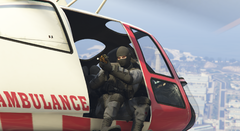 Quite the image. SWAT holding Gold Rifles while in an EMS Helicopter. How did they get there?
 -
It seems like 'Pause Menu' is causing the crash. [10/26/2020 8:10:16 PM.643] LSPD First Response: Origin: Game fiber "PauseMenu". Can you reinstall LSPDFR using Manual Install?
-
Send over your RPH log!
-
Hello, Can you send over your RPH log? Also, I recommend that you delete Albo's mods (Traffic Policer, Arrest Manager etc.) and replace them with Bejo's mods:https://www.bejoijo.com/
-
Hello, Reinstall LSPDFR using manual install and see if it works then.
-
Hello, Please send me your RPH log!
-
In case my assistance is required, I might be able to point out the issue, but not solve it. Can you send me your launcher.log in Documents/Rockstar Games/launcher
-
I don't know why these issues are occurring but you can try and download these: https://www.gta5-mods.com/misc/gta-5-gameconfig-300-cars https://www.gta5-mods.com/tools/heap-limit-adjuster-600-mb-of-heap https://www.gta5-mods.com/tools/packfile-limit-adjuster


