




brenden.iannetta
Members
-
Joined
-
Last visited
Everything posted by brenden.iannetta
-
Yea I was just a lil curious. Good luck with this!
-
Very odd. This is gonna sound a bit repetitive, but I've noticed that uninstalling GTAV through Steam/Epic is really finicky. Try first deleting your whole Grand Theft Auto V folder, then using the uninstall button. This will ensure no files are left over.
-
Have you looked through the whole YTD file? There might be another texture that looks like that.
-
Have you tried re-naming your mods folder again?
-
That has got to be the most interesting requirement I've ever seen. Wow...
-
Have you installed anything in between the fresh installation?
-
https://www.youtube.com/results?search_query=how+to+get+eup+backup+peds+for+ultimate+backup+ Something should suit your needs here.
-
What are you running for your graphics settings? What are your PC's specs? There is about a quadrillion different Acer Nitro 5's; You can't generalize. Have you gone into the lspdfr.ini and disabled Main.PreloadAllModels? Have you followed this tutorial?: Remove these plugins as they are deprecated/not updated to current GTAV versions: CalloutManager CoastalCallouts OP_Immersive_Dispatch
-
Try renaming your mods folder to "_mods", then launching.
-
? just when you thought you'd seen it all
-
Silly question, but i'm assuming every tutorial means: Downscaling oversized car ytd's, turning off PreloadAllModels, and etc?
-
Hate to insert myself but seriously... Im confused and I know my way around a PC.
-
No problem! Just mark it as a solution.
-
Try re-installing Ultimate Backup. Make sure to backup any configs you changed. Also ensure that RAGENativeUI.dll is updated. Download it here: https://github.com/alexguirre/RAGENativeUI/releases/download/1.9/RAGENativeUI.zip Open the .zip, drag RAGENativeUI.dll into your GTAV root.
-
There is a solution right above you...
-
Bit of an old post to resurrect, but can you tell me what plugins you are using and what your video settings are.
-
No problem!
-
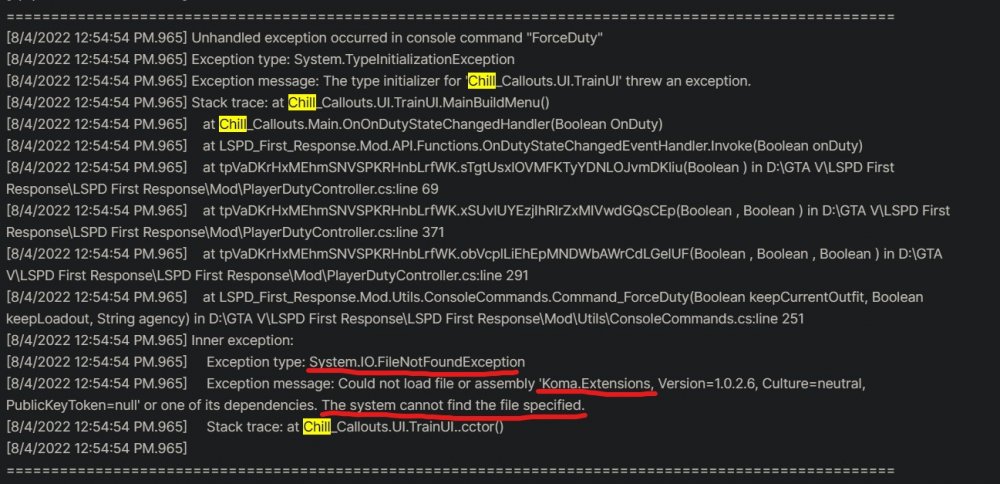
Seems like ChillCallouts shit the bed here. Try removing that; I think it's deprecated. Try re-installing that , I think you are missing a file. Also, remove the following as they are deprecated: TrafficPolicer (You have StopThePed) Just an FYI, it's much easier to read the log if you just upload it here. NotePad++ is leauges better than using the spoiler feature here.
-
Go into where your police car is installed, then open policex.ytd. Make sure you have edit mode on. Search for "sign" in the window that pops up. You should be able to delete the skin that looks like this. Ensure that the skins' numbers rise in ascending order starting from 1. Click save, then try to boot.
-
-
If you have a mods folder, rename it to "_mods".
-
If you have been looking for 2 hours and found nothing, there probably isn't one. Not every mod author makes a template.
-
Yea i'm personally not really sure. This is pretty unique. Unfortunately I don't know of any next steps. Unrelated, but is there any particular reason you're still on Windows 7? Just curious.
-
What have you tried so far?
-
You may have installed them wrong. Verify that they are installed all properly, as they work for every one else.


