




brenden.iannetta
Members
-
Joined
-
Last visited
Everything posted by brenden.iannetta
-
Your update.rpf is more than likely out of date. Follow this: https://darkvypr.com/irls
-
First, please update RAGENativeUI.dll. Download it from this link, open the .zip, then drop RAGENativeUI.dll into your main GTAV game folder. https://github.com/alexguirre/RAGENativeUI/releases/download/1.9/RAGENativeUI.zip ----------------------------------- Second, these plugins are deprecated, and their removal is advised: ComputerPlus, (CompuLite replaces this https://www.bejoijo.com/post/compulite) Corpse Inspection, Traffic Policer, ODLoadout, PoliceSmartRadio (StopThePed has most of the functionality that these have https://www.bejoijo.com/post/stop-the-ped) ------------------------------------ Third, this plugin is installed wrong: PeterUCallouts - Please re-download this, and place the LSPDFR folder from the download into your Grand Theft Auto V root.
-
These errors are kind of unique to my eye. You could try updating RAGENativeUI.dll I suppose. Download it from this link, open the .zip, then drop RAGENativeUI.dll into your main GTAV game folder. https://github.com/alexguirre/RAGENativeUI/releases/download/1.9/RAGENativeUI.zip
-
Weird. Try moving all of the UltimateBackup files onto your Desktop, and loading GTAV. This will temporarily remove UB.
-
Great! Enjoy, and mark this topic as solved 🙂
-
You might have an issue with your LSPDFR install. Download the LSPDFR manual installer, open the .zip, go into the LSPDFR folder, then drag and drop the "data" folder into your Grand Theft Auto V\lspdfr folder.
-
Great! Have a good one, and make sure to mark as solved!
-
Yea I was just curious. I mean you could try verifying your game files. Are you 100% sure you haven't modded any files? Also I'd recommend installing these so you don't have any issues with modding inthe future. They allow for higher limits on the already low game memory/car caps. https://www.gta5-mods.com/misc/gta-5-gameconfig-300-cars https://www.gta5-mods.com/tools/heapadjuster https://www.gta5-mods.com/tools/packfile-limit-adjuster
-
You could try but i doubt that will change anything. Do you have Script Hook V?
-
Did you install this LSPDFR build on a completely fresh GTAV version?
-
Send a RAGEPluginHook.log. It's in your GTAV root.
-
Try re-installing EUP Menu.
-
Do you have a mods folder? If so, rename it to "_mods".
-
This is the same issue that I was helping you with, that you marked as solved? Go into your root GTAV folder, right click on RAGENativeUI.dll, click "Properties", then "Details", then send me a screenshot of that window.
-
-
No problem. Hope it works 🙂
-
Yep, as Charlie said, this log isn't the same one that was generated when your game crashed. You need to make the game crash the same way, then upload a new log that it generates.
-
Try renaming your mods folder to "_mods" and chasing someone.
-
Well it looks like you are missing all of the logo names. Try browsing through the ini files and changing these to lspd, lssd and the like.
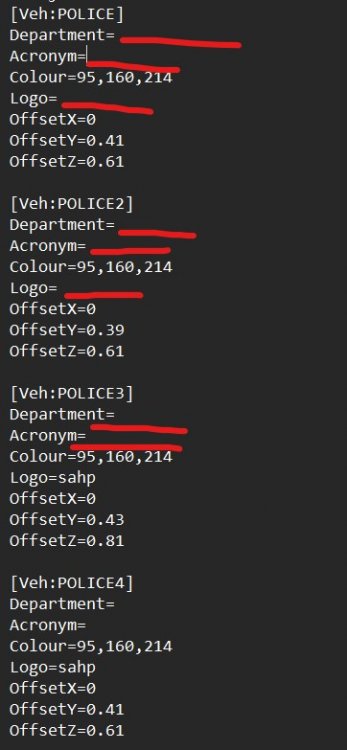
-
I'm pretty stumped. You might want to try a fresh copy of GTAV as the menu's also look weird.
-
Sorry, just UltimateBackup lol. Only that plugin. I provided a link.
-
The reason they didn't load is because renaming your mods folder disables it temporarily. Please follow this, and make sure to read the notice about vehicles.meta files and etc...: https://darkvypr.com/irls
-
Yep looks right. Try re-installing UltimateBackup with a fresh copy, yours is broken.\ https://www.bejoijo.com/post/ultimate-backup
-
Send me a photo of the following directories: Grand Theft Auto V\plugins Grand Theft Auto V\plugins\LSPDFR UltimateBackup looks to be installed wrong, but i'm curious to see something in these folders.
-
Looks like It's right here.... Are you saying that this command does nothing when you execute it? Also it seems a bit far-fetched on the count that It's restarting your whole PC. Is it a blue screen?





