




brenden.iannetta
Members
-
Joined
-
Last visited
Everything posted by brenden.iannetta
-
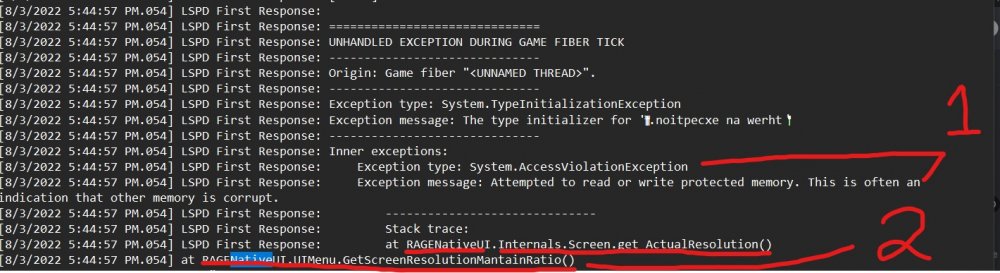
No problem 🙂 1. This usually happens when there is an out of date RAGENativeUI.dll. 2. Same as 1, but more obvious because it: a) Says "RAGENativeUI" b) Involves screen resolution and menus, and as we know, the abbreviation UI means user interface, so it all kind of ties together.
-
You have an old RAGENativeUI.dll. Download it from this link, open the .zip, then drop RAGENativeUI.dll into your main GTAV game folder. https://github.com/alexguirre/RAGENativeUI/releases/download/1.9/RAGENativeUI.zip Also, a sidenote: I see that you are using VocalDispatch, I'd reccomend switching to GrammarPolice as it's much better maintained and much more feature-rich.
-
No problem 🙂 Glad it worked because I was unsure lol.
-
Yep. Click "Yes" on that popup, then re-download CompuLite and "re-put" the files in as Charlie suggested.
-
You might have an old RAGENativeUI.dll. Download it from this link, open the .zip, then drop RAGENativeUI.dll into your main GTAV folder. https://github.com/alexguirre/RAGENativeUI/releases/download/1.9/RAGENativeUI.zip
-
Interesting. I saw LiteDB and I was wondering what plugin that corresponded to. Good to know for the future!
-
Great! Just mark as solved 🙂
-
Just realized how old your RAGENativeUI.dll is. Download it from this link, open the zip, and drag RAGENativeUI.dll into your main GTAV folder. https://github.com/alexguirre/RAGENativeUI/releases/download/1.9/RAGENativeUI.zip
-
Nope. No info here. This is the generic crash popup for LSPDFR used in all LSPDFR crashes.
-
You are missing the UltimateBackup folder. Please re-download UltimateBackup, open the .zip, then place the folder called UltimateBackup into your Grand Theft Auto V\plugins\LSPDFR. https://www.bejoijo.com/post/ultimate-backup
-
What is the name of the car that you are trying this on? For example: police2, fbi, etc... Second: Can you send me a photo of DashcamV.ini. It looks like you have a configuration issue.
-
What do you mean by "Kind of works". I suspected your mods folder was outdated/broken.
-
Did you install the texture files in the download? Also, if this is an addon car, you need to manually add the DashcamV settings into the .ini yourself using the model name of the car. Link:
-
Yes. Delete both BreathalyzerRAGE.dll & .ini. This might be an issue with BetterEMS. Please re-install that plugin, making sure to save a backup of BetterEMS.ini if you modified it. Try loading with the default ini for now.
-
Can you send me a photo of both of these directories: Grand Theft Auto V\plugins Grand Theft Auto V\plugins\LSPDFR You installed plugins wrong.
-
First, you can delete "BreathalyzerRage", as it's build into StopThePed. Can you send me a photo of both of these directories: Grand Theft Auto V\plugins Grand Theft Auto V\plugins\LSPDFR
-
Rename your mods folder to "_mods".
-
New log. This is also not crashing on "start-up", it's crashing when RAGE tries to load LSPDFR.
-
You are missing the Grand Theft Auto V\plugins\LSPDFR directory. Please make a folder inside of Grand Theft Auto V\plugins and call it "LSPDFR". Also like I asked, did you install the files I supplied?
-
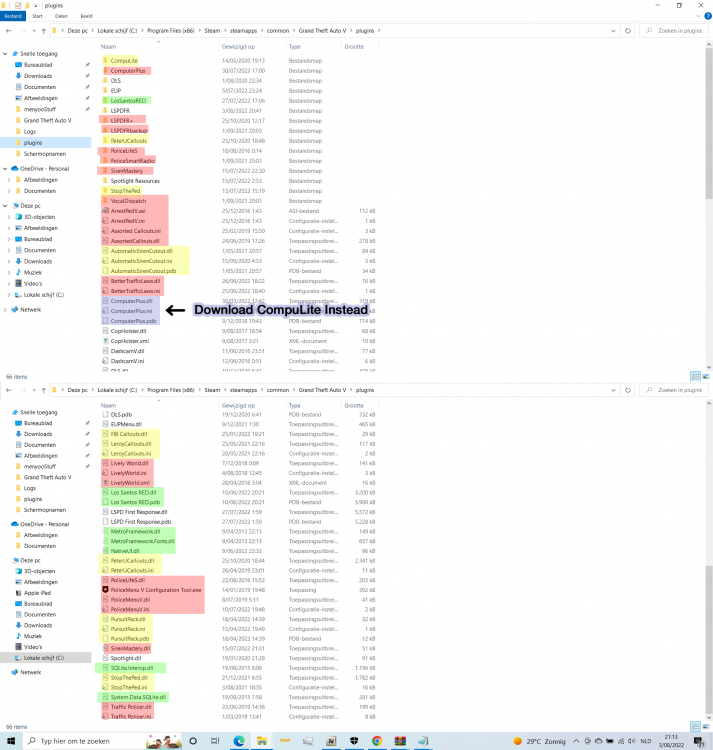
Here we go... Key: If the files are Green, I have no clue what the plugin is. If the files are Yellow, you need to move the file/folder into Grand Theft Auto V\plugins\LSPDFR. If the files are Red, you need to delete the plugin/file/folder as it is deprecated or useless. If the files are Blue, see the notice to the right as there is a better plugin available. You need to delete these files as well. If the files have no highlight, don't touch them, they are in the right spot. Concluding thoughts: You need to learn how to install plugins and read the installation instructions. Annnnnd ignored...
-
Install these: https://www.gta5-mods.com/misc/gta-5-gameconfig-300-cars https://www.gta5-mods.com/tools/packfile-limit-adjuster https://www.gta5-mods.com/tools/heapadjuster If the above doesn't work: Please send me a screenshot of BOTH of these directories. Make sure they are not cut off: Grand Theft Auto V\plugins Grand Theft Auto V\plugins\LSPDFR
-
Welp this is a pretty big issue lol. Lots of the plugins that you have installed are actually meant to be loaded by LSPDFR itself. You have placed them in \plugins, instead of \plugins\lspdfr. You are also using some ancient, deprecated plugins. I'm going to need a full screenshot of \plugins as this one is cut off.
-
And did that resolve the issue?
-
Did you try renaming your mods folder like I suggested?
-
If you have a mods folder, please disable it by renaming it to "_mods". Also can you please send me a screenshot of both of these directories: Grand Theft Auto V\plugins Grand Theft Auto V\plugins\LSPDFR



