




brenden.iannetta
Members
-
Joined
-
Last visited
Everything posted by brenden.iannetta
-
Can you send me a screenshot of in-game while your lights are "on".
-
Wow that is odd. Only LSPDFR would have an issue so weird lol. Have fun!
-
Im 99% sure it is in the menu that @OfficerChris1 mentioned. I remember accening that to disable apartments.
-
I'm not seeing any log issues here. Does this happen on every car?
-
Ancient software possibly.

-
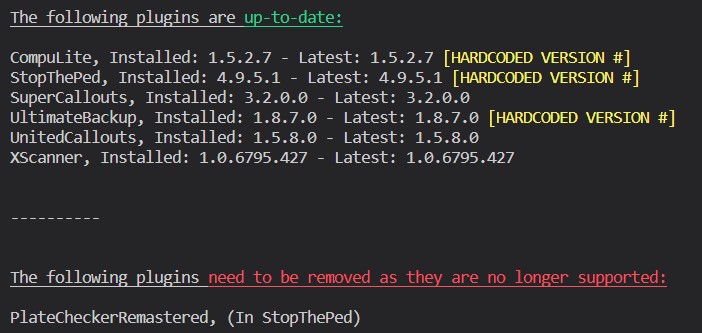
Does this happen on a consistent basis? There are some crashes which are just one-offs. If this happens again, please send a RAGEPluginHook.log. Also, refer to this:
-
Try taking the window tint off of the car with a trainer if there is any. Also make sure that you have this installed:
-
Weird. Can you try verifying your game files? Might be a broken thing.
-
Idk why no one has ZPhDevs.Common, yet has LoreCallouts installed. This is like the 5th post. Anyways, download this: Then drag ZPhDevs.Common.dll into your root GTAV folder.
-
Are you going on duty and trying them?
-
Well I don't know how you managed that, but try this:
-
Renaming the mods folder would have worked if this was the case.
-
Interesting, can you try disabling your mods folder? Rename it to "_mods".
-
Try clearing out your commandline.txt in your GTA root.
-
Well bad news, almost all of these plugins are old. Remove these, and replace them for StopThePed. Most features are in there, and these plugins are deprecated: Foot Pursuit Aid (by Albo1125) Keep Calm Police Station Armory Traffic Control YetAnotherPartnerMod Also ensure that you have the most recent ScriptHookV and you are installing the plugins correctly. Can you send me a screenshot of both of these while all of th plugins are installed: Grand Theft Auto V\plugins Grand Theft Auto V\plugins\LSPDFR
-
No problem! I looked through the UC ini file and couldn't find the callout to disable fighting which is weird. Oh well. Really weird why only some are having this issue.
-
Rename dinput8.dll in your GTAV root to "_dinput8.dll". If this doesn't work, rename it back to original, i'm not quite sure of a fix.
-
Try installing all of these: https://www.gta5-mods.com/tools/packfile-limit-adjuster https://www.gta5-mods.com/tools/heapadjuster https://www.gta5-mods.com/misc/gta-5-gameconfig-300-cars
-
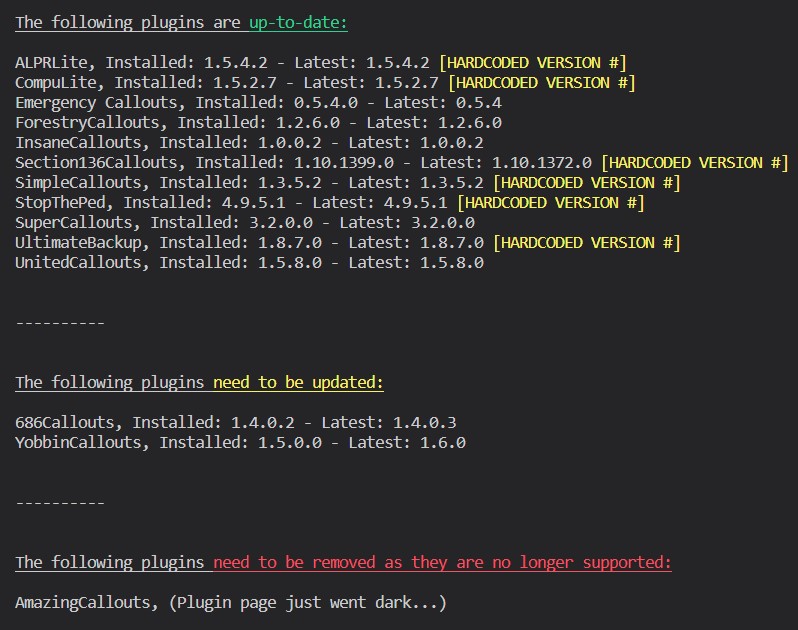
This is a different issue. Re-install LoreCallouts as you haven't put ZPhDevs.Common into your GTAV root. You can also opt to install only ZPhDevs.Common from the LoreCallouts .zip. Just drop the DLL into your GTAV root. Also follow this:
-
No problem!
-
This is the wrong log. Send the one in your root GTAV folder.
-
Most mods are working fine. You probably have an old version of update.rpf. If renaming your mods folder does the trick, follow this: https://darkvypr.com/irls
-
StopThePed exists. LSPDFR's native implementations aren't the end-all be-all.
-
Update Coastal Callouts you have it. I realize this is also an old thread but whatever.
-
Update your game? If "It's all I have" is the reason to use an old version of the game, that isn't a very good one. You can't ask for support on old versions of GTAV/LSPDFR/RAGE. Also you don't get banned for using LSPDFR? I'm not sure what you mean by ban. Or you just pirated GTA...


