




KN1IGHT
Members
-
Joined
Everything posted by KN1IGHT
-
Hi guys, I recently had to restore my bookmarks in Google Chrome, because of a mishap with the Bookmarks, and signing into chrome. I restored my bookmarks, to undo that action. I'm using Windows 8 However, I have a problem now. The icons on my taskbar from left to right are as follows: Internet Explorer, Google Chrome, File Explorer, Acer Power Button, Windows Live Movie Maker, Bandican, and Minecraft. When I click Google chrome beside Internet Explorer, it opens on the other end of my icons on my taskbar. Before I had to restore my bookmarks, this didn't happen. The window it opens in on the other end, also shows that it's not "pinned" to my taskbar. Any thoughts?
-
In my experience, having an all white car, means you don't have the correct textures for that vehicle, in its texture file.
-
How did you fix it? I'm having pretty much the same problem on some YouTube videos.
-
Only time I've encountered that error, is when I had the specific .img file open in SparkIV or OpenIV. Double check and be sure you don't have any .img files open in SparkIV or OpenIV.
-
I changed it to Mip Map 1, and it worked perfectly, the texture is clear as crystal! Thank!
-
I will check this next time I'm in game.
-
Here's some screenshots First 4 are of the texture in-game. Last one is how it looked in OpenIV
-
I'll get some pics ASAP
-
Hi guys, I recently made a texture for my Clan's Unmarked FBI Tahoe, based on the template. However, when I get into game, any text on it appears blurry, and almost unreadable. Any ideas how to fix this?
-
Hi guys, I'm wondering if anyone has a link to the siren used in this video? http://www.youtube.com/watch?v=xOS6647Ui-g ~ KRI
-
Hmmm, well I have noticed that certain players jump around more then others. Some people I play with are in the U.S., and others are not to far away from my area
-
What do you mean by de-sync? Sorry, I've never heard of that...
-
Hi guys, I've been watching YouTube videos, and on some, for the person that's recording, the handling of other players' vehicles, is perfect. I mean perfect. No jumping around, driving sideways, perfect turning, etc. If they're driving straight, they are seen by others as driving straight. I'm wondering how they managed to do that? Me and a few friends who play Multiplayer, our handling for each other isn't that great. Example: On my screen I'm driving down the right side of the road, but on another person's screen I'm driving down the sidewalk, killing pedestrians. We have all decided on certain vehicle models, uploaded them in a pack, with a handling.dat, and everyone has put the handling.dat in, and our handling still isn't that great How can we get our handling to be perfect? (If possible)
-
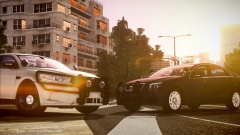 Download link for that Chevy?
 -
I believe the Snow MOD, comes with a custom handling line to make it more difficult to drive, and simulate winter driving, hence the sliding around, harder to stop, etc. If you made a backup of your original handling.dat, I'd suggest to try placing that back in and see if that fixes the sliding.
-
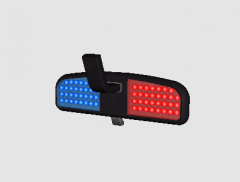 Nice Never seen this before 10/10
 -
Has he tried forwarding the following ports on his router?: 8765 - TCP 8766 - UDP In my case, if those ports are not forwarded, I can not connect to any TeamSpeak server, until they're forwarded
-
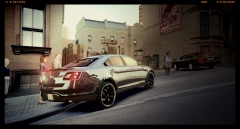 Where'd you find that Taurus?
 -
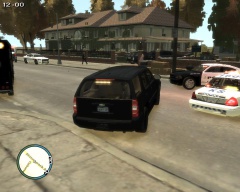
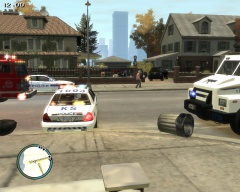
From the album: LCPDFR Scenarios
The owner of the house and Mustang seen in this picture, got an unexpected visit from some very angry drug dealers. The dealers arrested in the Dealer Meeting raid on Nov. 10/2013, had some members who were not present at the meeting. The dealers learned after being hauled off to prison, that the owner of this house, who will be known as "Jim", actually called EPS, LCPD and RCMP and notified them of the meeting that day. The dealers ordered their hitmen to eliminate Jim. Jim was going about his daily routines, and had just gotten home from his part-time job, and was walking in his house, as his house was approached by 2 black Mustangs, 2 black Range Rovers, and 2 black Landstalkers. When he saw these vehicles approaching, he at first didn't know who it was, but as he saw the one driver's face, he realized, these vehicles in-fact belonged to the dealers' hitmen, who were not present at the Nov.10/2013 meeting. He instantly sprinted inside his house, locked all the doors, and telephoned police. EPS, LCPD, and RCMP were at his house within minutes, as Jim was on their watch-list, since he tipped off police about the meeting, and knew he could be a target of the dealers' hitmen. Within minutes, the area around Jim's house, was surrounded, by EPS, LCPD and RCMP Units, and also one RCMP SWAT/ERT Vehicle, and an LCPD Mobile Command Center, not there for communications, but occupied by at least 50 LCPD SWAT Officers. The stand-off between police and the hitmen, lasted approximately 4 hrs, until the hit-men realized they were outnumbered. They began walking out of the house peacefully, but as they all exited the house, they opened fire on EPS, LCPD and RCMP Officers. Luckily, most of EPS', and LCPD's officers reacted quickly, and sprinted behind the SWAT Units for cover. However, 2 LCPD Officers were wounded in the process of running for cover. SWAT Officers were left unharmed, as the hit-men were not using armor-piercing ammunition. Liberty City Ambulance, immediately took the two wounded LCPD Officers into the ambulance and did their best to stabilize their vitals, until the fire-fight was over. After approximately, 1 hr of gunfire, between the hit-men and police, the hit-men surrendered peacefully. SWAT Officers immediately cuffed the hit-men, and placed them in the ERT Unit for holding. Liberty City Ambulance was given the all clear to rush the two officers to hospital. The two Officers are currently in the hospital, in stable condition, but will be unable to return to work for about 2-3 months. The hit-men were charged with: - Attempted Murder - Possession of a Weapon - Hit & Run - Reckless Driving -
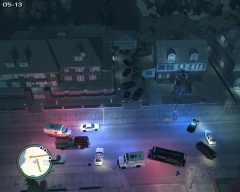
From the album: LCPDFR Scenarios
The owner of the house and Mustang seen in this picture, got an unexpected visit from some very angry drug dealers. The dealers arrested in the Dealer Meeting raid on Nov. 10/2013, had some members who were not present at the meeting. The dealers learned after being hauled off to prison, that the owner of this house, who will be known as "Jim", actually called EPS, LCPD and RCMP and notified them of the meeting that day. The dealers ordered their hitmen to eliminate Jim. Jim was going about his daily routines, and had just gotten home from his part-time job, and was walking in his house, as his house was approached by 2 black Mustangs, 2 black Range Rovers, and 2 black Landstalkers. When he saw these vehicles approaching, he at first didn't know who it was, but as he saw the one driver's face, he realized, these vehicles in-fact belonged to the dealers' hitmen, who were not present at the Nov.10/2013 meeting. He instantly sprinted inside his house, locked all the doors, and telephoned police. EPS, LCPD, and RCMP were at his house within minutes, as Jim was on their watch-list, since he tipped off police about the meeting, and knew he could be a target of the dealers' hitmen. Within minutes, the area around Jim's house, was surrounded, by EPS, LCPD and RCMP Units, and also one RCMP SWAT/ERT Vehicle, and an LCPD Mobile Command Center, not there for communications, but occupied by at least 50 LCPD SWAT Officers. The stand-off between police and the hitmen, lasted approximately 4 hrs, until the hit-men realized they were outnumbered. They began walking out of the house peacefully, but as they all exited the house, they opened fire on EPS, LCPD and RCMP Officers. Luckily, most of EPS', and LCPD's officers reacted quickly, and sprinted behind the SWAT Units for cover. However, 2 LCPD Officers were wounded in the process of running for cover. SWAT Officers were left unharmed, as the hit-men were not using armor-piercing ammunition. Liberty City Ambulance, immediately took the two wounded LCPD Officers into the ambulance and did their best to stabilize their vitals, until the fire-fight was over. After approximately, 1 hr of gunfire, between the hit-men and police, the hit-men surrendered peacefully. SWAT Officers immediately cuffed the hit-men, and placed them in the ERT Unit for holding. Liberty City Ambulance was given the all clear to rush the two officers to hospital. The two Officers are currently in the hospital, in stable condition, but will be unable to return to work for about 2-3 months. The hit-men were charged with: - Attempted Murder - Possession of a Weapon - Hit & Run - Reckless Driving -
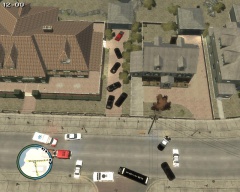
From the album: LCPDFR Scenarios
The owner of the house and Mustang seen in this picture, got an unexpected visit from some very angry drug dealers. The dealers arrested in the Dealer Meeting raid on Nov. 10/2013, had some members who were not present at the meeting. The dealers learned after being hauled off to prison, that the owner of this house, who will be known as "Jim", actually called EPS, LCPD and RCMP and notified them of the meeting that day. The dealers ordered their hitmen to eliminate Jim. Jim was going about his daily routines, and had just gotten home from his part-time job, and was walking in his house, as his house was approached by 2 black Mustangs, 2 black Range Rovers, and 2 black Landstalkers. When he saw these vehicles approaching, he at first didn't know who it was, but as he saw the one driver's face, he realized, these vehicles in-fact belonged to the dealers' hitmen, who were not present at the Nov.10/2013 meeting. He instantly sprinted inside his house, locked all the doors, and telephoned police. EPS, LCPD, and RCMP were at his house within minutes, as Jim was on their watch-list, since he tipped off police about the meeting, and knew he could be a target of the dealers' hitmen. Within minutes, the area around Jim's house, was surrounded, by EPS, LCPD and RCMP Units, and also one RCMP SWAT/ERT Vehicle, and an LCPD Mobile Command Center, not there for communications, but occupied by at least 50 LCPD SWAT Officers. The stand-off between police and the hitmen, lasted approximately 4 hrs, until the hit-men realized they were outnumbered. They began walking out of the house peacefully, but as they all exited the house, they opened fire on EPS, LCPD and RCMP Officers. Luckily, most of EPS', and LCPD's officers reacted quickly, and sprinted behind the SWAT Units for cover. However, 2 LCPD Officers were wounded in the process of running for cover. SWAT Officers were left unharmed, as the hit-men were not using armor-piercing ammunition. Liberty City Ambulance, immediately took the two wounded LCPD Officers into the ambulance and did their best to stabilize their vitals, until the fire-fight was over. After approximately, 1 hr of gunfire, between the hit-men and police, the hit-men surrendered peacefully. SWAT Officers immediately cuffed the hit-men, and placed them in the ERT Unit for holding. Liberty City Ambulance was given the all clear to rush the two officers to hospital. The two Officers are currently in the hospital, in stable condition, but will be unable to return to work for about 2-3 months. The hit-men were charged with: - Attempted Murder - Possession of a Weapon - Hit & Run - Reckless Driving -
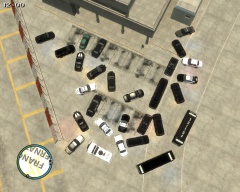
From the album: LCPDFR Scenarios
The owner of the house and Mustang seen in this picture, got an unexpected visit from some very angry drug dealers. The dealers arrested in the Dealer Meeting raid on Nov. 10/2013, had some members who were not present at the meeting. The dealers learned after being hauled off to prison, that the owner of this house, who will be known as "Jim", actually called EPS, LCPD and RCMP and notified them of the meeting that day. The dealers ordered their hitmen to eliminate Jim. Jim was going about his daily routines, and had just gotten home from his part-time job, and was walking in his house, as his house was approached by 2 black Mustangs, 2 black Range Rovers, and 2 black Landstalkers. When he saw these vehicles approaching, he at first didn't know who it was, but as he saw the one driver's face, he realized, these vehicles in-fact belonged to the dealers' hitmen, who were not present at the Nov.10/2013 meeting. He instantly sprinted inside his house, locked all the doors, and telephoned police. EPS, LCPD, and RCMP were at his house within minutes, as Jim was on their watch-list, since he tipped off police about the meeting, and knew he could be a target of the dealers' hitmen. Within minutes, the area around Jim's house, was surrounded, by EPS, LCPD and RCMP Units, and also one RCMP SWAT/ERT Vehicle, and an LCPD Mobile Command Center, not there for communications, but occupied by at least 50 LCPD SWAT Officers. The stand-off between police and the hitmen, lasted approximately 4 hrs, until the hit-men realized they were outnumbered. They began walking out of the house peacefully, but as they all exited the house, they opened fire on EPS, LCPD and RCMP Officers. Luckily, most of EPS', and LCPD's officers reacted quickly, and sprinted behind the SWAT Units for cover. However, 2 LCPD Officers were wounded in the process of running for cover. SWAT Officers were left unharmed, as the hit-men were not using armor-piercing ammunition. Liberty City Ambulance, immediately took the two wounded LCPD Officers into the ambulance and did their best to stabilize their vitals, until the fire-fight was over. After approximately, 1 hr of gunfire, between the hit-men and police, the hit-men surrendered peacefully. SWAT Officers immediately cuffed the hit-men, and placed them in the ERT Unit for holding. Liberty City Ambulance was given the all clear to rush the two officers to hospital. The two Officers are currently in the hospital, in stable condition, but will be unable to return to work for about 2-3 months. The hit-men were charged with: - Attempted Murder - Possession of a Weapon - Hit & Run - Reckless Driving -
 Yes, it is a Mobile Command Center I'll try find the download link and place it in the image description ASAP. ~ Posted using iPhone
 -
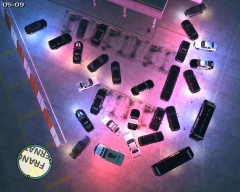
From the album: LCPDFR Scenarios
(The scene after backup was called in) (Ariel View at Night) A new employee at F.I.A. noticed a bunch of black cars, and one limo at a building behind F.I.A. and remembered that the few vehicles of this make and model he had seen before, belonged to drug dealers. He immediately telephoned police. After an investigation it was found out that the dealers purchased an abandoned building behind F.I.A. for the meeting, but stated that the use of the building would be for "research purposes", F.I.A. officials not knowing, the individuals who purchased the building, were drug dealers. They had the windows boarded up, and had the only entrance be behind the building. LCPD and EPS each station one unmarked car a distance away from the building, and had several other units ready for backup. A dealer member, who will be known as "Dave", noticed two black, unmarked cars a distance away from the building. However, since it was only two, he shrugged it off, and walked inside. The meeting took approximately 4-5 hours, and when all the dealer members exited the building, they were greeted with a surprise. LCPD, EPS and RCMP had surrounded the only way out of the building. All individuals were detained while police, searched through their database, to see if these individuals had any other charges, or had committed any crimes in the past few months/weeks. After searching through the database, all individuals were arrested, and charged with: - Drug Trafficking - Hit & Run - Felony Assult - Reckless Driving - Arson - Vehicular Manslaughter - Attempted Murder - Impaired Driving Causing Bodily Harm - Driving Under the Influence - Possession of a Deadly Weapon -
From the album: LCPDFR Scenarios
(The scene after backup was called in) (Ariel View) A new employee at F.I.A. noticed a bunch of black cars, and one limo at a building behind F.I.A. and remembered that the few vehicles of this make and model he had seen before, belonged to drug dealers. He immediately telephoned police. After an investigation it was found out that the dealers purchased an abandoned building behind F.I.A. for the meeting, but stated that the use of the building would be for "research purposes", F.I.A. officials not knowing, the individuals who purchased the building, were drug dealers. They had the windows boarded up, and had the only entrance be behind the building. LCPD and EPS each station one unmarked car a distance away from the building, and had several other units ready for backup. A dealer member, who will be known as "Dave", noticed two black, unmarked cars a distance away from the building. However, since it was only two, he shrugged it off, and walked inside. The meeting took approximately 4-5 hours, and when all the dealer members exited the building, they were greeted with a surprise. LCPD, EPS and RCMP had surrounded the only way out of the building. All individuals were detained while police, searched through their database, to see if these individuals had any other charges, or had committed any crimes in the past few months/weeks. After searching through the database, all individuals were arrested, and charged with: - Drug Trafficking - Hit & Run - Felony Assult - Reckless Driving - Arson - Vehicular Manslaughter - Attempted Murder - Impaired Driving Causing Bodily Harm - Driving Under the Influence - Possession of a Deadly Weapon

