




KN1IGHT
Members
-
Joined
Everything posted by KN1IGHT
-
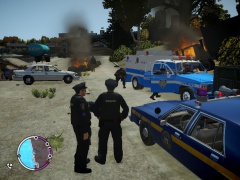
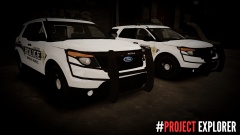 On the bottom image, the Explorer on the left has a guy under it
 -
Try run the GTA IV Launcher as an Administrator. Remember to run GTA IV, you need to right click on LaunchGTAIV.exe and click Run as administrator.
-
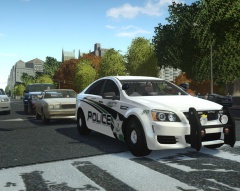 Download for that vehicle model?
 -
Hi guys, I felt that I shouldn't start another topic, so does anyone know the siren used in this video, and a download link?
-
There are many people here who would like to assist you with fixing your error, but, in order to make it more clear, please edit your post and say what error code you are getting (Ex: SMPA60, RC20, RC10, etc.) Here is a list of every error code for GTA IV and what they mean. And simply pressing Ctrl + F on that page and typing in Unrecoverable Fault indicates there is 30 errors that have Unrecoverable Fault in them. I apologize, if this post makes it seem like I'm being an a**, that was not my intent, but in the future please try your best to be more specific in support topics.
-
Hi guys, Does anyone know the link to the siren used in
-
Is that Suburban available for download? I occasionally use these as well:
-
As the title says, this thread can be used to share your favorite vehicle model for patrolling in LCPDFR. Screenshots encouraged. :) In my case, my favorite vehicle model for patrolling is this Police2 Slicktop CVPI: Note: This Slicktop is not released
-
Certain places like the Expressways, I allow up to 35, and any higher I pull them over. Streets such as Mohawk Ave, I haven't really set myself a limit, as long as the AI's driving is good, and they're not weaving all over the road or rear-ending vehicles, I leave 'em be.
-
Go to Root GTA Directory -> common -> data and open vehicles.ide, and find the line that says the name of the vehicle slot the vehicle is in. Go to the end of the line and add +livery then save the file, and try after this. Be sure it says +livery at the end of all vehicle slots you're using and want to be able to change the liveries. Second, open up your trainer.ini and search for the text Liver (this worked in my case), and it should instantly jump to a line in trainer.ini called VehicleLivery=1. In my case, I had to change the 1 to a 0 and then save it, and that allowed me to change liveries using my trainer.
-
![Nissan Silvia K's [S13]](//s3-gallery.int-cdn.lcpdfrusercontent.com/gallery/album_1170/sml_gallery_61676_1170_1046074.jpg) I know it's not the same model but this car reminds me of this car from the film Equilibrium
I know it's not the same model but this car reminds me of this car from the film Equilibrium -
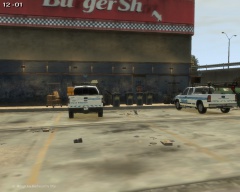
From the album: GTA IV/ LCPDFR Photos
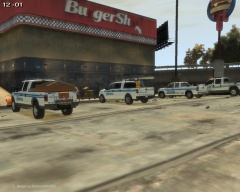
Here 2 City of Edmonton vehicles and one City of Edmonton Supervisor can be seen having a quick stop at a local Burgershot. An Alberta Sheriff pulled in not to much later after the others for a break. Today was a fairly busy day for City of Edmonton officials. Jim Wilson (Plow truck operator) has been busy cleaning up the City Rock Yard, with his truck. The other two Staff members have been dealing with water main breaks, redirecting traffic, fixing traffic lights, etc. The Alberta Sheriff has been busy conducting traffic stops on drivers for: - Distracted Driving - Speeding - Minor violations The F250 Plow is the newest addition to the City of Edmonton's fleet of vehicles. The F250 is the newest addition for the Alberta Sheriffs -
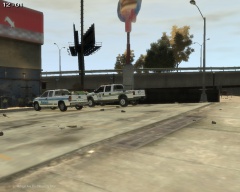
From the album: GTA IV/ LCPDFR Photos
Here 2 City of Edmonton vehicles and one City of Edmonton Supervisor can be seen having a quick stop at a local Burgershot. An Alberta Sheriff pulled in not to much later after the others for a break. Today was a fairly busy day for City of Edmonton officials. Jim Wilson (Plow truck operator) has been busy cleaning up the City Rock Yard, with his truck. The other two Staff members have been dealing with water main breaks, redirecting traffic, fixing traffic lights, etc. The Alberta Sheriff has been busy conducting traffic stops on drivers for: - Distracted Driving - Speeding - Minor violations The F250 Plow is the newest addition to the City of Edmonton's fleet of vehicles. The F250 is the newest addition for the Alberta Sheriffs -
From the album: GTA IV/ LCPDFR Photos
Here 2 City of Edmonton vehicles and one City of Edmonton Supervisor can be seen having a quick stop at a local Burgershot. An Alberta Sheriff pulled in not to much later after the others for a break. Today was a fairly busy day for City of Edmonton officials. Jim Wilson (Plow truck operator) has been busy cleaning up the City Rock Yard, with his truck. The other two Staff members have been dealing with water main breaks, redirecting traffic, fixing traffic lights, etc. The Alberta Sheriff has been busy conducting traffic stops on drivers for: - Distracted Driving - Speeding - Minor violations The F250 Plow is the newest addition to the City of Edmonton's fleet of vehicles. The F250 is the newest addition for the Alberta Sheriffs -
Since there is a file named window-template I'm assuming there's text on it. I'd export that file, preferably to the folder the vehicle is in, that it came with. Open it up and delete the text. (I use Paint.NET for all my texture editing needs) As for making it clear, it really depends on how clear you want it. The vehicle model that has vehicle_generic_glasswindows2 in my game, has no texture whatsoever for the window. It's just a transparent background which gives the impression of a completely clear window, except the actual glass is not visible. If you want the windows clear, but with a bit of tint, I'd make a copy of the old window template (one with text on it), and open it up in Paint.NET, make the whole thing black, and then experiment with the Opacity level. I can't recommend a good opacity level, that part is up to you.
-
There is more then likely a window texture in the .wtd They are named different things: - windowtint - window-template - wintemplate - f150_window_template - taho_windows_f - impala_window_back - vehicle_generic_glasswindows2 It can vary between vehicle models. The ones listed above, are just some of the window textures found in vehicles I picked at random Most vehicles I've downloaded have came with a window template file in the download. Take a look through the .wtd and see if there's anything named similar or the exact same as I listed above.
-
Sorry I couldn't be of more assistance
-
The tutorial is on LCPD-Mods Here's my Google Search Should be about the 3rd link down
-
 Thanks!
 -
Link to the truck present in this shot?
-
This tutorial might help you a bit. My apologies if it doesn't.
-
Damn! Nice truck model! Definitely earned a download from me! Can't wait to get it in game. -thumbs up-
- 27 comments
- 9 reviews
-
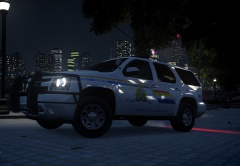 vehicle download link?
 -
From the album: GTA IV/ LCPDFR Photos
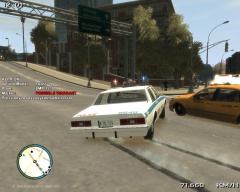
Officer Knight attempted to block this fleeing Taxi, but as he hit the brakes to stop and block the vehicle, the driver hit the accelerator, and avoided the road block. The driver of the Taxi was finally stopped and detained. A few minutes later the driver was arrested as there was a warrant out on his name (Name Withheld) and on his plate #, for skipping a court date© Code 2 Productions
-
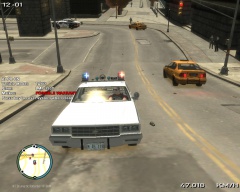
From the album: GTA IV/ LCPDFR Photos

![Nissan Silvia K's [S13]](http://s3-gallery.int-cdn.lcpdfrusercontent.com/gallery/album_1170/sml_gallery_61676_1170_1046074.jpg)
