




KN1IGHT
Members
-
Joined
Everything posted by KN1IGHT
-
By the way, "Integrety" is spelt wrong. It is spelt Integrity Notice the real one doesn't have Integrity spelt the way you have.
-
I'm sure they should be. But, I'll check the tutorial for mapping lights for ELS 6. As the lightbar I'm working with, I believe wasn't already mapped for ELS Edit: I've viewed the texture file in OpenIV, and the emerglights that came with the lightbar are present. See attached file for screenshot of hierarchy. The lightbar and the extras are at the bottom..... Edit 2: Is the emerglights_emis lightsemissive (or emerglights_emis) texture file supposed to be in the model's texture file as well? Is it possible my problem is because the following textures are in the file? - vehicleenvmap128 - vehicle_genericmud_car - vehicle_generic_smallspecmap
-
From my memory, I viewed the WTD file, the emerglights didn't show up in the file. But in SparkIV it shows up in the texture file just fine..... ~ Posted using iPhone Edit: When I get on my PC, I'll recheck the texture file for the vehicle model.
-
Bump. I checked the model viewer in OpenIV, and the lightbar displays correctly, but the light textures of red and blue cannot be seen. Thoughts?
-
I checked the model viewer in OpenIV, and the lightbar displays correctly, but the light textures cannot be seen. How can I fix this?
-
In game, all I see is the environmental lighting Nothing on the lightbar is flashing. The emerglights is added to the texture file, along with all the files that were in the lightbar's texture folder. The emerglights is the only light texture in the lightbar's download. Best, KRI ~ Posted using iPhone Edit: I didn't check if they showed up in the model viewer in OpenIV. I will check when I'm on my PC.
-
That's what I know from my time here. But to be sure, I'd get an okay from an Admin.
-
Bump. Okay, I got the white lightbar issue fixed. However, the lights on the lightbar don't flash. The environmental lighting is visible, but the lightbar lights themselves, don't flash.
-
If it's an unlocked model, I believe you can modify it. However, if you release it, give proper credits
-
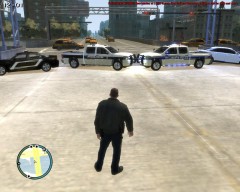
From the album: LCPDFR Scenarios
Moments ago, Environment Canada issued a warning for Severe Thunderstorms, and a Tornado Watch. "Severe thunderstorms may produce a tornado this evening. Conditions are favourable for the development of severe thunderstorms with the potential to produce tornadoes. These severe thunderstorms will also have the potential to produce very large hail..Flooding rain..Deadly lightning and powerful winds. Use this time to secure outdoor property and to ensure family members and co-workers are prepared to take action should the severe weather approach. Environment Canada continues to monitor the situation closely for severe thunderstorm development and possible tornado warnings. Please continue to monitor your local media or weatheradio for further updates. Should severe weather approach or if you feel threatened do not wait for warnings to take action..Take shelter immediately." Approx. 10 minutes before Liberty City Emergency Ops Center was being flooded with calls of rising waters, and individuals asking for advice on what to do. 4 Liberty City Police Units were dispatched to the Main Overpass separating Algonquin and Alderney. All four units blocked off the bridge in both directions, to prevent citizens from using the oncoming traffic lane to enter Alderney. Citizens who were clearly fleeing from Alderney and its rising rivers, were allowed through the police roadblock. After about 2-3 hours of having the bridge blocked off, Liberty City Police received reports that all of Alderney had been evacuated. During this time several citizens tried to enter Alderney, for the reason of forgetting some of their belongings. They were denied access to Alderney. Among these citizens, five attempted to get through the roadblock, by walking up to officers, holding knives, and some holding Barettas. All these citizens arrested and placed in a Paddy Wagon. Note: Quoted message is not the complete message, but was taken from actual Environment Canada website. -
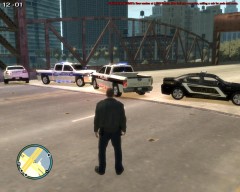
From the album: LCPDFR Scenarios
Moments ago, Environment Canada issued a warning for Severe Thunderstorms, and a Tornado Watch. "Severe thunderstorms may produce a tornado this evening. Conditions are favourable for the development of severe thunderstorms with the potential to produce tornadoes. These severe thunderstorms will also have the potential to produce very large hail..Flooding rain..Deadly lightning and powerful winds. Use this time to secure outdoor property and to ensure family members and co-workers are prepared to take action should the severe weather approach. Environment Canada continues to monitor the situation closely for severe thunderstorm development and possible tornado warnings. Please continue to monitor your local media or weatheradio for further updates. Should severe weather approach or if you feel threatened do not wait for warnings to take action..Take shelter immediately." Approx. 10 minutes before Liberty City Emergency Ops Center was being flooded with calls of rising waters, and individuals asking for advice on what to do. 4 Liberty City Police Units were dispatched to the Main Overpass separating Algonquin and Alderney. All four units blocked off the bridge in both directions, to prevent citizens from using the oncoming traffic lane to enter Alderney. Citizens who were clearly fleeing from Alderney and its rising rivers, were allowed through the police roadblock. After about 2-3 hours of having the bridge blocked off, Liberty City Police received reports that all of Alderney had been evacuated. During this time several citizens tried to enter Alderney, for the reason of forgetting some of their belongings. They were denied access to Alderney. Among these citizens, five attempted to get through the roadblock, by walking up to officers, holding knives, and some holding Barettas. All these citizens arrested and placed in a Paddy Wagon. Note: Quoted message is not the complete message, but was taken from actual Environment Canada website. -
I use SparkIV, is that going to affect anything? (Such as adding textures to the car in OpenIV) Only reason I use SparkIV, is because last time I tried OpenIV, it set off my Norton 360 Protection. Edit: Got OpenIV Installed, but cannot see how to add new textures, without replacing existing ones
-
I actually did, when I added the Lightbar in ZModeler. Unless you mean the WTD Texture File
-
I'll try that What about the ELS lightbar being all white in game? Thoughts? Edit: Tried unchecking store textures, and it worked fine.
-
Hi guys, I've been working on a Suburban for my own Single Player use, until I get used to ZModeler. I've only added the Whelen Inner Edge TIR3 Lightbar to the Suburban, and in ZModeler, you can clearly see the Red & Blue lights on the lightbar. However, when I spawn the Suburban in game, it doesn't crash, but the lightbar is all white, and no lights can be seen on it. Only lights that are see are the Environment Lighting (Reflection of ELS on the ground) Also, when I export it it gives me these errors: Texture "Texture Name" was DXT-5- compress to store in file. Texture "Texture Name" can not be stored properly because of it's size.You will need to store it in WTD File. Any thoughts? Other then those issues, it's fine. I've only added the Whelen Inner Edge TIR3 Lightbar to the Suburban right now. How would I get make the texture file, so it gets rid of those errors listed above, and the Lightbar and ELS Lights display properly?
-
Why would you want to pull over someone behind you? Not to mention LCPDFR is developed around everyday police work. Pulling over someone behind you most likely isn't everyday police work
-
If anything, use Razer Game Booster, I use it, and it works great for me. (http://www.razerzone.com/gamebooster) I used to lag more when I went on duty, on LCPDFR, but Game Booster, reduced the lag enough that it didn't annoy me. :P :) It shuts down all background processes, and dedicates your resources to gaming. However, in sections like System Services in Boost Settings, don't check Explorer.exe for a program to shut down. Shutting down explorer.exe will make all icons and ur taskbar disappear. It's easy to restart though: Ctrl + Alt + Delete>Task Manager>New Task>explorer.exe>Press Enter
-
 Download link?
 -
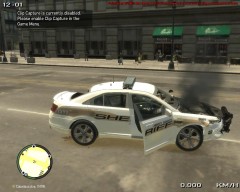 :P Yes I do. But as the description says, I turned off ELS, and kept the siren on, to shoot out the suspect's tires. Something I didn't put in the description is, that the reason the one side is smashed completely, is because I hit the E-Brake to late, and the car slammed against a wall
 -
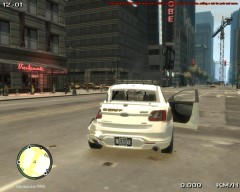
From the album: GTA IV/ LCPDFR Photos
Officer Knight's car after a long pursuit. ELS not activated, to be able to shoot out suspect's tires. -
From the album: GTA IV/ LCPDFR Photos
Officer Knight's car after a long pursuit. ELS not activated, to be able to shoot out suspect's tires. -
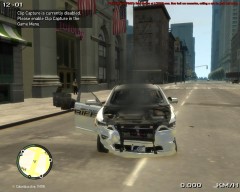
From the album: GTA IV/ LCPDFR Photos
Officer Knight's car after a long pursuit. ELS not activated, to be able to shoot out suspect's tires. -
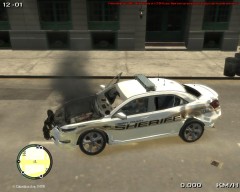
From the album: GTA IV/ LCPDFR Photos
Officer Knight's car after a long pursuit. ELS not activated, to be able to shoot out suspect's tires. -
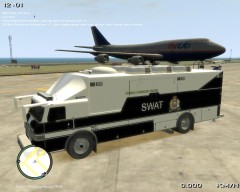 Thanks! That's one I made yesterday, during my first attempt at textures.
 -
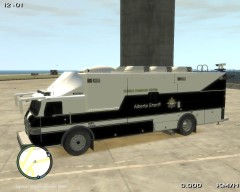
From the album: GTA IV/ LCPDFR Photos
A texture I made for Alberta Sheriff Mobile Command Center. Opinions?

