




Yasd
Community Team
-
Joined
-
Last visited
Everything posted by Yasd
-
To know where the error comes from, disable all plugins in gtav/plugins/LSPDFR by renaming the folder to _LSPDFR. Then check, if the error is still there.
-
Its an issue in the mods folder, according to your log. You might revert the latest changes or start a new folder.
-
Your game crashed cause you have added the same item twice, check your latest edited config files.
-
Update ScriptHookVDotNet nightly in the main gta folder: https://github.com/scripthookvdotnet/scripthookvdotnet-nightly/releases
-
Update/ install RageNativeUI in the main gta folder. https://github.com/alexguirre/RAGENativeUI/releases Remove these plugins, they are outdated: Assorted Callouts Better EMS Code 3 Callouts Code Red Callouts LSPDFR+ Officer Status Plugin Police Smart Radio Traffic Policer Alternatives are: UltimateBackup, StopThePed & GrammarPolice
-
Remove those plugins, they may cause the crash: - Assorted Callouts - Better EMS -> alternative: Ultimate Backup - LSPDFR+ -> alternative: Stop The Ped - Traffic Policer
-
Post the Ragepluginhook.log from the main gta folder.
-
post the ragepluginhook.log from the main gta folder. keep the mods folder renamed to _mods
-
rename the folder gtav/lspdfr to _lspdfr and install the folder from the lspdfr download.
-
If you do not have an internet connection, alternatives to Bejoijos mods are https://github.com/Aschtar?tab=repositories TrafficPolicer LSPDFR+ ArrestManager PoliceSmartRadio In my opinion its not as good as STP and is missing some features, but it doesnt force internet connection.
-
Unfortunately if you do not have a backup, there is no way. We only offer support for the latest version. And only the latest version of lspdfr is downloadable.
-
 Thanks for reporting! It's a known problem and will be fixed in the next update!
- 259 comments
- 24 reviews
-
Install RageNativeUI in the main gta folder. Link Next time pls attach the log as a file.
-
When exactly is it crashing? On startup or when activating a siren on a specific vehicle?
-
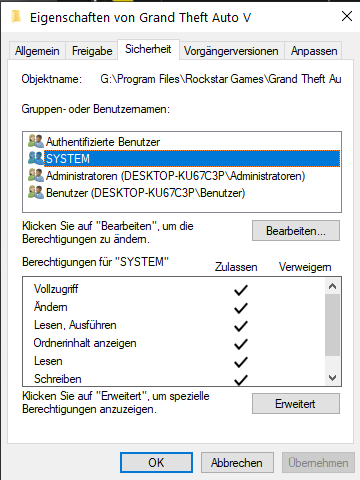
Exception message: Access to the path 'D:\Program Files\Epic Games\GTAV\lspdfr\stats.dat' is denied. Add your gta folder as an exception in your antivirus. RIght click on your g ta folder -> Properties -> Security -> make sure system, admin & user has all hooks/ permissions Start gta/ rph as an admininstrator
-
The error is related to SimpleHud. Try reinstalling or remove it temporarily.
-
Update RageNativeUI in the main gta folder https://github.com/alexguirre/RAGENativeUI/releases
-
-
lol I mean I did push a lot of updates recently, but isn't that a good sign? New updates means more fixes & new content?
- 259 comments
- 24 reviews
-
Disable ambient events, by adding those lines to your lspdfr.ini: Main.DisableGameBlipHiding = true Remove the oudated ones, once you have a stable game you could add them back: - CalloutManager - Federal Callouts Im unaware of LSPDFRCallout, probably remove it too. You're missing Pyro.Common in the main gta folder from SuperCallouts. Narcos is missing System.Net.Http.Formatting, completely reinstall it.
-
You can ignore those messages.
-
Replace vehicles are: police police2 police3 police4 policet sheriff sheriff2 fbi fbi2 You can use any of it
-
Its something in the mods folder. Revert the latest changes or start a new one.
-
Sorry, I don't understand. Do you mean: What are the police cars names to replace a SAHP unit in OpenIV?
-
@chorg blorgPlease open a new topic for your issue, thanks.

