




Yasd
Community Team
-
Joined
-
Last visited
Everything posted by Yasd
-
Update ScripthookVDotNet nightly.
-
This comment above is just wrong. The crash was caused by an invalid police vehicle -> police4 remove that vehicle or double check config files
-
Update ScripthookVDotNet nightly.
-
-
Hello, you’ve played for half an hour, your log looks perfectly fine, but please remove AssortedCallouts, it’s outdated and may have caused the im guessing probably game crash.
-
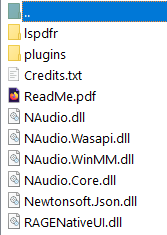
Your crash was caused by an broken vehicle "policet", a possible step would be to remove it. D:\Program Files (86x)\steamapps\common\Grand Theft Auto V\Plugins\NAudio.dll D:\Program Files (86x)\steamapps\common\Grand Theft Auto V\Plugins\RAGENativeUI.dll D:\Program Files (86x)\steamapps\common\Grand Theft Auto V\Plugins\Venoxity.Common.dll Those are wrong installed and belong in the main gta folder instead.
-
Hello! You are missing required files from MCCallouts. 1. Download the latest MCCallouts version -> Replace all files by dragging and dropping all files in the screenshot in the main gta folder.
-
 Thx, I'll fix it in the next update, I will use the english version since the polish translator hasn't translated it yet 🙂
- 237 comments
- 20 reviews
-
- lspdfr callout
- rph
- translation
- legacy
-
Tagged with:
-
 No, it's not. FiveM has a complete different infrastructure and APIs. see comment below
- 30 comments
- 4 reviews
-
Negative, pls download each mod separately from the specific site. Sharing of mod packs without the consent of each developer is not allowed and disrespectful against the authors.
-
Post the Ragepluginhook.log from the main gta folder. give details on when it’s crashing and what you’ve done before
-
Your topic has been moved to LSPDFR 0.4 Support. Please post in the correct location in the future. Post the Ragepluginhook.log from the main gta folder
-
Try updating or removing ScripthookVDotNet.asi in the main gta folder
-
First goal is to get gta working on its own. Otherwise RPH cant work.
-
Correct, renaming the mods folder meanss disabling it from loading. Additionally make sure to have a custom gameconfig, heapadjuster and packfile limit adjuster.
-
Can you start gta on its own?
-
LemonUI.Ragepluginhook does not belong in the scripts folder. Only the SHVDN version does.
-
Looks like an issue with the player Inventory from LSPDFR rename the gtav/lspdfr folder to _lspdfr and install the folder from the lspdfr download.
-
Armoury requires LemonUI.RagePluginHook, install that. Remove due to being outdated: ArrestManager Assorted CAllouts LSPDFR+ TrafficPolicer Update: MCCallouts
-
rename the mods folder to _mods
-
Rename the mods folder to _mods
-
Update AdvancedHook.dll from the ELS download in the main gta folder
-
You can either use StopThePed, then you can do field sobriety tests. Or you dont have StopThePed, then you can ask for the ID via LSPDFR (hold E for a few seconds) and check for legal age.
- 237 comments
- 20 reviews
-
- lspdfr callout
- rph
- translation
- legacy
-
Tagged with:
-
Retry this link -> link
-



