Yasd
Community Team
-
Joined
-
Last visited
Everything posted by Yasd
-
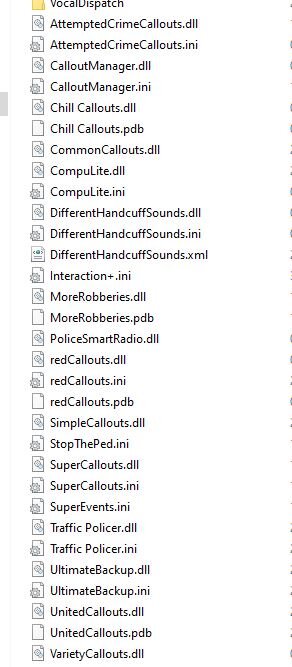
pls post a screenshot of your main gta folder!
-
Hallo und hi! You installed sth. wrong. STP has a coroner and tow truck! What exactly is your problem? Is the coroner and tow truck option not showing in the smart radio? Or do you need help installing STP or Arrest Manager?
-
>>Is it possible that the user simply does not have .NET Framework 4.0 installed on the machine? Do you have .NET Framework 4.0 installed?
-
Exception message: Access to the path 'C:\Program Files (x86)\Steam\steamapps\common\Grand Theft Auto V\lspdfr\patterns.tmp' is denied. Try disable your antivirus and firewall. Also update your RPH to newest version.
-
The new scripthook (SHV) was updated today. Install it!
-
This is not the italian forum? WHy do you always answer in italian?
-
-
Installier RageNativeUI. Aktualisier dein Ragepluginhook.
-
New scripthook update is available: http://www.dev-c.com/gtav/scripthookv/
-
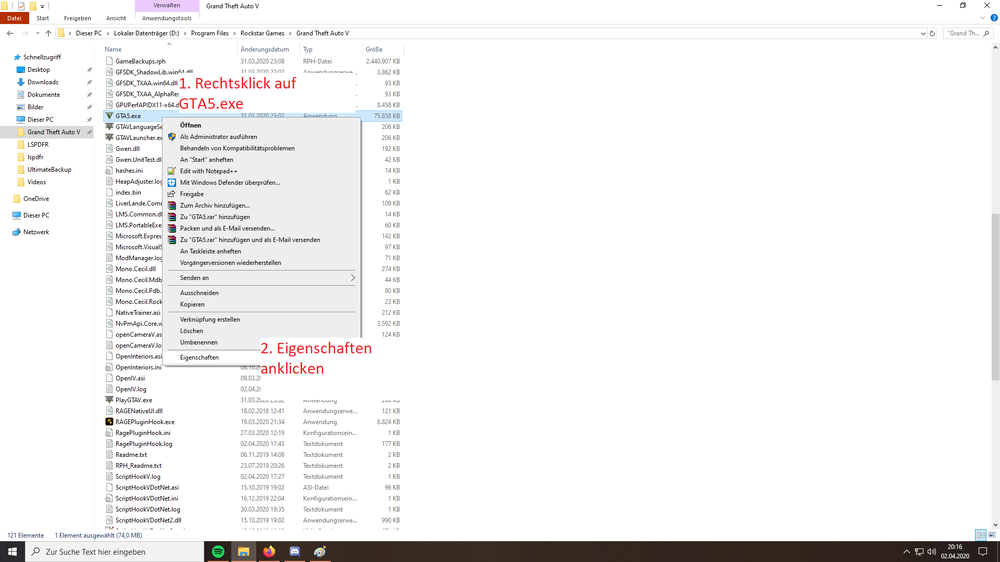
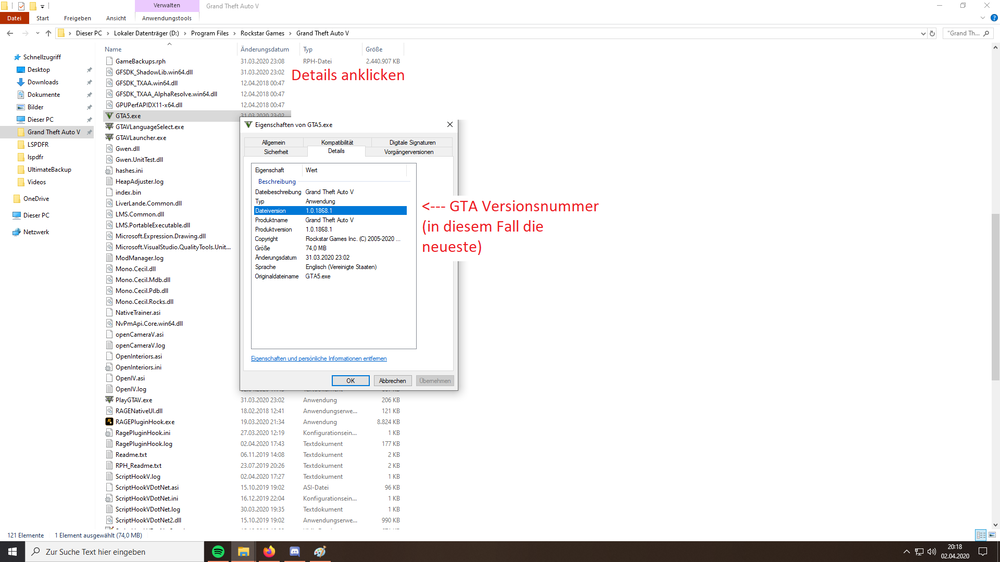
The easierst solution would be solving the problem which causes the lags and not trying to installing old versions, which might be or not working. So with the newest game version you may possible not able to play an old version of LSPDFR. Which version of the game you have, this is how to find it out: 1. RIght klick on GTA5.exe 2. Properties 3. Details 4. GTA Versions number (in this case/ i have the newest one)
-
I had the ASI Loader installed (ini files moved in right direction, old ScriptHookV removed, TrainerV and Scripthook wokring after new ASILoader installation ) and it worked until ELS. ELS didnt work. I used my horn which sounded ELS like, but i couldnt Strg + P to open Menu. Also "J" didnt work. Hitting "E" was the ELS horn. 1st question: Did anyone else had success with ASILoader and ELS? 2nd question: I just want an answer pls. I will not try to solve it because i already deinstalled it. I will wait till ScripthookV update.
-
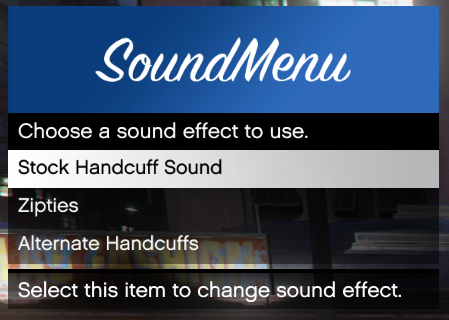 I would love to use your plugin. But its not working. My log here: [4/2/2020 5:03:12 PM.034] LiverLande.Common-> Checking DLL dependency LiverLande.Common, minimum required version is 1.0.0.0. [4/2/2020 5:03:12 PM.035] LiverLande.Common-> Checking DLL dependency LiverLande.Common, minimum required version is 1.0.0.0. Loaded version is 1.0.0.0. [4/2/2020 5:03:12 PM.035] LiverLande.Common-> Checking DLL dependency LiverLande.Common, dependency check passed. [4/2/2020 5:03:12 PM.035] LiverLande.Common-> Checking DLL dependency RAGEPluginHook, minimum required version is 0.52.1061.10387. [4/2/2020 5:03:12 PM.035] LiverLande.Common-> Checking DLL dependency RAGEPluginHook, minimum required version is 0.52.1061.10387. Loaded version is 1.78.1267.16039. [4/2/2020 5:03:12 PM.035] LiverLande.Common-> Checking DLL dependency RAGEPluginHook, dependency check passed. [4/2/2020 5:03:12 PM.035] LiverLande.Common-> Checking DLL dependency RAGENativeUI, minimum required version is 1.6.3.0. [4/2/2020 5:03:12 PM.035] LiverLande.Common-> Checking DLL dependency RAGENativeUI, minimum required version is 1.6.3.0. Loaded version is 1.6.3.0. [4/2/2020 5:03:12 PM.035] LiverLande.Common-> Checking DLL dependency RAGENativeUI, dependency check passed. [4/2/2020 5:03:12 PM.035] LiverLande.Common-> Checking DLL dependency LSPD First Response, minimum required version is 0.4.39.22580. [4/2/2020 5:03:12 PM.036] LiverLande.Common-> Checking DLL dependency LSPD First Response, minimum required version is 0.4.39.22580. Loaded version is 0.4.7. [4/2/2020 5:03:12 PM.036] LiverLande.Common-> Checking DLL dependency LSPD First Response, dependency check failed. [4/2/2020 5:03:12 PM.036] LiverLande.Common-> Dependency checks failed. Check log for more info. DifferentHandcuffSounds not loaded.
 -
RPH erst starten, wenn die Sirenen (Bild unten) und das GTA Logo kommt, dann klappts.

-
Ja, kopieren. Das was bei dir drin steht, sind zum einen Parameter, die standardmäßig so drinstehen und zum anderen kann man die auch auf true false 0 - 1 usw. schalten.
-
Raubkopien werden hier nicht toleriert. Hier wird und kann dir auch keiner helfen.
-
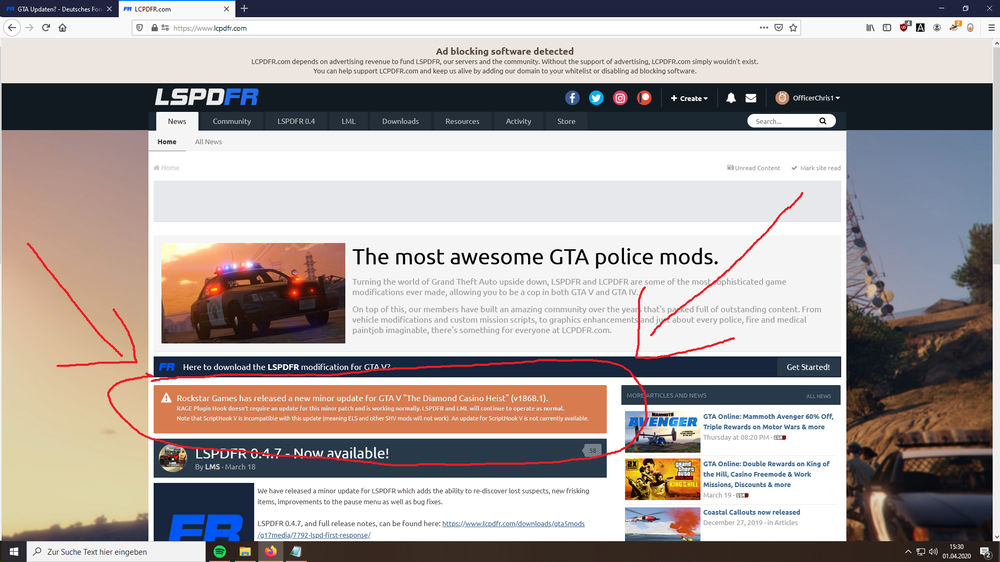
Normalerweise wenn ein GTA Update herauskommt und du das Game (automatisch) updatest, ist LSPDFR erstmal nicht spielbar, außer du blockierst das Update (mehrere Möglichkeiten, z. B. BlockGTA) Bei diesem Update ist das nicht so. Nur z. B. ScripthookV funktioniert nicht nach diesem Update. Kurz nach dem ein Update herauskommt, steht das auch auf der LSPDFR Website (unten markiert). Wenn GTA nicht automatisch updatet, gibt es als nur offline Spieler keinen Grund, das manuell zu tun. Außer du spielst auch online, aber dann hast du sicherlich ein zweiten GTA Pfad. Wenn du GTA updatest, frägt dich RPH, ob du ein Backup erstellen möchtest. Hier "ja" sagen. Hier lädt er ein Backup vom Social Club herunter. RPH und diese Version müssen übereinstimmen, sonst funktioniert LSPDFR nicht.
-
Was war das Problem und wie die Lösung?
-
LSPDFR zu benutzen sind viele FPS. 20-40 fps weniger ist normal. Was man verändern kann, um mehr Leistung rauszubekommen: niedrigere Grafikeinstellungen von GTA PC unter Energieeinstellungen auf Höchstleistung laufen lassen weniger Plugins und Scripts logischerweise Folgende Einstellungen unter C:\Program Files\Rockstar Games\Grand Theft Auto V\lspdfr.ini: Main.PreloadAllModels = false Networking.DisableServerCommunication = True Networking.DisableDiscordRichPresence = True Main.DisableAmbientScriptHooks = True AmbientSpawn.MaxCopsInArea = 0 WorldEvents.IntervalMultiplier = 0 WorldEvents.MaxNumberOfEvents = 0 Callouts.Multiplier = 250 Chase.CopsCanCommandeerVehicles = false Callouts.DisableBigRadar = true Ambient.DisableAmbientGameCopSpawnBlock = true Chase.DisableTrafficDensityAdjustments = true Chase.ExhaustionInterval = 25000 Chase.ExhaustionDuration = 30000 AmbientSpawn.DisableRandomUnits = true Chase.DisableAmbientAI = true PoliceStation.DisableAmbientSpawn = true Was die einzelnen Parameter bedeuten:
-
I had this problem, too on my PC. I switched in WIN10 Energy Settings to top performance.
-
Probier deine Firewall und Windows Defender (Antivirenporgramm, hat jeder WIN10 User) zu deaktivieren. Ein Screenshot der Fehlermeldung wäre hilfreich! Außerdem deine Ragepluginhook.log, ist in deinem Hauptverziechnis von GTA.
-
Jo warscheinlich :DDDD Ne mal ernsthaft das ist es nicht.
-
Das sagt dir OPENIV normalerweise automatisch.
-
FAQ aus LSPDFR 0.4 (englisch): We've noticed that some people are having issues with world textures disappearing when LSPDFR is loaded. See below for a possible solution: Set Main.PreloadAllModels to false in the lspdfr.ini file. More information on how to do this can be found here: https://www.lcpdfr.com/wiki/lspdfr/04/features/settings/
-
Hast du die Uniformen manuell oder per EUP installiert?
-
Welche Plugins hast du installiert? Und welche überlappen sich? Alle .dll Dateien sind 0.4.6/0.4.7 kompatibel. Diese habe ich aktuell installiert.