




Yasd
Community Team
-
Joined
-
Last visited
Everything posted by Yasd
-
Do you press E two times? One for opeining the door, and aother time to tell him to get in?
-
I have this problem, too. And an other user, too. Im Reporting this as a bug. did you call prisoner transport with 8 via arrest manager or simply via lspdfr (backup menu ->local transport unit)
-
Pls post your Ragepluginhook.log
-
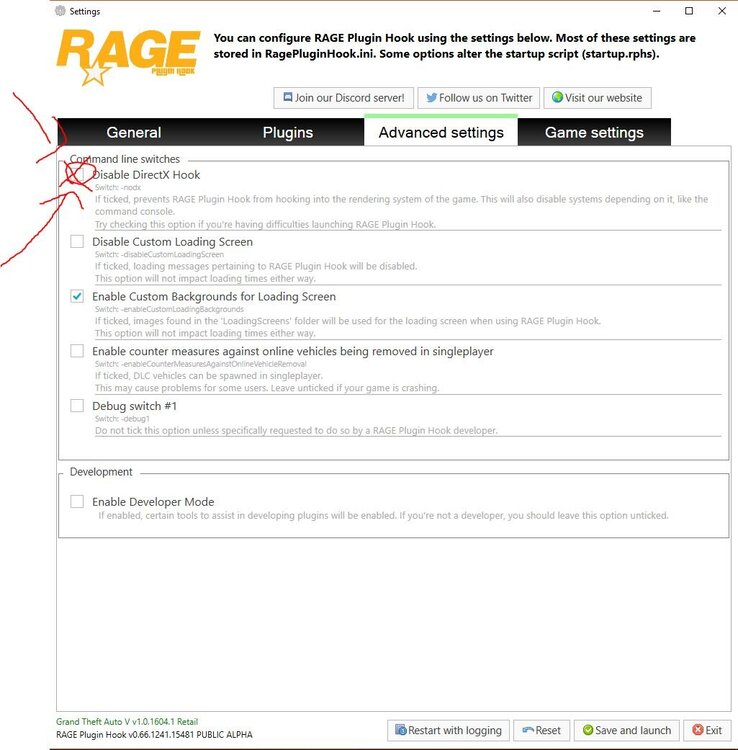
@MattDH No solution yet and many user have this problem: Try to: set "enableCounterMeasuresAgainstOnlineVehicleRemoval " disabled checked “Disable DirectX Hook"
-
1.Can you start GTA 5 without lspdfr without crashes? Your crash is saying "Invalid model". 2. I think you installed the vehicles in the mods folder, (so delete/ rename the mods folder and check if it still crashes.)
-
Eigentlich müsste es auch ohne EUP gehen. Aber probier mal aus was passiert wenn du EUP installierst. Informier dich ein bisschen.
-
Don't you have installed the graphic mod in the mods folder? So it's not the graphic mod, because you renamed the mods folder. Try to disable DirectX, start the game. If it still not works, try to untick and start again.
-
EUP Menu: The following DLC(s) are not present: mpheist, mppatchesng, patchday1ng, patchday2ng, mpchristmas2, patchday2bng, patchday3ng, patchday4ng, mpluxe, patchday5ng, mpluxe2, patchday6ng, mpreplay, patchday7ng, mplowrider, mphalloween, patchday8ng, mpapartment, mpxmas_604490, mplowrider2, mpjanuary2016, mpvalentines2, patchday9ng, mpexecutive, patchday10ng, mpstunt, patchday11ng, mpbiker, patchday12ng, patchday13ng, mpspecialraces, mpgunrunning, mpairraces, mpsmuggler, mpchristmas2017, mpassault, mpbattle, patchday14ng, patchday15ng, patchday16ng, patchday17ng, patchday18ng, patchday19ng, patchday20ng, mpchristmas2018. [8/9/2019 9:59:27 AM.626] EUP Menu: Please ensure your game is up to date and your dlclist.xml in /update/update.rpf/common/data/ contains entries for those DLCs. Try to delete/ rename mods folder, so it won't load.
-
I also noticed this in my game, but after some time, the ped despawned.
-
Can you start GTA 5 Story Mode without RPH?
-
CopHolster lädt ganz normal und gibt keine Fehlermeldungen aus. Vielleicht hast du es übersehen, weil zum einen lädt das Pluginbeim Start von RPH und zum anderen fügt es einfach nur eine kleine Animation beim Auswählen deiner Waffe hinzu. Du brauchst in dem Fall das Plugin nicht manuell laden. Hast du auch das Plugin EUP installiert? Und wie hast du L & O installiert?
-
But you can still play LSPDFR. How i said, just Good luck 😉
-
Try to disable Antivirus and Firewall. Make sure you are using lspdfr 0.4.3 and have the newest patch of gta.
-
Has that happend only once or always? Are you talking about Arrest Manager (8 for Transport) or the vanilla transport (open backup menu -> transport -> local transport unit)?
-
The latest is 0.4.3 and it is VERY important to have 0.4.3, otherwise it's the reason for the crash! Try to delete or rename the mods folder, so the folder won't load. You can disable the whole antivirus program and the firewall. Also please post your Ragepluginhook.log. Its in the main directory of GTA.
-
1. There is no crash in your log. 2. Try to remove plugins -> Bodycamsound ; ClearTheWayV 3. update your Albo Common -> You maybe have to manually remove plugin by plugin to find out which one causes the crash. You also can remove all to check if its even plugins relevated.
-
Pls post your Ragepluginhook.log. Its located in your main directory of GTA. You maybe installed the vehicles wrong. Maybe watch a tutorial.
-
Pls post your Ragepluginhook.log. Its in your main directory of gta
-
Exception message: Requested value '-' was not found. Try to remove your plugins and see if the problem is solved. Possible is one of your plugins is the error
-
It would be the best if you start the lspdfr mod when you are not at a mission. Save the game once youre finished adn when you are at an apartment
-
Try to remove the mods and see if its still crashing. Maybe try to download the newest versions of the mods.
-
Normally it is there. You maybe have to search better 😉 Also you can spawn the car manually, and change the components with (for example) simpleTrainer.
-
You can change the lspdfr keys under keys.ini which is located at main directory -> lspdfr -> keys.ini You also can change the menu key for ultimate backup (which i did) under main directory -> plugins -> lspdfr -> UltimateBackup.ini
-
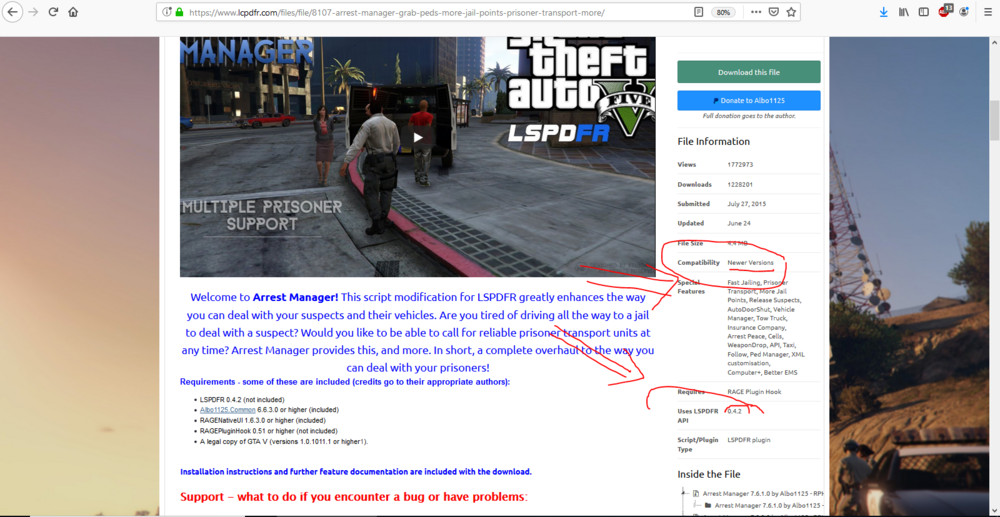
Right file, but in this file there is no crash. Due to you're being new, im explaining. There is a new lspdfr update (0.4.3). Now it takes some time for the mod creators to update their mods. You better stay at the older version (0.4.2). But for that its already too late because you need a backup. (RPH) What you can do now is to check the plugins/ scripts with which lspdfr version they are comatible with. You can do that by checking out every plugin and test it. Thats what you need to do.Some plugins may still be working, but are made for older lspdfr versions.
-
Pls make your own Topic. Looks like you have LSPDFR 0.4.2 installed. Install LSPDFR 0.4.3.



