




Yasd
Community Team
-
Joined
-
Last visited
Everything posted by Yasd
-
I think you manually tried to edit the commandline.txt . If you make a little mistake like forgetting a space one time windowed[SPACE]-disableCustomLoadingScreen then the whole game doesnt start. Maybe (if this space was the only fault) adding a space at that space would have solved the problem. If you still have the file you can try it.
-
 Awesome! I just had some problems with the vehicles.meta and carvariations.meta. Working on it right now. <- Solved.
- 125 comments
- 51 reviews
-
-

- 1
-
-
 I think so, because the last time he updated was 4th January. But all the info videos under "about this file" are grey and not available...
- 200 comments
- 27 reviews
-
@patchadams69 You can still go to RPH and set the plugins to automatically load. That should work now.
-
Hallo zusammen, ich habe das Problem, wenn ich LSPDFR beende, schließt sich GTA und es öffnet sich das Fenster, indem man den abgesicherten Modus und Neustart wählen kann. Ebenso öffnet sich jedes mal der "neue" Launcher, was ich nicht möchte. RPH-Log im Anhang Bitte um Hilfe. MfG Chris RagePluginHook.log
-
Lets try to disable all of your mods, plugins. So that you only have the standard lspdfr and rph files. This looks like an error in your commandline.txt in main folder of gta. try to delete the commandline.txt. it will automatically create a new one. [3/3/2020 9:32:08 AM.655] Command line option "windowed-disableCustomLoadingScreen" is specified twice. Please remove one. [3/3/2020 9:32:08 AM.655] Command line option "disableCustomLoadingScreen" is specified twice. Please remove one. [3/3/2020 9:32:08 AM.655] Command line option "DX10" is specified twice. Please remove one. [3/3/2020 9:32:08 AM.655] Command line option "windowed" is specified twice. Please remove one. [3/3/2020 9:32:08 AM.655] Command line option -disableCustomLoadingScreen is specified; disabling custom loading screen rendering. Whats up with that?: Pixel Shader 5.0 not supported. Falling back to 4.0. Try to start gta in safe mode wit rph.
-
möglicherweise ist dein antivirenprogramm schuld. deaktiviere dein antivirenprogramm und lspdfr neu installieren
-
Hast du dich korrekt mit LSPDFR verbunden? Der Counter funktioniert nur mit Vanilla LSPDFR, nicht z. B. mit StopThePed. https://youtu.be/sKFeX26vV6M
-
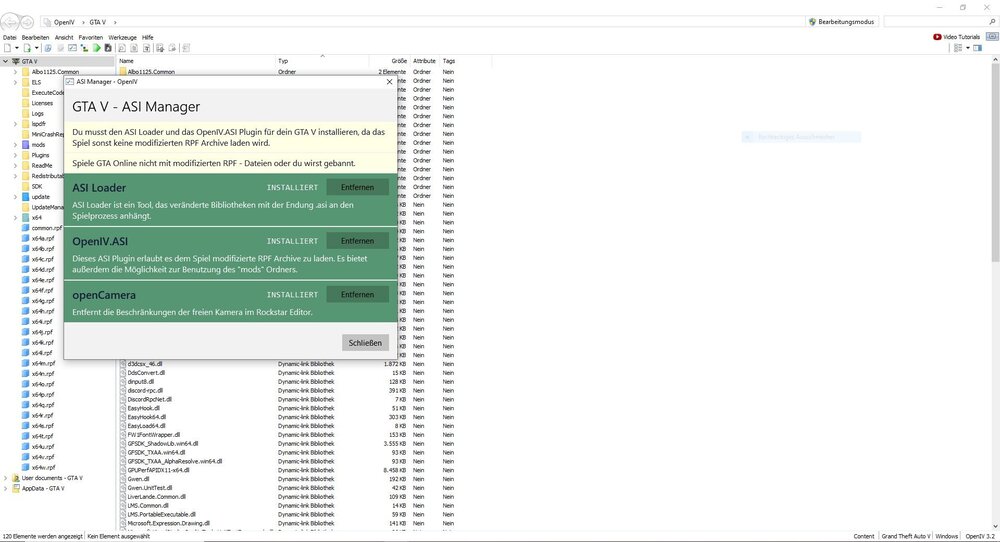
Hast du OpenIV korrekt installiert?
-
Hello! Awesome plugin! I found myself a problem, when I'm in the Active Warrant callout, and the text may be armed and dangerous occure, the ped just stands there with the gun in his hand. When you fire a random round, after that, the ped starts shooting at you. Is that the way its supposed to?
- 200 comments
- 27 reviews
-
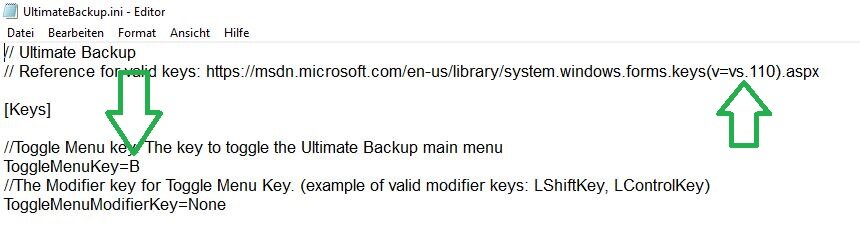
You can set the key to nearly anything. the upper arrow is a link to all keys you can use, and the lower is the key to open ultimatebackup.
-
lol there are strippers in the night club. maybe you were at the wrong time. there are no updates with strippers... because theyre already there
-
More simple would be removing all the Police Radio files, and reinstall it. Then go through the ingame menu
-
Try to remove Computer+
-
Welche Fehlermeldung kommt genau?
-
Benutzt du EUP? Aus deinem einzeiligen Fehlerbericht kann ich dir nicht helfen. Poste deine Ragepluginhook.log und ein Bild von deinem GTA Ordner.
-
Zu Computer+ gibt es eine deutsche Übersetzung: https://de.gta5-mods.com/misc/lspdfr-computer-deutsche-uebersetzung
-
Poste bitte deine Ragepluginhook.log http://y2u.be/wZfh4HddVoo <- Lösung:
-
Hinzuzufügen ist: Q drücken, um eine verhaftete Person knien zu lassen Police Computer: Wenn geöffnet (mit Q) kann man mit Alt für Nummernschilder während einer Verkehrskontrolle und mit Tab für Namen der Person hin- und herschalten. Für den Namen muss man vorher nach dem Ausweis fragen. Auch neu ist seit 0.4.6 das Durchsuchen der verhafteten Person auf der Rückbank. 0.4.7: Gefangenen ins Fahrzeug führen: Gefangenen greifen (E), zu einem Police Cruiser hintere Tür gehen und (E) gedrückt halten; https://www.youtube.com/watch?v=pMgTV9g6vYc
-
Poste bitte deine Ragepluginhook.log, die ist im Hauptverzeichnis von GTA.
-
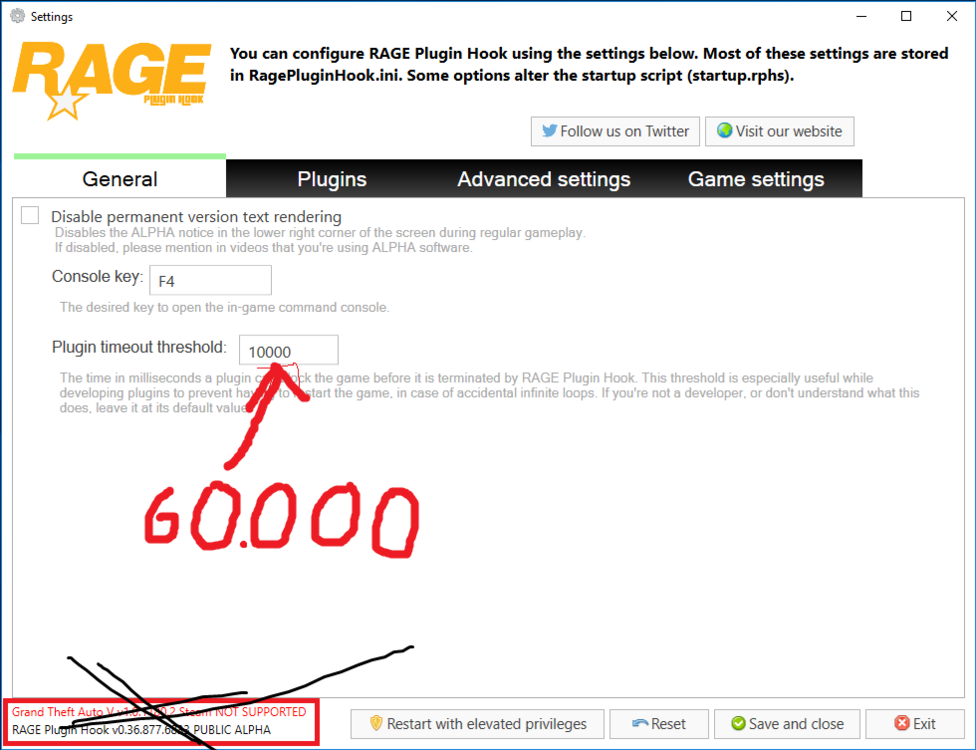
Du startest RPH und während es startet, hältst du Shift gedrückt. Danach öffnet sich dieses Fenster. Unter "General" stellst du den Plguin timeout threshold von 10000 auf 60000. Was du hier veränderst ist letztendlich die Zeit, wie lange ein Plugin laden darf, bevor das Laden abgebrochen wird und du die Fehlermeldung erhältst.
-
Diesen Wert auf 60000 (maximum) setzen, dann löst du folgendes Problem: Ich sehe keine Fehler deinerseits. Die letzte Meldung vor dem Crash war ein Ambient Spawn. Diesen evtl. in den LSPDFR Einstellungen ausmachen. Kannst du mal noch 2 weitere Logs posten? Ob dort jeweils zum Schluss der Ambient Spawn war? Ansonsten kannst du folgendes probieren: Plugins weglassen, Scripts weglassen, Ram und CPU Auslastung im Taskmanager beobachten, während dein Spiel läuft. Stürzt dein GTA auch ab wenn du GTA ohne LSPDFR spielst und ohne RPH?
-
Ich benutzte Compu Lite und hier wird alles gespeichert.
-
Welches Fahrzeug hast du den installiert? Ist dir bewusst dass du J öfter drücken musst um alle Lichter zu aktivieren? Es gibt Stage 1, da blinken meistens nur Warnlichter. Stage 2 mehrere uns Stage 3 alle, hier bleiben auch die Verkehrsteilnehmer stehen.
-
Alright, but when the victim is up next to the helicopter, you have to get him in the helicopter, but thats not working. He stays at the rope.


