




Yasd
Community Team
-
Joined
-
Last visited
Everything posted by Yasd
-
rename mods folder to _mods
-
This are the requirements for rph: https://ragepluginhook.net/Requirements.aspx
-
rename mods folder to _mods
-
it crashed because ultimatebackup is needed, yes.
-
pls remove cheepcallouts, its outdated and not compatible.
-
yes, it might be the POLICE vehicle, because it crashed right after its preloaded.
-
Thats not the solution, we know now that your problem is in the mods folder. from what you wrote you have EUPSR.15 EUPLO8.3 installed in the mods folder. if you didnt install anything else, i would try again installing those in a new mods folder.
-
you are talking about 3 callouts, if that is all you have then no. assorted callouts and policesmartradio are outdated, that may cause problems, but must not.
-
try to start gta/ rph as an admin or try starting gta and rph without loading lspdfr automatically, once ingame, load LSPDFR manually. If this doesnt help, add the whole gta folder as an exception in your antivirus and in windows antivirus. if this doesnt help, do the steps on page 4 on the rph faq: https://docs.google.com/document/d/1Hp2Qco0qsgKfohkhjYWUxTr2OF7NSCkp8uSZwWz6rRQ/edit#
-
Remove RageNativeUI out of D:\Steam\steamapps\common\Grand Theft Auto V\plugins\lspdfr Update RageNativeUI, it has to be installed in the main directory: D:\Steam\steamapps\common\Grand Theft Auto V\ Link of RageNativeUI: https://github.com/alexguirre/RAGENativeUI/releases
-
you can temporarily remove the lspdfr folder from the main directory and install the folder again from the lspdfr download, then try again.
-
otherwise post your ragepluginhook.log
-
where is the log...
-
rename mods folder to _mods and try again
-
have you installed the .xml file? have you installed scripthookv?
-
you do not need to save it, just post your ragepluginhook.log from the main gta folder after the crash occures.
-
install ultimatebackup. https://www.bejoijo.com/post/ultimate-backup
-
the latest gta game version is 2628, which you have to update to. the latest rph, version 1.93, is only included in the latest lspdfr download, which you both need to update.
-
start by posting your ragepluginhook.log from the main gta folder
-
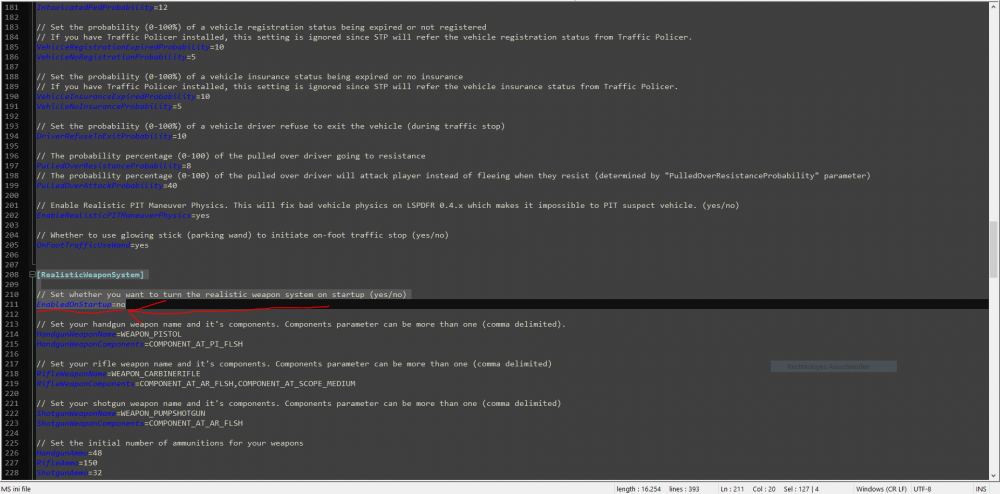
It could be the realistic weapon system from stoptheped. you can disable it in the stoptheped.ini located under C:\Program Files\Rockstar Games\Grand Theft Auto V\plugins\LSPDFR
-
post your ragepluginhook.log from the main gta folder
-
Simply update RageNativeUI: https://github.com/alexguirre/RAGENativeUI/releases
-
Install RageNativeUI in the main directory. https://github.com/alexguirre/RAGENativeUI/releases
-
i hope you understood me right. rename the mods folder to _mods and start the game. if you do not have crashes then, its something in the mods folder
-
poste dein ragepluginhook.log aus dem hauptordner von gta👍🏽



