




Yasd
Community Team
-
Joined
-
Last visited
Everything posted by Yasd
-
Error while hiding ambient game blips. Disable ambient events in the lspdfr.ini. GrammarPolice: Could not find a part of the path 'C:\Program Files\Epic Games\GTAV\plugins\LSPDFR\GrammarPolice\grammar\en-IMMERSIVE\custom\actions'. Could not find a part of the path 'C:\Program Files\Epic Games\GTAV\plugins\LSPDFR\GrammarPolice\grammar\en-IMMERSIVE\custom\commands'. make sure you have the newest ragenativeui.
-
ArrestManager, BankCallouts, CalloutManager are outdated. pls remove them. Before installing Callouts, check on the download page to the right which version is supported, minimum lspdfr 0.4.7. also check the last updated date.
-
so basically if your rename your mods folder to _mods , which means disable from loading, you are able to play?
-
this file has 500 kb of space, this is not too big...
-
you installed calloutsz in the wrong location. you installed it in C:\Program Files (x86)\Steam\steamapps\common\Grand Theft Auto V\Plugins\CalloutZ.dll the right location would be C:\Program Files (x86)\Steam\steamapps\common\Grand Theft Auto V\Plugins\LSPDFR\CalloutZ.dll
-
try disable discord overlay or discord / nvidia overlay
-
-
now its says Requested value 'w' was not found. still from forceacallout.
-
if not solved yet, try renaming your mods folder and try again.
-
post your ragepluginhook.log from the main gta folder. at which point does it fall back to story mode? when falling back, is lspdfr still working, like do you still receive callouts?
-
rename your mods folder to _mods and try again.
-
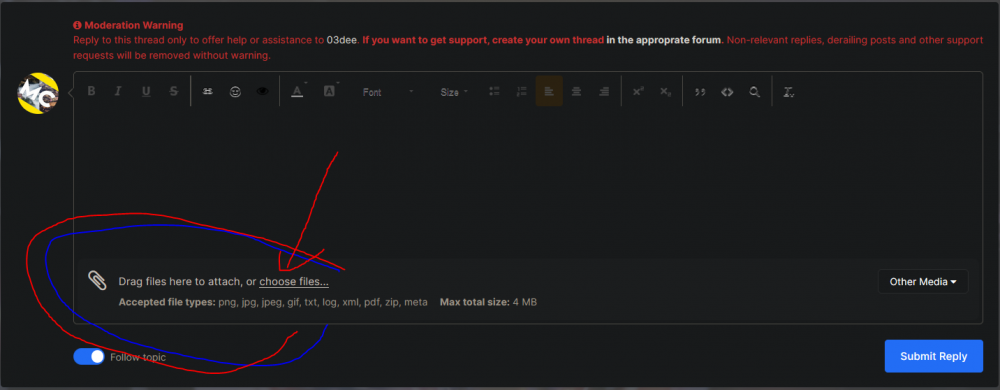
post your ragepluginhook.log, a text file from the main gta folder. you do that by clicking on choose files... (see the screenshot) rename your mods folder to _mods and try again. if it works then, you have a problem in there. try to revert your last changes, before the problem occures. Like you already said, you installed some vehicles.
-
post your ragepluginhook.log from the main gta folder.
-
post your ragepluginhook.log from the main gta folder. at which point is it crashing? does gta start at all? are you able to get ingame?
-
you tried renaming the mods folder? if it works then, there is a problem in your mods folder. try to revert the last changes, that you made, before the problem occured.
-
you still have the default windows antivirus, add the whole gta folder as an exception in this antivirus, tutorial: https://support.microsoft.com/en-us/windows/add-an-exclusion-to-windows-security-811816c0-4dfd-af4a-47e4-c301afe13b26 otherwise disable geforceoverlay, if activated. also try to end discord, there are also discord overlays. or do the steps on page 4 on the faq: https://docs.google.com/document/d/1Hp2Qco0qsgKfohkhjYWUxTr2OF7NSCkp8uSZwWz6rRQ/edit
-
post your ragepluginhook.log from the main gta folder.👍🏽 If you press F11 or F12, your screen is getting darker or brighter? So you have to press F11 and FN or related to get the normal F11 function.
-
post your ragepluginhook.log from the main gta folder👍🏽🥳
-
post your ragepluginhook.log from the main gta folder👍🏽 for myself: check the lspdfr version and game version mods folder up to date?
-
Simply update RageNativeUI: https://github.com/alexguirre/RAGENativeUI/releases
-
post your ragepluginhook.log from the main gta folder👍🏽
-
you have a problem with ForceACallout Requested value '<' was not found. This means if you edited anything in the .ini files you made a mistake by adding a < anywhere.
-
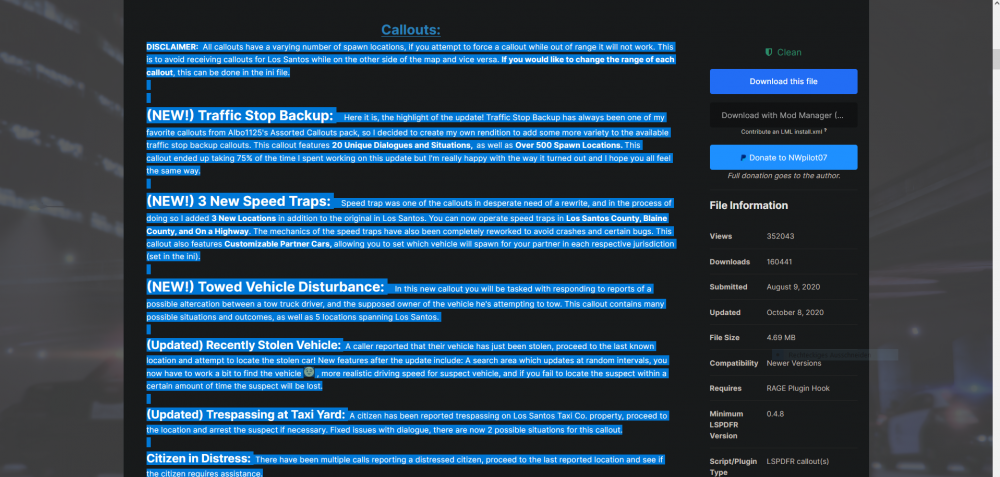
you can lookup the callout in your ragepluginhook.log. or you can search that on your own. search for the plugin name on google or lcpdfr.com and on the plugin download page there are the callouts listed. f. e. typical callouts:
-
the geforceoverlay is known to cause problems, specific to crashing gta right after loading / while loading or not even starting it.
-
update gta and lspdfr with rph to the newest version.



