


JBin818
Members
-
Joined
-
Last visited
Everything posted by JBin818
-
 I would like to know that too. I downloaded the no biker because it was on the bottom and usually the latest is on the bottom but it says previous so I don't know. It seems to work fine though.
- 81 comments
- 16 reviews
-
If you have McAfee you should just disable Real Time Scanning. Shouldn't really have to disable the whole thing. Odd though, my Rage.exe disappeared today and i still have Real Time Scanning off. Had to re-download RPH. Not a fan of McAfee. I am just using it because it came with my new comp. I should just get rid of it and go with AVG,Avast or Avira. I've had those in the past and never had a problem with them blocking gaming stuff.
-
I had a problem withe Rage when I would try to launch it, it wouldn't launch and the Rage launcher (.exe) file would disappear but only that file. Found out it was my McAfee anti-virus that was blocking it. Maybe disable your anti virus, whatever it is and try to install and launch. See if that does it.
-
How about this; https://steamcommunity.com/discussions/forum/1/648814845105881422 Also they said maybe try disabling your anti virus then try to verify integrity. Maybe the anti virus is blocking the update.
-
Ah, bummer. I have retail version so I don't know steam too well. On steam, that is the latest GTA version they have?
-
Try this. Copied this from a Reddit post for you all. Open Steam > Right click on Grand Theft Auto V > Properties > Local Files > Verify integrity of the game cache
-
Copied this from a Reddit post for you all. Open Steam > Right click on Grand Theft Auto V > Properties > Local Files > Verify integrity of the game cache
-
I had something similar where it was loading ok but no splash screen. On youtube someone said to go into RPH/Game Settings/Command Line Switches and check Forced Windowed mode and Borderless Window. That did it for me. Might try that.
-
Nevermind. Problem Solved. Actually with help from another post on this forum. Apparently it was McAfee Antivirus that was preventing it from opening/launching. Had to turn off Real Time Scanning. McAfee came with my new computer, I didn't want but was taking advantage of the free few months it gives you but I am not a fan of McAfee, quite the opposite in fact. In 2010 my computer got infected and McAfee says when I run a scan that no problems found though my computer was on the verge of going blue screen at start up. Never trusted McAfee since. Should just uninstall and put in AVG,Avast or whatever that other one was. Forgot what I had before. Anyway, problem solved. Now, to move forward, again.
-
I am just getting around to installing LSPDFR and Rage on my new computer and I can't seem to launch rage. I follow ALBO's vid instructions. I did this on my old comp which was win 7. It seemed to launch like it should. I may have had some hang ups but I don't remember what those were or if i had a problem with rage not loading. But I did get lspdfr and a lot of the mods running and it did good. Now I have this new computer and I have a problem with rage not launching or loading. Interesting thing is rage that comes with lspdfr, I unblock, then run the launcher and it brings up the box to unblock files. When I get to the back up your game it said something like this version of the game is not supported. When you download lspdfr, the rage files it comes with, are they the latest version. I've heard no they are not so you have to go to rages site and download the latest from there. I did that. I installed per read me which said to install all except SDK and Licenses folders which is different then ALBO which he says to just drop all contents in the root GTA. Anyway, so the problem is when I double click the rage launcher, after a few seconds I hear a windows chime but nothing pops up saying what it is. I've tried to create a short cut of the launcher to the desktop and there it tells me the short cut is not good. I found out why, because the rage launcher gets deleted after I try to open it. So with the rage launcher in the root gta folder and before I launch it I right click and unblock. I get a need admin permission box so i click continue. Then apply and OK. Then I click the rage launcher and after the windows chime I hear the launcher disappears from the gta folder. So I paste it back into the folder with all the other rage contents and it just disappears when I try to run the launcher. So what is going on here? BTW my new computer is Win 10
-
I've used Police Search - Search Pedestrians and Vehicles. Haven't used it since the rage update so not sure if it'll work.
-
I have a GeForce Card in my new comp and I noticed a Geforce Experience program installed. I checked it out and the program will look for games on your comp and see if GeForce Experience can make that game experience better, like automatically adjust the settings. The program knows your vid card and will adjust the game settings to the best it sees. After it did that the lags were gone. When i first installed the game it was very laggy and I tried to adjust but it didn't fix it. So the GeForce Experience program worked for me.
-
Thanks, I think so too. Yeah, it's really neat how much better it looks when playing. Cool avatar pic you have, was one of my favorite shows!
-
On my new computer I installed GTA V and it lagged big time. Even with my decent graphics card. I tried tweaking this and that in setting and got a little worse. I found on my new PC a Geforce Experience program for my Geforce 1070 card i have. The Geforce exp program will look for games installed and then you click the "details" in the game in the program and click to optimize your game. That took the lag out of my game. The program will check your graphics card and game and change the game settings to the best your card can handle. It worked for me . https://www.nvidia.com/en-us/geforce/geforce-experience/
-
Yeah, it's neat some of the things that I find. Even if you went up in a Heli it would take you a while to canvas it all and you would have to fly low to see stuff AND in daylight. Tough flying low in the mountains at night. Also when you by this property by a pier (forgot which property) it will give you submersible missions and you can explore under water in the deep ocean but you still can't go too deep even in the sub. A lot of interesting stuff down there. Must have been a lot of plane crashes cuz that is what there is a lot of. Also in a missions where Trevor crashes a military plane into the Almo sea, I was able to get a sub into the Almo sea and go down and check the crash site. Not much to get except a health pack and a weapon or 2.
-
I'm new to installing vehicles also and still haven't done so but have watched vids on it. Still need to get some things worked out before installing. When you go to the downtown PD and go into the garage (most people don't because they use modded vehicles and those don't show up in the garage) you can select light bars or not and a couple other things you can add or remove. But that is just with the original game vehicles. Too bad there isn't a place/file whatever where you can drop all your modded cars and in game, for example, go to the PD garage, enter it and select your vehicle, add or remove what you want on that vehicle. Kinda like going into a LS customs shop.
-
Is that a "Winning" mod? HAHA, I had say that. I've wanted to find a mod that would have better graphics but not more items in it. I think one of the visuals mod adds more trees, bushes, this and that which i don't want really. I just want what is currently in the game a bit more better looking. I haven't installed any yet.
-
Ah, sorry, wasn't sure if it was more GTA V or Computer category.
-
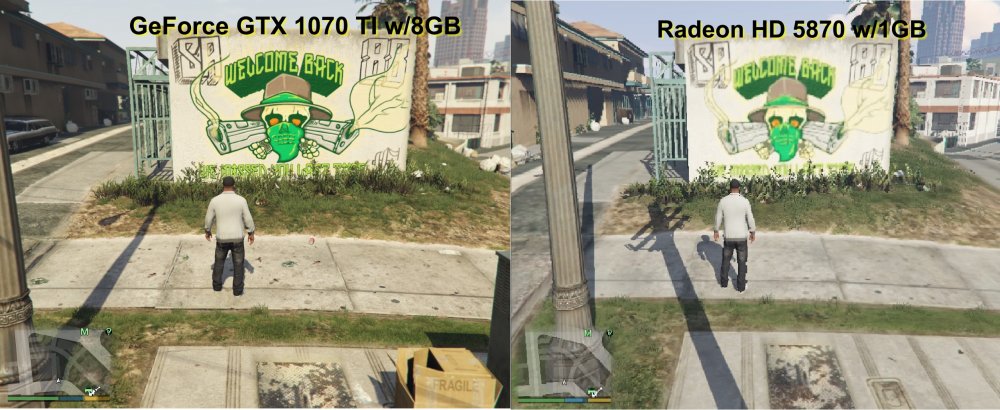
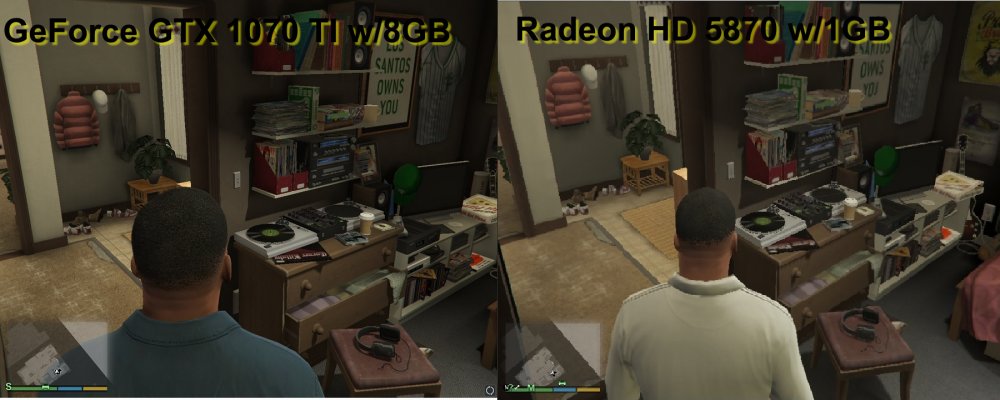
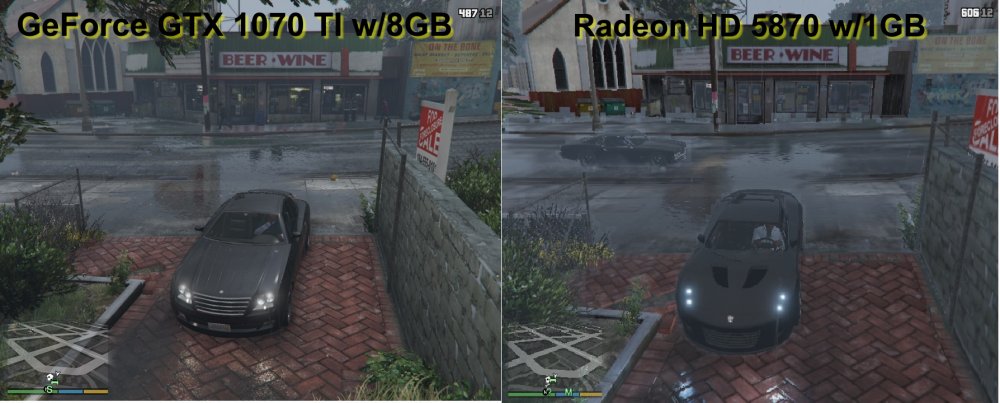
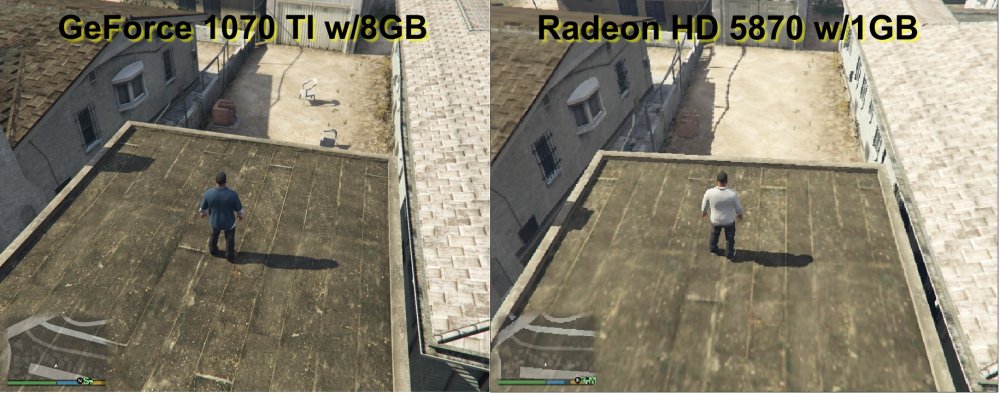
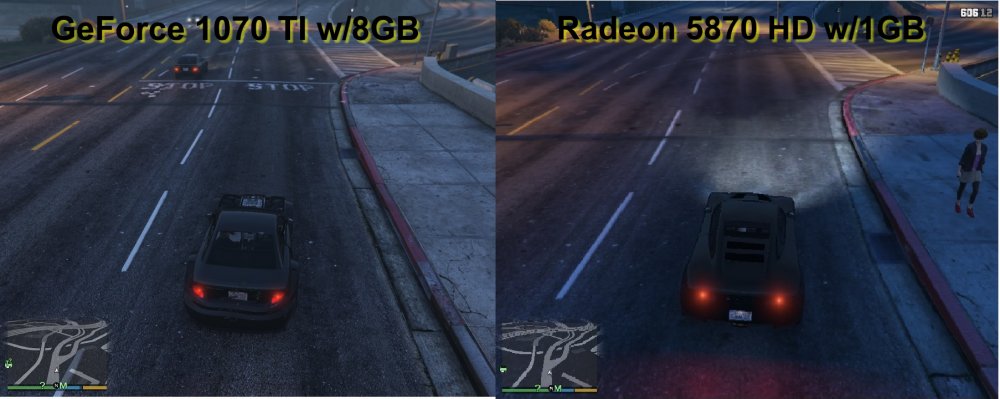
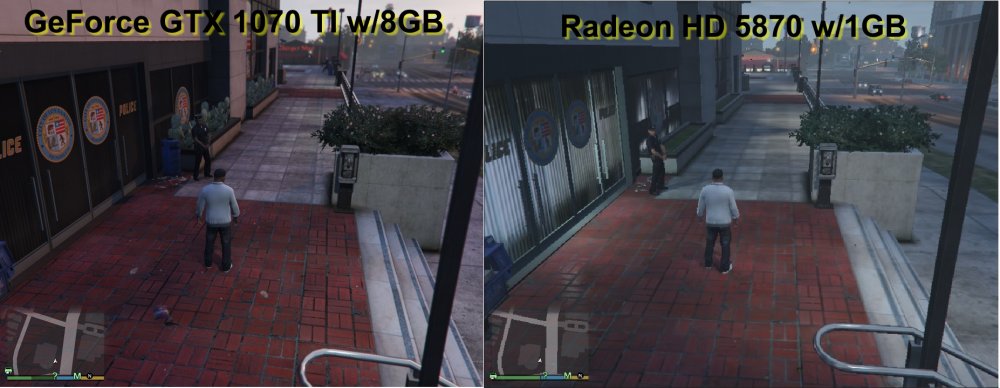
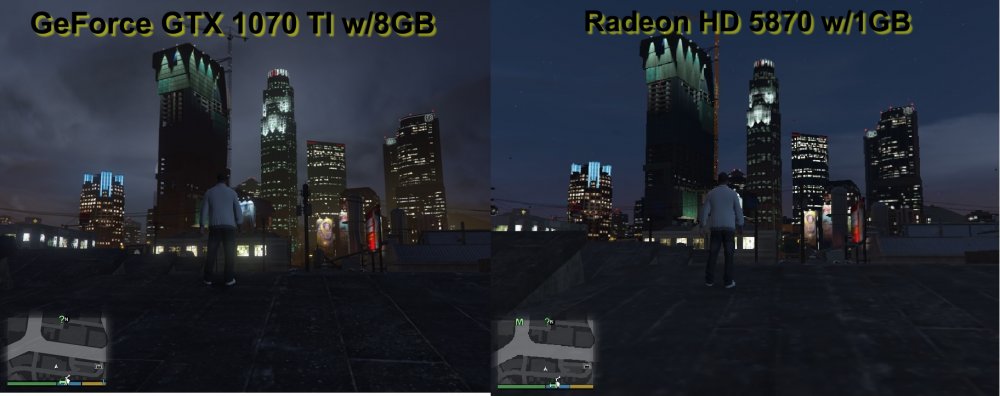
When GTA V came out for PC in 2015 I think, I had a computer with a low graphics card but it played GTA V ok, just the graphics were low. Minimum requirements for V are 2gb Vid Mem but I had a Radeon HD 5870 with 1gb mem. Ran the game but and I got used to the low graphics. Everything else on my computer was above min req. I had 9gb RAM, Win 7, i7 processor at 2.8 GHz I think it was. Recently I got a new computer and paid extra for a decent graphics card and got a GeForce GTX 1070 Ti with 8GB video memory. What a difference! I've played games in the past on PC and could never afford a good graphic card, I would get like a mid range card and have to mix the setting to get the best performance. At the rate games come out and each time it 's like they have higher and higher specs and I only get a computer once every few years I was always a bit behind in the graphics card area. So my new rig with Win 10 and this G Card is really cool. Thought I would take some side by side shots of GTA V with my old and new rig and you could see the difference. So you will know what it looks like with a high and low end card. In the Welcome Back pic you see the fragile box is in the high card and not the low card. Also little things like the soda can in the sidewalk. Just the color difference between the 2 is so noticeable. In Franklin's Room you see difference in sharpness. In Franklin's Driveway, raining, looks good in the high card. The rain drops are more detailed in the ground, better reflection off the water. Don't have a pic of it but when you are looking off in the distance in the mountains or building in downtown my low card made the rain very pixeled. Meaning there were areas of "squares" that could get filled because of the low end card. When it rains is gives a overcast or foggy effect when you look in the distance. Because of the low vid mem it could only do so good in filling all the "raining look". You do see some spots on the bottom of the beer and wine building of what I'm talking about in the low card pic. Franklin on the roof top in ballers territory you see the brick BBQ in the high card but not yet in the low card. When you get closer you start to see it like it's "fading in" . Plastic chairs in one and not the other. Coming up to a stop line, notice the distance the car is at in the high card pic and can't see the stop line yet in the low card pic even though the car is closer. It also fades in when you get closer in the low card. At the PD not much to say there except the bushes to the left of the Officer is in one and not the other. Finally a shot of LS buildings behind Franklin's House at night. The low card may look a bit better because it was a clear might where the high card was a cloudy night. All these pics were taken at about the same time but may have had little differences to the weather conditions. Just thought Id share this with you. I found it interesting. Old Rig; Dell Studio XPS 9100 (Mid 2010) Windows 7 Ultimate 1.5 TB HDD Intel Core I7 930 2.8 GHz 9 GB’s of RAM Creative Sound Blaster XFi Titanium ATI Radeon HD 5870 with 1 GB New Rig; Dell XPS 8930 Windows 10 512GB SSD and 1TB HDD 8th Gen Intel Core i7-87006-core processor up to 4.6 16 GB RAM No Sound Card GeForce GTX 1070 Ti with 8 GB
-
I think most police leave their keys in the vehicle, when on a call, so they can hop back in and take off if needed. No one would really dare to take a patrol car. Well I guess except for this guy. Hate it when that happens in game. One time a ped came up and took my patrol car and I couldn't get to the door fast enough to yank the now suspect out. I was close enough to the car the doors were unlock. In GTA BTW, I've never been a LEO. Siren is going as it's driving away and about a minute later I'm hearing it get closer. Susp took a couple turns i guess that looped back down the street I was on. I saw my car, stopped in traffic and went over and yanked the susp out and arrested him. Funny thing is I had the original susp in the back of the car the whole time. That's GTA for ya.
-
Ok, I got it to run smooth now. Since no one replied, this post can be deleted but I don't know how.
-
So, I've been playing GTA V on my recently old PC which is a Win 7 Ultimate SP1 / i7 930 2.80GHz / 1.5TB HDD / 9 GB of RAM / Radeon HD5800 1GB memory. It played fine, sometimes it would lag when a whole lot was going on but not bad. Had to play it in game setting 800x600 res because of the 1gb vid mem limit. Graphics weren't too bad, I just got used to it. Now I have a new PC that is Win 10 Home i7-8700 3.2GHz but it can go up to 4.6 GHz but I'm not sure how that works. Is there some where I ca raise that? Should I? Have a 1TB HDD and a 512 GB SSD that the OS and Game runs on. 16 bit OS / 16 GB of RAM / GeForce GTX 1070 ti 8GB . So i think my rig is pretty awesome. Not bad vid card right? I installed GTA and the game settings res is set to 1280x1024 same as my PC. I think it is set on Directx 10 though i do have the 11 option but then it resets back to 800x600 res. I didn't change anything else in the graphics settings. Starting playing the game and the graphics are awesome. Big difference playing in higher res. But i noticed that every few seconds it lags for a sec. Especially when in a vehicle and picking up speed. So what's up with that? My rig passes with flying colors on the games min reqs. I see that a lot of people have had problems with lag in GTA V with Win 10. There are a few things I can do watching videos on youtube about it but I thought I would check here and see what you all think. Anyone have Win 10 and had lag problems with GTA? Win 10 is supposed to help with gaming from what they say. I mean, heck, they even have a game mode settings under their Windows Settings. So I thought I would see if any of you have any easy fixes or i'll just do what is recommended on youtube. Thanks
-
There's mods for each one of those. There's one called EMS mod I think. There is a Fire, Lifeguard and Coast Guard mods to. Might be a couple more but I can't remember. Go to the Downloads tab and make sure you are on the GTA 5 tab click on the scripts/plugins. Just scroll through those pages and you'll find them.
-
I use Police Search - Search pedestrians and vehicles! It works fine and i installed Rage just a month ago so it should work as long as Rage hasn't been updated recently.
-
In GTASA Officer Tenpenny is based off of real life former Officer Rafael Perez who was a crooked cop in the LAPD in the late 90's. Look up Rampart Scandal.




