




HazyTube
Members
-
Joined
-
Last visited
Everything posted by HazyTube
-
It's sad to see you go aswell, You're mods where absolutely good! Thanks for sharing them with the community. Are you planning on keeping them up-to-date with the newest RPH release? I understand your decision.
-
 Why so salty? He just doesn't wan't people to change his script and publish it, wich is totally understandable. Making some minor changes for your personal game is ok if you don't publish it.
- 338 comments
- 46 reviews
-
 I love this pack! The details on the skins and the model are insane! Really recommended
- 253 comments
- 53 reviews
-
-

- 1
-
-
-
 Did you hear the high pitch ingame or when you opened the files from the installation folder?
 -
Then you need to use an if statement. It would be: If (game.localplayer.character.position) and then add your suspect and the distance.
-
Thats actually a REALLY Big log haha, could you delete (or move or backup it) your log, then let it crash again and send the smaller/cleaner log please? This is easier for me to find the error
-
This is a common issue, This is very normal if you have mods, plugins and all sorts of things installed. But under 60 FPS is not bad and playable.
-
Now, did all of you copy the updated update.rpf to your mods folder? If not, copy your new update.pf to your mods folder. This got updated since the new update
-
Did you copy the new update.rpf to your mods folder?
-
-
Do you have Natural Vision Remastered? If so, go to GTAV\mods\update\x64\dlcpacks\NVR_emmesive and go to the textures folder. Then delete the ones that you want (in your case firetruck and ruiner)
-
-
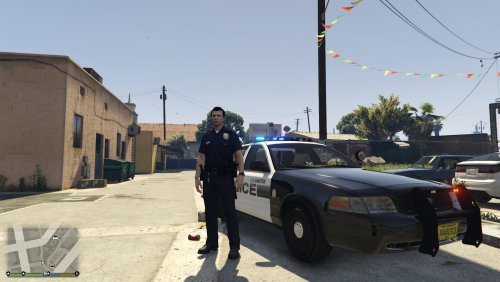 Does this fix the issue of it beign bright enough during day and at night insanly bright?
- 9 comments
- 2 reviews
-
No, I gues you have just installed something wrong. Try using another vehicle or something
-
Nice, Personaly I don't really like NYPD in GTA V. Sadly that GTA 4 is bad tho haha
-
I think you should post this in english, I bet no one here understands this
-
Yeah true, but after a update it replaces it again.
-
It's probably your mods folder then. Did you copy the new updated update.rpf to your mods folder? If so, try renaming your mods folder to '_mods' and start your game. If that works let me know
-
Then just don't use that vehicle
-
Yeah thats nice, are you planning on making it? Would be nice to see
-
Yeah okay but that doesn't fix your problem I gues, what if you install an other car in that slot? Does it work on that?
-
Explain your problem a bit more please, like are your lights turning on and is it just your siren sound that doesn't work?
-
What car have you installed in that slot? It doesn't sound like you have deleted the files because it's the sheriff2 slot and the sheriff slots are the only ones who are bugged with NVR
-
I don't really understand what your problem here is, lets begin with the CTRL+P issue this is just because P pauses the game and opens the map screen. and for downgrading, you said you downgraded to 1493 but this is the latest version there is and scripthook V is already updated for this version. And for the ELS problem, do you mean your lights aren't bright enough? If so, download a mod that makes them brighter

