



By NickkAtNyte
- 1,571 views
- View NickkAtNyte's images
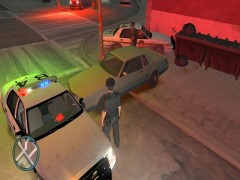
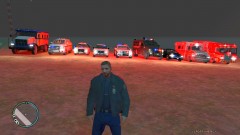
This is the Fleet. The cars that I use in game for LCPDFR. From Left to right: unmodified LCPD Stockade Inmate Transport, Pennsylvania State Police Chevrolet Tahoe, Pennsylvania State Police Ford Crown Victoria Police Interceptor, Pennsylvania State Police Ford Crown Victoria Police Interceptor Slick Top, City of Pittsburgh Police Department Chevrolet Impala, LAPD Riot Control Lenco Bearcat APC, Unmarked Ford Crown Victoria Police Interceptor, FDNY GMC Ambulance, Montgomery Firetruck.
Credit is Given where Credit is due: All rights belong to the original owners and creators of these cars, I just took pictures of them, I just don't remember whose cars and skins they belong to.
Enjoy!
Recommended Comments
Join the conversation
You can post now and register later. If you have an account, sign in now to post with your account.