




Dozel
Members
-
Joined
-
Last visited
Everything posted by Dozel
-
Usually Increasing Plugin Timeout Threshold to 60000 helps, but you already have it.. Try in lspdfr.ini set Main.PreloadAllModels = false Also on top, Remove: LeroyCallouts (broken), SuperCallouts2 (seems like you have that .dll in plugins/lspdfr, even don't know what is that callout plugin, probably backup of original SuperCallout but there is only one SuperCallouts you should have in folder). Remove: YobbinCallouts (or disable bait car callout), UnitedCallouts for better game experiance
-
Well from log I may assume that crash was caused by khorio plugins, you could try to join his discord server and create ticket, attach thoose logs to it and I hope you will get more specific help about that issue
-
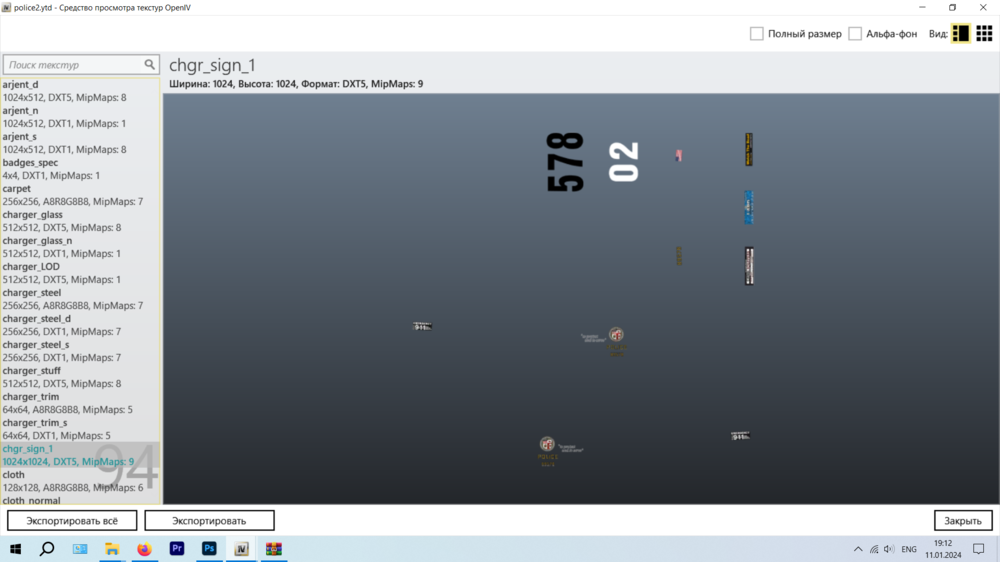
Livery of that car are in alpha channel, so there is no color on livery it's transparent, you can try to make own livery (find tamplate on internet) or install another one for Dodge Charger 2014, you can find it somewhere on forum. Maybe changing car color via trainer would help, but I'm not sure about that one.
-
-
You're welcome.
-
-
-
I'm not sure it will work, but I think worth of trying. Try disabling antivirus (Windows defender, Avast, etc), add the game folder to exceptions and reinstalling CompuLite with the previous files deleted (clean installation).
-
As far as I understand that's the error message why CompuLite wasn't loaded So just want to make sure, did you download CompuLite from Bejo's website or not?

-
I'm not sure that the way it's supposed to be Are you sure you downloade it from Bijo's website?
-
Glad you figure it out.
-
-
 I've just read about DeepSpeech from Mozilla (guys who made Firefox browser), It's open source so I think it's free. Actually don't know how good that one, but I think everything will be better than Microsoft Speech Recognition piece of code 😁 Yeah, just found one flow out there, out of box DeepSpeech supports only English, of course there is "community shares" with other languages, Germany, French, Spanish.... Jez I wish Google Speech-To-Text engine was free or Amazon's AWS. Also there is Whisper from OpenAI, but I think it's still in development.
- 1,347 comments
- 82 reviews
-
Attach RagePluginHook.log, file located in GTAV main directory, not logs folder
-
Actually I wonder, is there is any way to switch from default Windows speech recognition (Cortana, right?) to some other, like Google's one or smth? I don't mean switch in Grammar Police. I mean integrate new speech recognition to GTAV.
- 1,347 comments
- 82 reviews
-
To make els work on your new police5, rename .xml file from police5.xml to police5addon.xml (like file name of the model).
-
Attach RagePluginHook.log, file located in GTAV main folder, not from the logs folder.
-
Please provide RagePluginHook.log, file located in GTAV Main folder.
-
Can you please provide RagePluginHook.log with that error? You can find RagePluginHook.log in GTAV Main folder
-
Because police5 is now actually part of GTAV content and originally modded police5 wasn't designed for it. The livery for original police5 is made in a completely different way than before, which may have caused this problem. Replacing police5 with police3 was needed because that one model is similar to the modded police3 or fbi2, and messed interior happened on police3 also because it's not designed for that one specific replace. That's why making seperate addon(model) from modded police5 will show exectly is original police5 interfering with textures or not(which is 100% totally interfering).
-
In my mind only one thought. Make an separate addon from police5 vehicle, rename all files police5 (including _hi ones). You should be able spawn addon car via trainer by it's file name Here is an good tutorial for that: I should clerify that my suggest could be wrong and that will not fix the issue, but as an attempt worth for try.
-
Yes, that one could fit as well and much easier to do then creating own addon, but don't forget to create backup.
-
You can enable mods folder simply by renaming it back to mods If after installing Gameconfig, HeapAdjuster and Packfile Limit you still getting crash, try to revert previos changes removing mods one-by-one, or you can always start fresh mods folder. Also I wondering, after GTA V Chop Shop update, did you updated content of mods folder as well (update.rpf, update2.rpf, etc...)?
-
Just for a test, try to make add-on car from this one specific police5 car which will be connected to police3/fbi2.
-
Yap, I think first crash was caused by Xscanner Pursuit Update and the second by Xscanner Unfortunately I really don't know why, but can make a guess that for Xscanner it could be something with one of saved broadcasts, but I could be wrong, so don't forget to make backup. And yeah, I'm not an moderator, so sorry about it.





