




Dozel
Members
-
Joined
-
Last visited
Everything posted by Dozel
-
Still install Packfile Limit Adjuster and HeapAdjuster if you don't have one
-
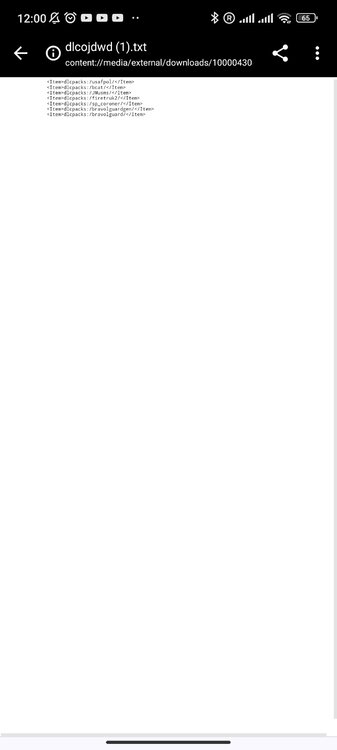
It's not log file You could try this gameconfig as well And I really hope you didn't rename dlclist.xml to dlcojdwd 🫠 If it'll not help, than you probably have one broken mod, try revert recent changes deleting mods one-by-one.
-
I don't know what exactly could cause it. But at least make sure ELS itself is working properly. If you can switch stages and you can open panel on CTRL+P, means plugin is fine and problem could be somewhere in config files, but I'm not sure about last part.
-
 I understand pack is outdated. But for those who still want to use it, be adviced, ELS config files for 13 FPIU Undercover (FBI2), 16 Charger (POLICE2), 14 Charger (POLICE4), 14 Tahoe (SHERIFF2) contains a syntax error. I didn't check but seems like for both versions, Red&Blue and All Blue, nothing critical, but you have to fix that configs by yourself. FBI2: POLICE2: POLICE4: SHERIFF2:
- 260 comments
- 37 reviews
-
-

-

- 2
-
-
Attach RagePluginHook.log, file located in GTAV main folder, not in logs folder
-
What did you change inside your game? Renamed mods folder and get that error? If so I suggest verify game files.
-
Not sure. It's not listed in requirements. But still give it a shot.
-
Did you tried press CTRL+P? If there is no panel, that means your ELS wasn't loaded. And according to the log you have attached you have "ELS.asi" failed to load, usually reinstalling ASI Manager from openIV helps. But one friend of mine who has the same issue told that reinstalling of ELS, ScriptHookV and Script Hook dot Net helps. Not sure if it's your case but as an attempt worth to try. If nothing help let me see AdvancedHookV.log, it's also in main GTAV folder, maybe there I'll be able to find some clues, but not sure about it.
-
Hm... a bit strange, you have Packfile Limit Adjuster, and it's loading successful according to log. So you shouldn't have that error. Try to rename mods folder to _mods and play a while, if everything will be fine, somethings in your mods folder causing the issue, not sure but maybe it's some broken mod, or wrongfully installed car pack.
-
I used to use both. But after your question I'm not so sure anymore 🥲
-
If you mean police5, I suggest you read that topics: ELS depends on SHV and ASI Loader. Try download clean SHV, if it'll crash make sure you don't have ScriptHookVdonNet installed, if you do, try this version.
-
Try to delete ScriptHookV then.
-
If renaming helps, it means some of your .asi plugins causing crash. Rename dinput8.dll back (leave mods folder _mods) and test .asi one-by-one to find culprit. Unfortunatly you have to reload game each time.
-
Try to rename dinput8.dll to _dinput8.dll if it will not help, verify game files.
-
So if renaming mods folder works, rename it back and make sure you have this installed: Gameconfig or Gameconfig (choose one) HeapAdjuster Packfile Limit Adjuster
-
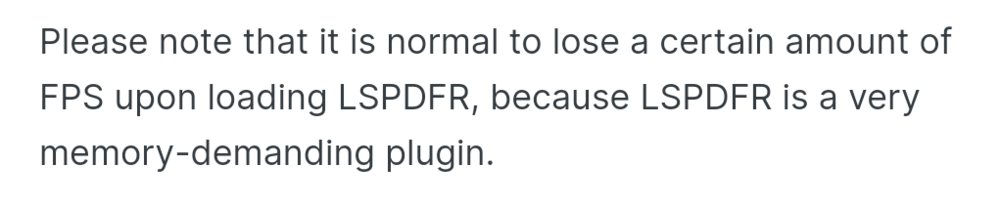
Still keep in mind that But also I could be wrong, Personally I never experienced fatal fps drop.
-
Usually it's callouts. Take a look into your Plugins/LSPDFR folder and check, maybe some of the plugins outdated. Also if you have big amount of different callouts, reduce it, use around 3-4 stable callout packs at once.
-
Yeah of course. If you not able to load into story mode with your mods on, it's neither you missing Gameconfig, HeapAdjuster and Packfile Limit Adjuster, or neither you install some mods incorrectly, or maybe some mods just broken.
-
Do you have Packfile Limit Adjust installed? If yes, send asiloader.log from GTAV main folder.
-
So if you disable mods folder (rename it to _mods) you'll be able to load story mode?
-
Files from HeapAdjuster and PackfileLimitAdjust archives yes. Gameconfig should be installed different way. Read carefully description on the mod pages and ReadMe files for more information about installation of the mods. At least will be helpful in the future.
-
I don't have it here, and yeah, the previous one is unavailable. I remember checked it while it was still available, and you have ELS.asi failed to load. Usually reinstalling ASI Manager helps, but it could also connected with ScriptHookVdotNet or with ScriptHookV itself.
-
Not sure it's necessary all of that. Only the following Gameconfig or Gameconfig (choose one) HeapAdjuster Packfile Limit Adjuster And resource adjuster if he has 8GB or more RAM and VRAM. Else could destabilize the game and gives new error. Or maybe it's just my terrible experience.
-
It's ERR_MEM_EMBEDDEDALLOC_ALLOC?
-
Is there specific window pop up when game crashing? Not sure I get what do you mean by "Game memory error"


