


Reddington
Members
-
Joined
Everything posted by Reddington
-
 But it was fun!
 -
For convenience, please create your own topic. :) Please post a screenshot of your GTA V directory.
-
This topic has been moved to the appropriate forum. Please post in the correct location in the future.
-
Did you install the correct VCF for the vehicle? and did you place said VCF in the pack_default folder?
-
Try installing these - https://www.microsoft.com/en-us/download/details.aspx?id=48130 http://www.microsoft.com/en-us/download/details.aspx?id=13523 https://www.microsoft.com/en-us/download/details.aspx?id=52685
-
What do you mean they work as if they are normal vehicles? Do the headlights/tail lights just flash?
-
Go to the RagePluginHook Settings ---> Game settings ---> Command line switches check "Force Windowed mode" and "Force DirectX11" then save and launch. You can change back to full screen once in game.
-
You're welcome. :)
-
No, they aren't, but you can verify integrity of game cache. For the future, please use a mods folder when installing these things. It'll save you - http://openiv.com/?p=1132
-
Technically, yes, you'd just delete the vehicle files. However, depending on what all you've done, you might need to replace them back with the vanilla cars. When replacing cars, make sure you're hitting "edit mode" at the top of OpenIV then dragging and dropping the replacement files. This topic has been moved to the appropriate forum. Please post in the correct location in the future.
-
Please clarify. Did you replace OVER the livery, or add it as a new one? aka charger_sign_2/chgr2_sign_2? If you're trying to add a second livery to make it have multiple, check the vehicles.meta under flags. Make sure it has FLAG_HAS_LIVERY
-
I have never delved into vehicle development, so I've moved this to the appropriate section for you. You should get someone better suited for your question shortly. :)
-
Hi there, Modded replacement cars go in your newest patchday.
-
Are you using any graphics mods? I've had this issue with a few models and found out it was caused by either my graphics mod or ENB. The only thing I can suggest doing is disabling the takedowns and seeing if that does it.
-
Hi there. In the future, please just create a new topic. This topic was last posted in over a year ago, it's a lot easier to just make a new topic. Carvariations for police, police2, police3, etc are hard coded into the game, you won't be able to find/edit those. However, you can paste in new carvariation lines for these slots as needed. In OpenIV go to mods/update/x64/dlcpacks/mpchristmas2/dlc/common/data. Next, extract the carvariations to your desktop and open it. Copy this carvariation line: and paste it as a new entry in the carvariations, but do not delete any other carvariation lines. The only editing you need to do from here is change the <modelName> to match the slot you're trying to use it in. Some files will have you change the sirensettings. Don't do this unless either a) The file tells you to. or b) You know what you're doing. Finally, after adding in your line, save it. Now, in OpenIV, click "edit mode" at the top. Now drag and drop the edited carvariations on your desktop to the same exact place you got it from. Click "edit mode" again and you're good. For standalone/addon cars, essentially the same thing. Rename <modelName> to your standalone car and add it in as instructed above. Since this topic was necro'd, I'm going to go ahead and close it. Tntmurda, if you require more help, please do make your own thread and I'll pop in. :) If you feel this topic has been closed in error, please report this post.
-
Ha ha, it's no biggie at all, and not a bother! You're welcome. :)
-
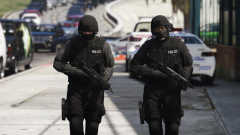 Which SWAT ped is this? looks amazing!
 -
Going to go ahead and close this to prevent hijacking and/or bumping. If you feel this topic has been closed in error, please report this post.
-
By default you bring up the ELS panel with CTRL+P (no idea why Lt Cain thought this was a smart keybind), but everyone changes it since P is for pause.
-
You can try going into the VCF for the vehicle and disabling it from using any sirens, but honestly, if you're using ELS vehicles, why are you trying to use Siren Mastery? If it's a non-ELS vehicle, again, you can try disabling the sirens there, but I don't know if it'll work. Either way it may come down to you having to choose one or the other. This topic has been moved to the appropriate forum. Please post in the correct location in the future.
-
Programs don't just randomly uninstall themselves. To be on the safe side I'd run a virus scan.
-
You don't press F4 in the police station. :) Go to the exact location where the badge is on your map. Either go to the entrance of the station or go into the locker rooms if you're at the downtown police station. You'll see a prompt to go on duty.
-
This topic has been moved to the appropriate forum. Please post in the correct location in the future.
-
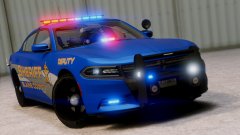 I really like the texture! The colors really go well together.
 -
On top of this, he even says it's JJDawkin's pack.


