


Reddington
Members
-
Joined
Everything posted by Reddington
-
Double check all your trainers and make sure no setting is enabled that shouldn't be. If you have Menyoo, check that out as well.
-
This topic has been moved to the appropriate forum. Please post in the correct location in the future.
-
Your topic has been moved to GTA V Support, this is not LSPDFR related. Please post in the correct location in the future.
-
Double check all of the NVR folders. A graphics mod won't interfere with custom car spawnings unless it still has vehicle files in its provided dlc.
-
You're welcome. 🙂
-
I recommend learning to install cars yourself. It seems intimidating at first, but it's really not difficult as long as you know what you're doing. Quite honestly, the mod you linked to looks more complicated than actually doing it yourself. I have a tutorial here which should help you, but if you get stuck and need more help, just ask -
-
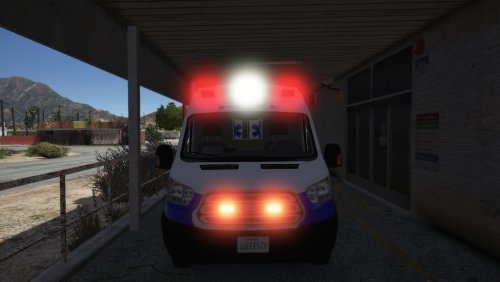 Lets be honest, ambulances should have either all red or red/white lighting. 😂 All credit goes to Trooper Goetz, I'm just a guy who changes colors. There are two different variants in the download. 1) All red and no amber light. 2) All red with rear amber light. I tried doing a 100% red version, but Trooper Goetz added takedowns/scene lights to the ambo. If I changed out the white light texture, it also made the light housing red, which looked weird when you had the scene lights activated. If you don't plan on using the scene lights and want 100% reds, let me know in the comments and I'll add it. Install instructions Important note: Remember to back up the .ytd, +hi.ytd and the XML just in case. Ambo can be found here -
- 1 review
-
-

- 1
-
-
I will be putting in the request to ban you by the end of the night.
-
Huh? lol
-
😂 They also have a main Miami PD channel which is really good. This one is just Nick's personal channel.
-
I recommend watching the first five minutes as there's a lot of goodies, but the Charger showcase starts at 5:21
-
-
 If on controller, color selection might be the bumper buttons. I was just messing with EUP's character a few days ago.
- 631 comments
- 71 reviews
-
Try launching GTA V via the GTA V.exe.
-
There's a chance it could be from the vehicles. Temporarily remove them and see.
-
Please define 'doesn't work'. What's the problem?
-
Aside from teleporting to vehicle, try just setting a waypoint and teleporting there. There's really not much else that can be done, it happens to me as well.
-
Should be under model settings, I believe. It might vary on the trainer.
-
To add, what exactly are you doing? and are you using a mods folder?
-
Do you have ScriptHookV? http://www.dev-c.com/gtav/scripthookv/
-
I'm almost positive the installation is the same, drag and drop.
-
Your topic has been moved to GTA V Support, this is not LSPDFR related. Please post in the correct location in the future.
-
Check my stickied topic on how to install add-on cars. I provide a carvariations you can use, but for the meta, you need to take one of the lines for police, police2, etc and then edit it to fit your add-on.
-
Your topic has been moved to GTA V Support, this is not LSPDFR related. Please post in the correct location in the future.
-
Have you added or changed anything prior to this happening?

