


Reddington
Members
-
Joined
Everything posted by Reddington
-
-
.thumb.png.ad0afdda9e46f37617979f70be2304b0.png) @RustyHarper Have a bit of a big request for you if you don't mind. Can you include this pack, please? Templates are in the download. Please add them as BCSO, and if you wouldn't mind, please use the gold color for the "SHERIFF" text. The yellow is just too bright.
@RustyHarper Have a bit of a big request for you if you don't mind. Can you include this pack, please? Templates are in the download. Please add them as BCSO, and if you wouldn't mind, please use the gold color for the "SHERIFF" text. The yellow is just too bright. -
-
Thanks for sharing, Jeff! There always has to be someone.
-
If you feel this topic has been closed in error, please report this post.
-
Please do not link to your Discord in threads, as it's considered advertising. There's not really a proper place in the forums for threads such as this. I recommend just adding that you're looking in your signature and profile about.
-
Your topic has been moved to GTA V Support, this is not LSPDFR related. Please post in the correct location in the future.
-
If you turn off the tint in the trainer, does it fix it?
-
Your topic has been moved to GTA V Support, this is not LSPDFR related. Please post in the correct location in the future.
-
Your topic has been moved to GTA V Support, this is not LSPDFR related. Please post in the correct location in the future.
-
Are you using a mods folder?
-
Your topic has been moved to GTA V Support, this is not LSPDFR related. Please post in the correct location in the future.
-
Your topic has been moved to GTA V Support, this is not LSPDFR related. Please post in the correct location in the future.
-
Have you tried a different siren?
-
Your topic has been moved to GTA V Support, this is not LSPDFR related. Please post in the correct location in the future.
-
Please define "don't work".
-
This topic has been moved to the appropriate forum. Please post in the correct location in the future.
-
"Best" and "cheapest" don't work well together for gaming, especially for triple A games like GTA. You're going to need to spend a little more if you want something good.
-
Your topic has been moved to GTA V Support, this is not LSPDFR related. Please post in the correct location in the future.
-
Hi there, Emergency Lighting System (ELS) is a separate script that gives you better control of your lights and siren. It is not required for LSPDFR.
-
Your topic has been moved to GTA V Support, this is not LSPDFR related. Please post in the correct location in the future.
-
Hi there, Most of the vehicles come with readmes, or tell you on the mod page how to download and install. There are also some really good tutorials on Youtube.
-
This topic has been moved to the appropriate forum. Please post in the correct location in the future.
-
@cargast I've split your post into its own thread, in the future please make your own. Generally, crashing at "loading and populating game world" indicates an issue with game files. What did you edit recently?
-
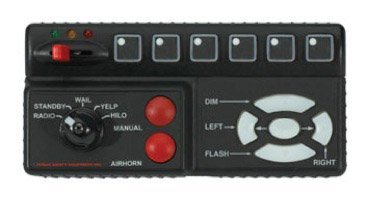 I recommend adding an in-game preview, as there's a big difference between the real life siren box audio and the one in game.
- 6 comments
- 3 reviews
-
-

- 2
-

.thumb.png.ad0afdda9e46f37617979f70be2304b0.png)
