




unitedOrange66
Community Team
-
Joined
Everything posted by unitedOrange66
-
Hey, Form my experience, from what I know is GTAIV lcpdfr's callouts are so unstable, it could caused a crash or texture lost anytime when you answer one of those calls, That's why a lot of players using scripts callouts right now, such as "policing scripts", So I recommend you to focus on those scripts callouts, some of them are even more fun than normal callouts, when you start lcpdfr, disable lcpdfr callouts, and press the key that scripts callouts set to enable scripts callouts, This is an easy, common way to solve this problem, I hope this can help you, Good luck -Peace
-
Hey, I would like to help you, if this will works for you. First, please go to your GTAIV game folder, find a file named: "paul.dll" , remove it to your desktop but don't delete it. Then, run LaunchGTAIV as admin again, you will be able to get into the game. That's it! **Note** This is only for offline play, if you want go online, you have to put "paul,dll" back, then you have to create an account, click play not play(offline). But rockstart socialclub login have a serious issue, never can login and play online, at least that never works for me until today. please follow the step above of *note*, it will works for you, If you still have any problems, please let me know, Good luck and have fun! -Peace
-
Hey guys, I just get back to lcpdfr today, I was busy, didn't have any free time at all. But right now I have a very annoy issue, after I choose a normal cop character, not FIB or NOOSE, but when I order someone to stop or investigate someone, my character won't say anything, won't say the speech that they suppose to say, even during a traffic stop. I still can hear AI cops saying their speech, but my character completely muted. I have no idea what did I messed up , I don't know how to fix it, so if someone was has same problem and solved, or if you know how to fix it, please reply soon. Thanks a lot! -Peace
-
Hey, First I would say no, this is not realistic police car lights at all, realistic police lights should looks smoothly routing and more brighter. I recommend you to install an ENB , if your pc can handle it, this is the most easy way to make your police car lights looks more realistic, I'm using cryenbv3. Also don't use the ELS common file settings, download ENB and use ENB common file, it will change every lighting in your game of course include police lights too, in order to looks much more realistic. Hope this idea could help :) Good luck -Peace
-
Hey, From what I know is you have to download everything properly, from LCPDFR to ELS to your police cars, here is my advice: First, download the last update of LCPDFR 1.1, use an auto installer clean install, (also make sure you whether use xlives loader or dsound loder, don't use both). Second, install last update of ELS, V8.51 Tired, make sure you install a clean car pack which means those cars you installed into the game won't caused anything crashes, such as texture lost, game freezing or can caused lcpdfr crashing, also make sure they're ELS enabled cars. Lastly, go to your GTAIV folder, find ELS folder, open SLOTCONTROL with notepad, then make sure you trun on your police cars ELS. Finaly, please make sue you have those following programs installed to your pc: Microsoft Visual C++ 2010 Redist. Package (found here). Microsoft Visual C++ Redist. for Visual Studio 2012 Update 4 (found here). Microsoft Visual C++ Redist. for Visual Studio 2013 (found here). I hope this will help :) Good luck -Peace
-
Hola Hey, I'm surprising to see your poster at support section I thought you are a GTA pro, don't you? I didn't done this before, but I think you should try it and test it in the game, don't have to waste time to imagine will this works or not? If you have any issues I would like to help as I can. :) Good luck -Peace
-
Good luck with game play Just don't waste the space for person who having real issues need support.
-
Hi, First, cryenb v3 high settings make lights too much bright, if you would like to, you can change your ENB. Second, if you sill use cryenb v3, then go to common-data-visualsettins.dat , open it with notepad, then find "car siren" , there you can change the value that you would like to use. I hope this will help! :) Good Luck! Thanks! :) -Peace
-
Hi, Yes, there already has a script at mods-dowloads-GTAIV-scrips&plugins Try this one, ONLY works for police car, if you don't want to mess up this mod, don't try to drive any cars to station, take a taxi or teleport. I hope this will help you :) Thanks -Peace
-
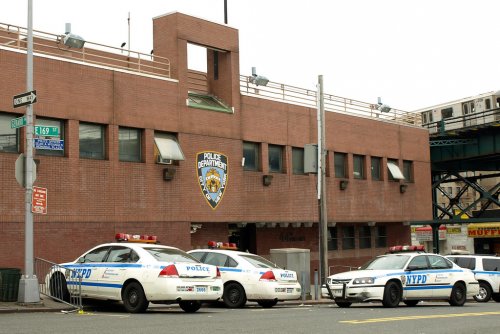 Hey, Overall is a very good mod, but some interior are not solid, I hop you can fix that. Second, you might want to make the main entrance door become real doors, which can open and close, because special in winter it will be cold inside. Third, you can make the interior a little colorful, such as walls. Also, you should add the dispatch radio inside the police station, add a speaker in the front desk! when you walk in you can hear dispatch as a background sound, just like GTA V LSPD station, you can actually heard she talking, and GTA IV hospital, you can hear him speaking over the radio. Lastly, when take suspect in the station, you should make real cells, like GTA V, and add doors on those cells, you put suspect in and game will detect they are arrested, in stead of a chose options in front desk and has loading screen, which I think it's unrealistic. Thanks a lot -Peace
 -
-
 looks cool! Great work:) I hope I can solve my laptop problem soon and back to LCPDFR.
- 222 comments
- 1 review
-
-
So I probably will buy a new laptop for GTA IV and V. Do u know what laptop will be great to run both IV and V? And what price will be good?
- 222 comments
- 1 review
-
-
-
-
-
-
-
-
So, LCPDFR callouts are so unstable, even your pc is strong enough, that's why they have scripts callouts. I recommend you to download some scripts callouts on website, put into your scripts folder, when you on duty, turn lcpdfr callouts off, only use scripts callouts. This will make your patrol more stable, a lot of youtuber, lcpdfr officers using this way also. Since VP callouts is gone, you can use this policing scripts, also has lots of fun callouts:
-
Hey, It is important that you backup your original files when you replaced them with new mods, I think the problem that you have are all the police cars and transport cars mods caused, so you can find another car mods on website, then run the game test it, until you find one that works for you, won't crash your game. I Hope this will help -Peace
-
Hey, You can try this, if doesn't work or causing issues go back to original settings, but I don't want to broke your game. Make a shortcut of your LaunchGTAIV to your desktop, Then right click on LaunchGTAIV - properties - type spece, -windowed after exe. Hope this will help
-
Well, After you install openIV, when you open it, make sure you select GTAIV, then it will ask you where is you GTAIV game folder? Right? Then tell him where is your game installed on your own pc. For steam: C:\Program Files (x86)\Steam\steamapps\common\Grand Theft Auto IV\GTAIV Non-steam: C:\Program Files (x86)\Rockstar Games\Grand Theft Auto IV\GTAIV -Peace


