




unitedOrange66
Community Team
-
Joined
Everything posted by unitedOrange66
-
Hi, This is a common issue for GTAIV social club. For single player go to GTAIV game folder, remove "paul.dll" file, then start game again. I hope this will help you -Peace
-
Hi, Why don't you use xlives loader if possible?
-
Hi, I believe the problem is the social club login issue, Please go to your GTAIV game folder, remove "paul.dll" file, then start the game again. I hope this will help you -Peace
-
Hi, So this is not a issue for you, for everyone. When you check your installation, the only red bar is logfiles, BUT, if others requirements are green, that means you are good to run lcpdfr. You can ignored logfile when checking your lcpdfr installation, it won't cause any big issues.
-
so, Make sure you are using only one loader, whether xlives or dsound. Try to uninstall lcpdfr completely, then install last update - 1.1 by using auto installer, Make sure you are using those scriptsHook from lcpdfr auto installer.
-
Hi, Try to use this enb: Also, I want you keep in mind, for GTAIV ELS V8, it's different then V, all the enbs or graphic mods are focus on the effects of police lights, very few of them has a huge effect on the ground. So try to install this enb for a better els lighting effects, maybe this will help you. Thanks -Peace
-
That's not the real reason, like I said, those native callouts mostly will crash the game, you can try to use scripts callouts, when on duty press F7 disable lcpdfr native callouts.
-
-
-
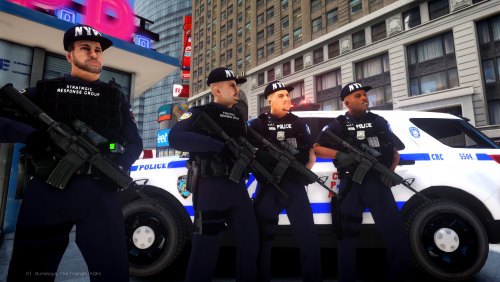 You mean install those uniforms? Use openIV, go to pc-models- cdimagnes-componentpeds, in search bar type in m_y_cop or any models you want to install, Then in pc-models- cdimagnes-pedprops, replace file like m_y_cop_p , to install hats and glasses. Go to google download openIV. -Peace
- 73 comments
- 4 reviews
-
Hey, This is a common issue for everyone, when you almost arrive the game crash. There no specific way to fix this, it's depends on your luck i guess... sometimes might works sometimes doesn't work. Well, why don't you try those plugins: If those callouts still not working, try this scripts callouts, when you on duty, disable lcpdfr callouts, press alt+delete start callouts. Simple copy this callout to script folder: I hope this will help you -Peace
-
Can you screenshot your GTAIV game folder please?
-
Well, Right now none of mods and scripts will works with last path 8, include lcpdfr, unless they release new script.Hooks works with new path 8. Other than that, keep path 7.
-
-
-
You're welcome, But when you press key for backup, does the game shows text and dispatch sound? like "we have a suspect resitting arrest" or we have and officer need backup atxxx ,something like that, Or after you press backup keys, there won't show any blue circle which is backup units on the radar? Go to LCPDFR folder, open lcpdfr ini setting file, make sure you set a number to max cops in pursuit on foot and in vehicle, make sure they are not zero.
-
For AI cops, make sure you go to els.ini setting file(in your GTAIV game folder), then all the dwon, you can see, AI cop lights option, on or off. When you in pursuit, all keys call backup are working, and E should working as well, but why do you have to press F9-12 when you join a pursuit?
-
Hey, Here we go again, please post in the right section This is GTA IV support section, I believe you are asking support for GTA V, all we looking at are GTA IV issues, and giving supports, if you really want to get supports from us, please post in the RIGHT section next time Thanks!
-
Hey, Does your pc support GTAIV ? or it's low end pc. If it's low end pc use non-els vehicles with siren control tool. Try to use old versions, like v7, v6 and test it in game. if necessary, try to reinstall your game, it might help. Good luck -Peace
-
Hey, First, please post in the right section! This is GTA IV support section, all we looking at are GTA IV issues, we can not give you much support unless you post in right section. Before you post it please pay attention to the sections.
-
-
Each car's interior file are different, it will mess up if just replaced... :(
-
Where can I find a interior wtd file and how to edit in Zmodeler? There not too much videos on Youtube that's why I'm asking
-
So... Then how to edit interior?
-
Hi, Thanks for reply! I'm changing to this vehicle right now, author didn't say it's locked or not:
-
That's fine, just make sure you are using legal copy of GTAIV. In order to run lcpdfr, make sure you have those: Please download those following programs: Microsoft Visual C++ 2010 Redistributable Package: https://www.microsoft.com/en-gb/download/details.aspx?id=5555 Visual C++ Redistributable for Visual Studio 2012 Update 4: https://www.microsoft.com/en-gb/download/details.aspx?id=30679 DirectX End-User Runtimes (June 2010): https://www.microsoft.com/en-us/download/details.aspx?id=8109 Also, open your GTAIV installers folder, Grand Theft Auto IV-installers, open DX2008 and 2009 folder, run both SETUP.
-
Umm.. The key is under ESC key, something like ~ and ` , that's the console key,

