




unitedOrange66
Community Team
-
Joined
Everything posted by unitedOrange66
-
I never try that before since I play LCPDFR many years... I don't know what's the point to link account.
-
If you replace audio file, for example, WEAPON or HORN Make sure you rename it to WEAPON first, instead of WEAPON.ivaud
-
This is GTA V or IV?
-
Hey, You should have 1.0.8 version when you download GTA IV from steam. Then, you have to DOWNGRADE to 1.0.7 in order to play LCPDFR or modify the game.
-
Ooh, okay. I think you posted to the GTA IV section, man.
-
Well, stuff member removed your poster here so I assum this is related to LCPDFR - GTA IV. Radar gun
-
Yes, there are some LAPD ELS vehicles for LCPDFR, those are the best I can find, but I think you need ENB if you want make the lights looks better: 2011 LAPD CVPI: https://gta4-mods.com/2011-lapd-ford-crown-victoria-police-interceptor-v3-8-f32437.html 2013 LAPD Dodge Charger: https://gta4-mods.com/2013-lapd-dodge-charger-ppv-v3-5-f32313.html
-
Good evening, everyone, Recently, I've discovered a new problem related to pursuits. The problem is, in a vehicle pursuit, after the suspect has been arrested, when you use tow truck mod from policehlper to tow the suspect's vehicle, game will crash with an fetal error. This problem will occur randomly, also only happening for the vehicle has been marked with a pursuit red target. If anyone know how to fix or knows what is causing the problem, please reply to this poster, Thanks a lot!
-
Hey, I know this poster is a little bit old, but hopefully it's still alive. Open policehelper.ini setting file with notepad, then go to world event, change the value to zero. This will disable the random event such like person request ambulance. Also, for the traffic event would be the same thing, change value to zero. If that was causing problem too. Also, you can try to change your ambulance mod to default one, if you have ambulance mod installed. But I recommend disable the world event for policehelper, it really helps.
-
Hey, It's possibly that your game memory runs out due to your heavy car mods. Remove other car mods except police cars.
-
Hey, Obviously is the vehicle texture issue. Can you contact the author report the issue? Or search for another similar texture to use?
-
Hey, Start up crash most likely related to the mods you have installed. Such like vehicle mod. The easy way to find out what causing the crash is to remove your mods one by one, make sure you have backup files you can replace with.
-
Hey, The screen black is caused by the ENB, if you use games4windows ENB, somehow it will shows all baclk screen. Try to use cry ENB V3, if your pc can handle it: For the loading screen, if you launch from steam, go to library - right click on GTA IV - properties - click launch options, then type this: " -norestrictions -nomemrestrict -availablevidmem 30.0"
-
Hi, First, do you know what caused your FPS drop? Second, the wastland callout won't cause any problem such like FPS drop, or game running lagging/slow. It could be your graphic settings, or ENB you using, in specific area/place cause FPS drop. As for the log file, this consider to be normal, you don't have to worry about it. I don't think it related to any FPS dropping issue.(correct me if I'm wrong, thanks.)
-
Hey, For the first issue that was caused by texture losing, you should create a commanline inside your game folder in order to fix it. Second, for multiplayer, how did you connect to the server, whether by LAN or LIVE? Either way, make sure you download GFWL(games for windows live), and login to the windows live program. And minimize the GFWL window, don't quit. Then launch the game. If you can sigin to GFWL then you won't have any problem with play online, the major problem I've seen and experienced was the GFWL signin problem, caused online problem.
-
Hey, Did you check your slotcontrol? It is an ini file inside your ELS folder? Make sure the ELS status is ON for the vehicle you using.
-
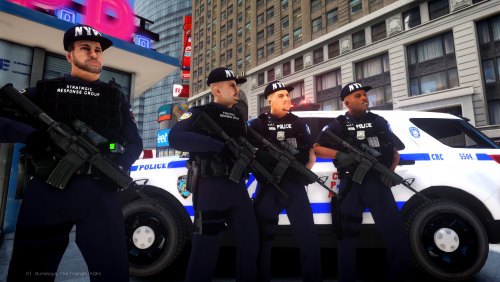 Cool Also, for the traffic ped, you might want add gloves on ped hands, also add more heads, instead of all white head. Also add an amour/vest would be great.
- 73 comments
- 4 reviews
-
Hey, I would like to report a bug for the m_y_cop model in this pack. The two lower models, the belt texture does not looks so clear, also, there will be small space between upper and lower when you put them together. Also, the HWY peds hat and glasses doesn't really fit the heads.
- 73 comments
- 4 reviews
-
You could have the same problem with IV also. This issue could named texture lost. The best way, common way to fix this is to create an useful commandline that must based on your own pc performance.
-
First, you need to press alt+p to active the LCPDFR mod first. Then, press "~" , type "forceduty".
-
This is GTA IV support section.
-
Hey, In order to use ELS, you need install ELS compatible car models when ELS is installed. Go to vehicle section under GTA IV mods, you can find a lot of ELS car mods in there.
-
Hey, Just a quick question regardless of LCPDFR issue. How do you edit your signature? Thanks a lot
-
Hey, I'm here happy to work with you, hopefully your issue will be resolved soon. First, please send a screenshot of your current GTA IV game directory, where your GTA IV game installed. Second, what ENB you have installed? Third, how did you installed the NYPD police car mod? Basically, I need more detailed information about the game crash. Thanks
-
Hey, You don't have to make the log check working. It is consider to be normal and won't cause nay problems of game play. As long as other requirements works well.

