




unitedOrange66
Community Team
-
Joined
Everything posted by unitedOrange66
-
Hello 😀 I'm planing on building a gaming pc just for LSPDFR. I have never played GTA V before, to be honest... Therefore I'm wondering if my new build would handle LSPDFR 0.4.3 with high end graphic, as well as realistic scripts. CPU: i9 9900K GPU: MSI RTX 2060 6G gaming Z RAM: Crucial Ballistix Sport LT 3200 Mhz 16 GB SSD(M.2): Samsung 970 EVO 1 TB NVMe PCle Samsung 970 EVO 500GB NVMe PCle Monitor: LG 4K IPS FreeSync Thank you so much for your advises! 😉
-
Hey, The main reason I could possibly think of is your pc or laptop could not handle the air support script. Requesting a helicopter following the pursuit will cost a lot of memories, especially for GTA IV. The second reason might be your helicopter model, if you installed any mods for helicopter, you might want to remove it since it might causing a texture lost upon spawning.
-
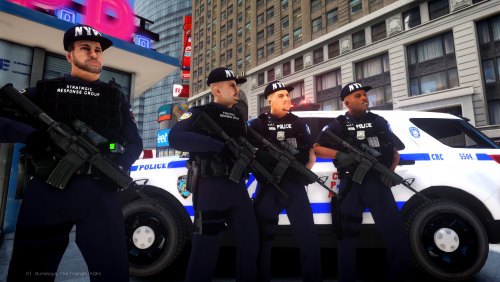 Do you still have the previous version of NYPD uniforms? The one that based on the LCPD uniform, but has the NYPD badge on it. (The gta 4 size, "small" ped model). He has ENB installed. If you want to make the uniforms looks better than the default color, you might want to use ENB or color mod.
- 73 comments
- 4 reviews
-
d3d9.dll is an ENB file. Remove it unless you're using ENB.
-
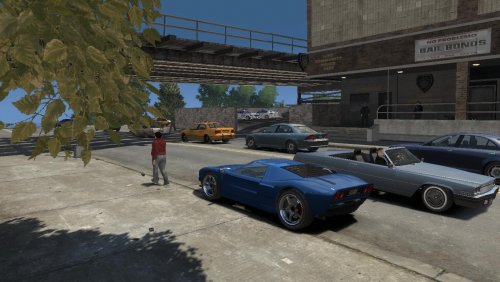 Wow, looks great Does it compatible with ELS?
 -
GTA V or GTA IV?
-
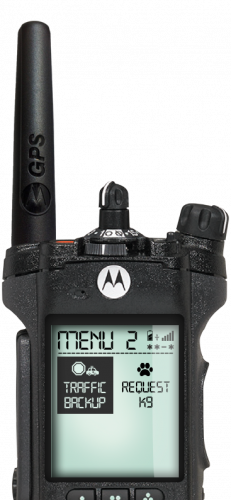 Only the backup, and tow truck option works. Also, I have to admit that, the traffic backup is very unstable.
- 222 comments
- 1 review
-
Use trainer, model - clothes.
-
You can still take a taxi with LCPDFR mod enabled, but before you enter the station.
-
-
-
Hey, Maybe the car model itself has problems, game can't spawn it, or game memory lost cause texture lost.
-
Did you check car signs in vehicle texture file? Also, does the mod come with vehcile.ide lines that you need yo replace? Or car color lines? -Thanks
-
Hi, The d3d9.dll is your ENB, if you remove that you will remove your ENB also. You might need xlives.dll loaders, go to google search for GTA 4 xlives, and download them, copy them into your game folder. Remove "Paul.dll" file from game folder, unless you play online through windows live. -Thanks
-
Hi, If you want to install vehicle mods, you will need a software called "OpenIV." Please search openiv on google, and go to the official website download the last update. Here are the steps: 1. Open openiv, and select GTA IV, then, follow the directions to locate your GTA IV game folder. 2. All the game vehicles are located in pc - model - cdimages - vehicle. (same as weapons, and peds, you can change them at here too) 3. Click on vehicle, at the right side search bar, type police2, and you will see the two police2 files below. 4. The first one, wft, is object file, you can click on it and you can view your vehicle. The second file, wtd, is vehicle texture file, you can change vehicle skins/signs in here. 5. Click on right top, edit, and click on yes. Now you can replace default cars with mods. Just drag the mod files into Openiv, after you done, click on edit again, it will auto save. Important! Make sure you backup every vehicles files before you replace them! This can be done by hold control key and select both wft. wtd files, right click on export, then make a new folder to your desktop rename it to backup vehicles. -Thanks
-
Also, some uniforms and vehicle mods doesn't work with LCPDFR. It will cause loading issue.
-
Wow it should be good. But does your game run without LCPDFR? Here is what you should consider to do: Download a zip achieve of LCPDFR 1.1, instead of installer.exe Then, copy all the files except dsound.dll loader. I recommend you to install xlives.dll loader, unless you want to play online. But you can't have dsound and xlives together. Remove a file named: "paul.dll" to desktop. Only put it back unless you want to play online. Launch the game by right click on GTAIVlauncher.exe select run as anim.
-
Did you purchase your GTA IV from steam? Do you have a decent pc to run GTA IV itself without any mods? These requirements are very important, if you have a pc can barely run the game, you will have a lot of complicated problems. -Thanks
-
Hi, It is ok with log file check failed. You can play LCPDFR without log file causing issues. Nothing to worry about. -Thanks
-
Hey, I have experience this million of times, I think it has to do with the LCPDFR mod. And I'm sure anyone else also experienced this, a lot of Youtuber's has same bug/glitch. I know it's annoy with siren on, but I don't think there's a way to fix it, cause it's not a big issue to consider about. You just have to turn them off by yourself or just leave the area. -Thanks
-
Hey, it is possible caused by peds mod or vehicle mods. Did you install any uniform mods or car mods? -Thanks
-
Don't just keep reinstalling the game when you're facing a problem... This possibly related to trainer, make sure you go to option, find "disable trainer keys", then make sure "save settings to trainer".
-
Like above. You are missing some requirements, make sure you have installed all the requirements before running LCPDFR.
-
Make sure you download the official, legit downgrader.
-
but I think the issue is when the pursuit vehicle try to disappear, when you leave the area, game also will crash. I think there's something to do with that targeted pursuit vehicle.

