




unitedOrange66
Community Team
-
Joined
Everything posted by unitedOrange66
-
Object spawner from Menyoo is likely the cause.
-
This topic has been moved to the appropriate forum. Please post in the correct location in the future.
-
This topic has been moved to the appropriate forum. Please post in the correct location in the future.
-
Your topic has been moved to GTA V Support, this is not LSPDFR related. Please post in the correct location in the future.
-
Your topic has been moved to GTA V Support, this is not LSPDFR related. Please post in the correct location in the future.
-
Do you use Menyoo? Go to MenyooStuff - menyooConfig.ini - open it with Notepad. Search "[object-spooner]," and find the following settings: "SpawnDynamicPeds = 1, SpawnDynamicVehicles = 1, SpawnStillPeds = 1" Change all of the values to 0 (zero), then save.
-
This topic has been moved to the appropriate forum. Please post in the correct location in the future.
-
This topic has been moved to the appropriate forum. Please post in the correct location in the future.
-
This topic has been moved to the appropriate forum. Please post in the correct location in the future.
-
This topic has been moved to the appropriate forum. Please post in the correct location in the future.
-
The majority of the callouts in PeterUCallouts do not work anymore, it is advised to remove it. That might be caused by an error in a XML file. Remove Custom Backup and replace those files with original XML files.
-
Hi, Can you recall what mods you have installed? Your topic has been moved to LSPDFR 0.4 Support. Please post in the correct location in the future.
-
I'm closing this topic because you've created another one stating the same issue here. If you feel this topic has been closed in error, please report this post.
-
Would you mind to share how did you fix it? For future reference in case someone experiences the same issue.
-
I don't recall StopThePed having a "weapon safety mode" feature in neither the public version nor the early access version. LSPDFR does not have a similar feature. You must have a plugin or script that modifies weapons' function in GTA V, and it has a key bind that enables the safety mode. Your topic has been moved to GTA V Support, this is not LSPDFR related. Please post in the correct location in the future.
-
1. To prevent the EUP menu from overlapping with the default LSPDFR menu, wait a few seconds after going on duty, allow a few plugins to load then select your uniform. 2. Depending on which version of EUP you're using, you need to install the appropriate EUP config XML.
-
It has something to do with your screen resolution. Go to GTA V in-game graphic settings, and change to your monitor's native resolution, set the ratio to "16:9."
-
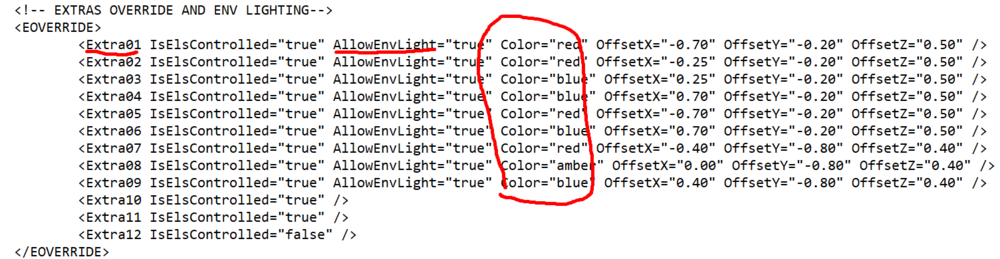
From the clip above, the ELS reflection is accurate and it wasn't reversed, for that particular vehicle shown in the clip at least. In case you're wondering how to change ELS reflection colors, this is the section in all ELS.xmls that controls the "environmental lightings:"
-
This topic has been moved to the appropriate forum. Please post in the correct location in the future.
-
The latest version of GTA V is 3095. Not sure what you mean by updating.
-
This topic has been moved to the appropriate forum. Please post in the correct location in the future.
-
Your topic has been moved to GTA V Support, this is not LSPDFR related. Please post in the correct location in the future.
-
This topic has been moved to the appropriate forum. Please post in the correct location in the future.
-
This topic has been moved to the appropriate forum. Please post in the correct location in the future.
-
This topic has been moved to the appropriate forum. Please post in the correct location in the future.


