


Captain14
Members
-
Joined
-
Last visited
Everything posted by Captain14
-
Yes. If they have the same ID, the newest one will overwrite the old, so make sure you have a unique sirensetting ID.
-
It is possible to add a carcols.meta file as part of a DLC package and avoid editing the main carcols.ymt entirely. This is excellent for ensuring compatibility between different modifications. My latest update to my sheriff pack now includes this feature. Please feel free to download and look at my files to see how it's done. I have also commented the file to allow other people to learn from it; all I ask is that you don't take my flash patterns and use them without giving proper credit.
-
 Major update is released! Installation is now as simple as can be with an OpenIV installation file. No more editing of files required, just a few simple clicks and you're ready to go!
- 445 comments
- 108 reviews
-
-

- 1
-
-
 You'll have to edit your carvariations file, police3 uses sirensetting 2 and this car requires sirensetting 1.
- 148 comments
- 34 reviews
-
Hi guys, All of these issues are caused by a conflicting carvariations file somewhere in your game. I am going to have an update out soon that will hopefully have these cars installed as their own DLC pack; at the very least it will include a carvariations file for simpler installation. In the meantime, check the other dlcpack folders in your mods for any conflicting carvariations files.
- 445 comments
- 108 reviews
-
-
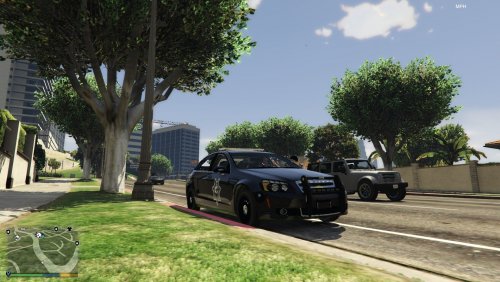
***UPDATE 11/22/16: Sheriff lighting completely redone! Happy thanksgiving!*** ***UPDATE 10/6/16: Multi-livery support added, various bug fixes*** ***UPDATE 9/19/16: Functional Spotlights, New Flash Patterns, Coronas, Separate DLC Packs!*** ***UPDATE 9/6/16: Rambars and Antennas added to all vehicles!*** New Video (does not showcase new lighting patterns): Installation has been completely redone and simplified - you can now install all vehicles as standalone DLC packs. All installation is done with a few clicks of your mouse using OpenIV Installation Packages. No more editing of files necessary! ------------------------------------------------------------------------- I am proud to finally present my LSSD Pack featuring a 2011 Crown Victoria, 2013 Tahoe (Marked and Unmarked), and 2013 Charger (Marked and Unmarked)! All vehicles feature ELS-inspired lighting setups (complete with environmental lighting) all accomplished without the use of any scripts or plugins. The lighting setup features all Federal Signal equipment and is complimentary to the other vehicles. The vehicles also feature the following extras: Extra 1: Spotlight up (Sheriff Units) Extra 2: Spotlight down (Sheriff Units) Extra 7: Setina Rambar Extra 10: Panasonic Arbitrator Dashcam Extra 12: Stalker Radar Unit Thanks to @FirstThirtyMinutes for featuring one of the vehicles and including an installation guide! Installation uses OIV packages and is as simple as can be. To install the vehicle, just follow the directions in the readme or watch FirstThirtyMinutes's video above. **If you experience your game crashing on start-up after installation, please download and install this gameconfig.xml to fix the problem: https://www.gta5-mods.com/misc/add-on-car-crash-fix Terms of Use: This file is not to be uploaded, in whole or in part, to any other site than LCPDFR.com. All files included in this download are not to be modified, ripped, or redistributed in any way, shape, or form. If you create a texture for these vehicles, please upload only the texture and provide a link to the original vehicle download. Credits: 2007 Tahoe by unknown author, modified into 2013 Tahoe and converted to GTA V by OfficerUnderwood Tahoe parts by Orex429/Shady Tahoe interior parts by Ubisoft, edited by OfficerUnderwood Tahoe wheels by GTAxBOSS Charger model ripped by DMN, converted and modified to 2013 Charger by Codex12 Charger seats from The Crew, modified by Codex12 Charger steering wheel from Simraceway, modified by Codex12 Charger interior texture by Carper 2013 Charger Hubcaps by Fartknockr, converted to IV by Bxbugs123, converted to V by Fartknockr 2013 Charger rim by GerryStudio, edited and converted to IV by Bxbugs123, converted to V by Fartknockr 2013 Charger rim and hubcap textures by Bxbugs123, color editing for V by Fartknockr CVPI Model from Driver SF, converted to IV by F5544, modified by KevinDV, CJ24, and OfficerUnderwood CVPI Wheels from NFS:MW, converted yb trewq34, textures by GreenAid CVPI Interior parts by Ubisoft, modified by OfficerUnderwood CVPI door handles by Lundy CVPI Hubcaps by Bueno Federal Signal Micropulse by DannyBoy1909, converted to IV by Him1250, converted to V by Captain14 Federal Signal Valor by RoegonTV, converted to V by Captain14, configured by Captain14 Federal Signal Arjent by OfficerFive0, converted to V by OfficerFive0 Federal Signal Impaxx by OfficerFive0, converted to V by OfficerFive0 Federal Signal Solaris ILS by M67v, converted to V by Captain14, lights configured by Captain14 Federal Signal Latitude Signalmaster by DannyBoy1909, converted to IV by Him1250, converted to V by Captain14 Console by 0taku Panasonic Toughbook CF-31 by RidgeRunner Designs Panasonic Arbitrator by johnclark1102 Stalker Radar by jasonct203 Whelen PAR46 Spotlight by EVI Unity Spotlight by Cyrax of gamemodels.ru, converted and edited by Black Jesus Antennas by PriMan, converted by Captain14 Setina PB400 by Kygo, converted by Captain14 Charger Setina Rambar by Vertex3D Tahoe Setina Rambar by NickieB The Charger/Tahoe in the FIB/FIB2 slots currently don't support multiple liveries (just one) and I'm not quite sure why. I have the vehicles.meta set up properly. They do accept a single livery however, and their marked counterparts accept multiple liveries. One last note: the included textures were quickly tossed together by me and are vanilla style. They aren't the best, so I apologize for that. If you would like to change them, templates are included. If you make a good quality black/white sheriff skin and would like me to use it as the default for my pack please message me! Enjoy!
- 445 comments
- 108 reviews
-
-
-

-

- 55
-
Yeah it's possible. Both the Tahoe and Charger have a basic traffic advisor as an extra, but I can certainly update it to include other patterns. Currently I just have mine set up to use only two sirens. It's best for the sake of efficiency if you do a combination of lights with hidden coronas and lights with coronas. The Tahoe I'm making uses just 6 sirens total for the lightbar, and that is including the traffic advisor and the flood mode takedown light. Cruise mode lights can also be done using just an extra and no sirens at all.Are you using someone else's valor or have you set up your own? You'll probably have to set up the sirens in Zmodeler and then plan your flash patterns around that.Unfortunately this won't be possible without modification to the game exe itself. The engine only recognizes 20 sirens max.Hopefully will be releasing these two within the week:Due to issues with poly filling on the charger not being done I'm switching to CodeX12's 2013 Charger. Pics coming soon. EDIT: New videoYep... this is also included in my original post.The lights go in order from siren1 through siren20. I added comments in my personal carcols just to make it easier to read. The first siren sequencer value is not used except for rotating lights. It's basically irrelevant as most people want to use LED types lights. The sequencer value under the "flashiness" section is the one that controls the flash pattern. Yeah just set the value to 0.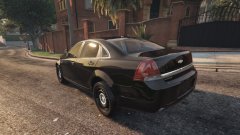 WantHey all, I'm working on a Sheriff replacement pack and wanted to share my progress. The pack will include a 2013 Tahoe (almost complete) and a 2013 Charger (by CodeX12, being re-templated by @Thero). They will have a vanilla-style sheriff skin included but will be compatible with skins for most 2013 Tahoes currently released. The lighting setup is loosely based off of what my local agency uses for their cruisers. The lighting package is all Federal Signal and will be very similar between the two models. The big thing I'm working on for this pack is realistic lighting patterns using the carcols.ymt file. Here is a demo video of the 2013 Tahoe: I will be posting updates as work progresses on the models. Thanks for reading!I had this in my original post that you could add custom ones, I guess it wasn't clear enough :PAs posted by grimdar, here is my explorer with environmental lights enabled: Working on a 2013 Tahoe for release using custom flash patterns!Okay so I've done a little bit more research and also tested out a few other flash patterns. It is possible to enable environmental lighting for coronas (visible in video). You have to set the "light" value to true to enable it. I do not yet know if it is possible to enable environmental lighting without using coronas. I am going to further research this. All lights seem to be placed into two groups (0 and 1), I am not yet sure what these groupings determine. "delta" and "start" values under the flashiness section determine the rotation of the light mesh and corona when active. You can change how much the sirens scale when enabled. Here is another quick demo video. I played around with the explorer a little and altered the flash patterns some more: The valor is using siren7 and siren8. The rear window lights are using siren2 and siren5. The grille lights are using siren15 and siren16. The front strobes are using two sirens each in this video (sirens 1, 6, 19, and 20) but I will be reducing this to 2 by rotating 19 and 20. The traffic advisor is again an extra using siren9 and siren10. Finally, the rear taillight strobes are not using the default taillight flashing system but are using siren3 and siren4. You can see in the video that the lights with visible coronas (corner strobes) are environmental. Coronas are currently hidden for my other lights but can be added easily. In the video you may notice that the left taillight strobe seems buggy; I believe this is due to my not-so-great graphics settings. More research soon to come.0 is off, 1 is on. It's a 32 bit unsigned integer and the sequence of bits determines the flash pattern. So 0101 would be off, on, off, on. You can totally customize these settings and the game will cycle through the pattern you give it X times per minute (sequencerBpm value).It's entirely in the carcols file. You can create extra siren settings to apply to an individual custom model if you would like to.

.thumb.png.bed6a4846025cfd3e25e7060053c0f05.png)
