


Captain14
Members
-
Joined
-
Last visited
Everything posted by Captain14
-
 It depends on the sirensetting the vehicles use. By default, you can switch the following vehicles: -FPIS and CVPI -13 FPIU and 16 FPIU -Charger and Impala
- 779 comments
- 187 reviews
-
1. What update version are you using? 2. Do you have your update.rpf inside your mods folder?
- 779 comments
- 187 reviews
-
I am using IronicRainbow's model. For now it is built into the paint so just put it where it would normally be. I'm going to update this soon.
- 779 comments
- 187 reviews
-
Start I am not sure. I just always keep it at zero. Delta value is the rotation of the light.
-
Think of it like configuring siren1 or siren6 on vanilla sirensetting 1. The mesh on those must be rotated 90 degrees, in this case it's either going to be 45 or -45 degrees.
-
It's set to a "vehicle_lightsemissive" material which is why it is glowing in game. You need to convert the material to "vehicle_glass" by selecting the material, clicking the little globe icon at the top right of the materials window, and selecting it through there. Then you will have to configure the textures.
-
Screenshot the material and it's properties for the glass.
-
Your glass may be set to an emissive material. Double check in Zmodeler and make sure the window mesh is assigned to a glass material.
-
-
-
 If you want additional addons you'll need a custom gameconfig.xml to support the additional cars.
- 445 comments
- 108 reviews
-
Fixed, my apologies. That log looks like the uninstaller rather than the installer, try running just the normal installer and see if it works. Edit the vehicles.meta and carvariations.meta to swap out police4 and police, then rename the vehicle files.
- 779 comments
- 187 reviews
-
-

- 1
-
-
It doesn't have police2 in there because it just uses the game's default police2 meta.
- 779 comments
- 187 reviews
-
-
- 1
-
-
I'm pleased to say that every single vehicle in this pack will support multiple liveries! No, I am not. It took me long enough to get the ones on there now looking like they do :) Fixed title.
- 779 comments
- 187 reviews
-
-
- 1
-
-
The strobes in the corners are sirens and will not be affected by the use of Emergency Strobes, nor will they affect them. For spawning the vehicles, you just need to type in the RAGE console "Spawn <vehicleName>". It may not pop up but it should work. I personally use SimpleTrainer to spawn my vehicles, police4 can be spawned as "Unmarked Cruiser" and police5 & 6 can be spawned by entering the vehicle name.
- 779 comments
- 187 reviews
-
-
- 2
-
-
Templates are included in the download archive. It's unlikely that this in itself would cause your game to break. If you uninstalled it, did you run the uninstaller? If not, manually edit your dlclist.xml to remove the entry for "lspdpack" and also replace your vehicles.meta with the clean one provided. Unfortunately LSPDFR doesn't support add-ons yet from the vehicle selection menu. For now you have to spawn police5 and police6 through a trainer or RPH. I haven't planned to do a carcols for default lighting. Other people have done so and their content looks good enough, I don't want to replicate something that's already been done.
- 779 comments
- 187 reviews
-
I have added this to my FAQ section, it was intended to be there originally but it slipped my mind. Thanks for the heads up, hopefully other people will notice it! You'd have to ask @TrentMU as he took all the screens for me.
- 779 comments
- 187 reviews
-
-
- 1
-
-
My Tahoe brought a tear to my eye... that is gorgeous. For anyone interested I have a new pack out now that uses carcols, this time for LSPD. I haven't seen many people here employing scaleFactor with their models. You can edit the scale factor value to change how much the lights scale when turned on and this makes it easier to hide lights in the off position while still using coronas. Feel free to check out the carcols in my packs, you will see that for some lights I use scale factors as large as 100 without issue.
-
Update 11/5/16: 2013 Ford Police Interceptor Sedan has been added! Previous users: The new FPIS has taken the police4 slot and the CVPI has been moved to police7. MAKE SURE YOU RUN THE UNINSTALLER PRIOR TO INSTALLING THIS UPDATE! After a long wait, I am proud to finally release my LSPD Pack with ELS Style Lighting! This pack now includes a total of 7 Vehicles: police - 2016 Chevrolet Impala Limited police2 - 2015 Dodge Charger PPV police3 - 2013 Ford Police Interceptor Utility police4 - 2013 Ford Police Interceptor Sedan police5 - 2016 Ford Police Interceptor Utility police6 - 2013 Chevrolet Tahoe PPV K-9 Unit (slicktop) police7 - 2011 Ford Crown Victoria Police Interceptor Demonstration video: These vehicles have been under development for several months and are fine-tuned and should be relatively bug-free (knock on wood). The installation package will modify your vehicles.meta to allow multiple liveries for all vehicles as well as changing the handling line for the police and police3 slots. This can be easily undone using the Uninstaller package included in the download. All vehicles feature HD 4k skins made by @TrentMU and possess a variety of extras, including: Setina Rambars Stalker Radar Units Panasonic Arbitrator Dashcams Prisoner Partitions Passenger-side Spotlights Installation Instructions Launch OpenIV and select Grand Theft Auto V. Click Tools -> Package Installer. Select "LSPD Pack Installer 1.0.0.oiv." Click install and choose whether to install to your mods folder (highly recommended) or directly into your game (not advised). Launch GTA V and enjoy! Frequently Asked Questions Q: The package installer fails partway through. How can I fix this? A: The package installer modifies your vehicles.meta to change just a few lines so that the vehicles will be multi-livery enabled and handle correctly. If you are having problems installing the package, please install a clean vehicles.meta into mods/update/update.rpf/common/data/ and then try again. A clean vehicles.meta can be found HERE. Alternatively, you can run the uninstaller package included in the download prior to reinstalling the package. Q: My package installed successfully but my game is crashing while loading. How can I fix this? A: If you experience crashing while loading, you probably don't have a gameconfig.xml configured to allow add-on cars. There are a few different gameconfigs which different people are reporting as working. You can find a gameconfig.xml to fix your crashing problem HERE, or if that doesn't work, HERE. Q: I've installed the package but my lights do not seem to be working. They are showing up in the wrong places or not flashing correctly, why? A: This mod uses a custom carvariations.meta to assign custom sirensettings to each vehicle included. If the lights are not working correctly, another mod you have installed is causing a conflict with this carvariations.meta. Please check all installed mods for a carvariations.meta file (it will be located in common/data/ within a DLC folder). If you have another carvariations which assigns a sirensetting to police, police2, police3, police4, police5, or police6, delete those vehicle entries from it and see if the issue is resolved. Q: I've installed the package and my vehicles are working in game, but the lights are not bright like they are in the screenshots. How can I fix this? A: You will need to install a light-enhancing graphics mod as well as set your Post FX and Shader settings to High. I would recommend installing Radiance V. Q: I like this pack! Where can I find more vehicles like it? A: Be sure to check out my Sheriff and FIB Replacement Pack here: This pack is provided as-is with no form of warranty. These files are not to be modified, redistributed, ripped, or otherwise exploited in any way, shape, or form. These files are exclusive to LCPDFR.com and are not to be reuploaded elsewhere. When uploading textures, do not reupload the vehicle models. Upload the textures only and include a link to the original vehicle pack download. Please report any bugs in the comments section so I can address them. Enjoy!
- 779 comments
- 187 reviews
-
-
-

-

- 68
-
-
No, the lightbars on these vehicles are configured specifically for the siren settings used. Other vehicle makers could create vehicle to fit these patterns, but as of now, no one has.
- 445 comments
- 108 reviews
-
No, it will only read the first 32.
-
-
Delta value is what controls the rotation direction. A value of pi (3.14159300) will rotate it 180 degrees.
-
I tried using two siren9s, only one of them works in game.
-
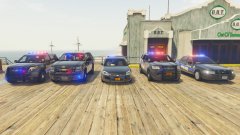
From the album: Captain14's WIPs

.thumb.png.facfc3f0bf4f434cf1c2363c0791f2f0.png)

