Aquamenti
Members
-
Joined
-
Last visited
Everything posted by Aquamenti
-
Oh, is there any chance you could improve the hwaycop model as much to give it a few hats? LSPD or Smokey the bear style campaign hats would arguably add a lot to enrich LSPDFR experience, but even a cap would add to variety. Think about it!
-
 Copy the ytd and yft files to the corresponding archive under mpchristmas2 and see if that works.
- 26 comments
- 5 reviews
-
You can use the calculator provided by Windows. The 1s and 0s are a binary value, the Programmer calculator should convert it to a decimal value. 32 1's would be 4294967295
-
Did you install it any differently than in the readme, such as renaming the vehicle? If so, make sure the <modelName> and <txdName> values in carvariations and vehicles meta files match the name of the vehicle files. Also, did you install the whole vehicle under the same DLC pack? It might not work if you install the vehicle files into a separate dlcpack from the data files.
- 26 comments
- 5 reviews
-
It would be easiest to do this with a trainer.
-
Doesn't seem to be, but they've been saying "soon" for weeks now so I believe it's only a matter of days now.
-
From the album: Aquamenti Police Workshop & Museum
-
From the album: Aquamenti Police Workshop & Museum
-
It should work, if you don't have any mods that overwrite policet files. I also suggest adding the vehicles meta files though.
- 26 comments
- 5 reviews
-
The carvariations for policet are encrypted and inaccessible, so as I said, you need to use the ones I provided to overwrite them.
- 26 comments
- 5 reviews
-
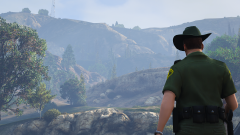
From the album: Aquamenti Police Workshop & Museum
-
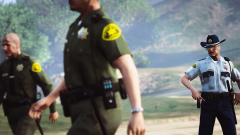
From the album: Aquamenti Police Workshop & Museum
He knows what he's talking about. -
Do you use a plugin for transport units, such as the Arrest Manager? Such plugins usually let you customize which vehicles are used for prisoner transport. Alternatively, you can rename the vehicle to POLICET, for this you'll need to rename all the vehicle files, the <modelName> and <txdName> values in vehicles.meta lines (located at the top) and the <modelName> in the carvariations line (also located at the top). This is especially important because the lightbar used by this vehicle doesn't support the original sirensetting used for the police transport van. Hope you'll get it working.
- 26 comments
- 5 reviews
-
If you mean parking lights, then I have now added a separate file that changes it. If you meant flashing emergency lights then that would require carcols editting which can be rather messy.
- 26 comments
- 5 reviews
-
Hmm. I might consider doing the Radius in the future.
-
Someone specifically asked for the LED lightbar, otherwise I would've used the rotator one. I'll consider adding it in a future update. Thanks for the feedback, guys!
- 26 comments
- 5 reviews
-
poni b done
-
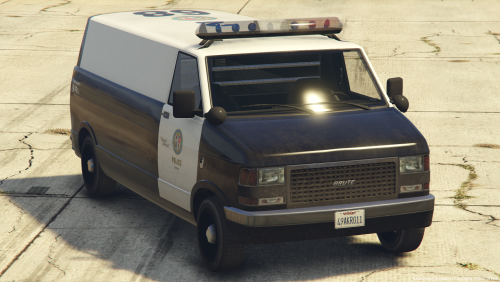
Apparently there's demand for an alternate transport model, so here's Pony. Mapped and templated, completely lore-friendly and unlocked as always. Starting with v1.10, files needed for texture editing are separated to reduce the download times of the vehicle files as the .psd is quite sizeable. I've also made three variants available for the Pony, all of which are separate downloads: Brute Pony with an LED lightbar configuration (pony3) Brute Pony Unmarked/Slicktop - with LED lights (pony4) Brute Pony with a rotator lightbar configuration (policet replacement) Click "Download this file" and then make your choice. Or get any combination of the vehicles, they don't overlap in the files. All three have multiple livery support, use the files provided in the (Optional) download to customize your van. Share/request liveries in my WIP and showroom thread, or just keep up to date with my other content:
- 26 comments
- 5 reviews
-
-

- 13
-
-
Now for something a little different ...
-
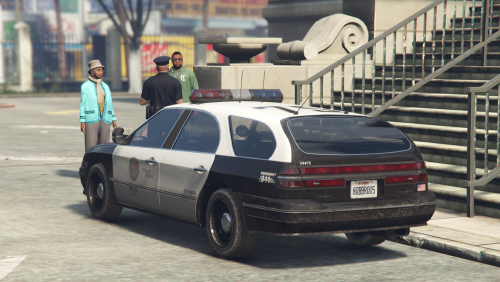 I don't know what to say. The Department has been made to cut expenses and they're taking it out on the frontline worker - you're driving an estate now. This standalone vehicle, converted by the IV Pack team, has been touched up to fill the more basic needs of law enforcement duties, but owing to its native interior you'll be sitting in a ditch and there's no bulkhead to guard you from the perils of the back seat. Yes. They're cutting back everything. I deemed the original handling lines absolutely unsuitable for a police vehicle, so until I learn how to tweak them, the car's RWD and acts like a Stratum - shouldn't be a problem. Features list Carvariations and vehicles .meta lines No windows, dials, pushbar or dirt mapping bugs The vehicle is mapped and templated for your customization experience If you want to showcase or request textures for this vehicle, or check out my other content, visit my WIP and showroom thread:
- 9 comments
- 3 reviews
-
-
- 12
-
-
From the album: Aquamenti Police Workshop & Museum
Here's two of my models - the Pinnacle, and today's surprise release. -
I only do four-doors. But yeah. I've got something cooking from IV.
-
The pivot and the mesh are at the same place.. in other words, the axes on the siren can't be centered on the actual object. The game makes the siren emissive two times larger and casts it two times further away from the dummy .. Check the attachment at the end of the first post in F5544's thread here if you don't understand, import a vanilla police car into zmodeler and take a look at how its sirens are set up...
-
-
Using this plugin, extralight_1 is turned on with the red and blues, disabling environmental lighting for the headlights, which are (well, may be) on wig-wag. Is that an intentional function?