




PNWParksFan
Insiders
-
Joined
-
Last visited
Everything posted by PNWParksFan
-
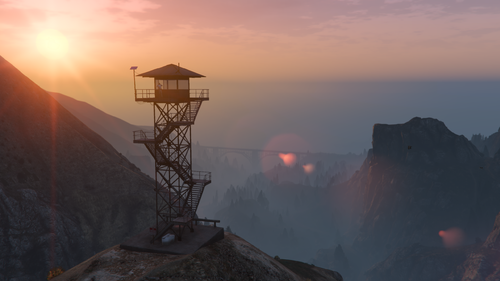 It does work with the Forests of San Andreas map; however, the tower in Raton Canyon will be beneath tree line so not very useful. The tower on Mt. Chiliad is up high enough to be above the tree line. I didn't actually test the Vinewood Hills location with that mod, but I don't think it adds trees in that location.
 -
Logging companies have already eliminated most of the forests around Los Santos, so all the more important to protect the few patches of trees that remain on the slopes of Mt. Chiliad and northern valleys of the Vinewood Hills. Forest rangers can now keep a sharp lookout from above to immediately call in any trace of forest fire smoke that they can make out through the smog on the horizon. This map mod adds three fire towers across the map - one high on the flanks of Mt. Chiliad, one perched above Raton Canyon, and another above Galileo Observatory in the Vinewood Hills. The tower model is adapted from the Cayo Perico watch towers, and has been equipped with glass windows and a well-equipped interior for round-the-clock patrols. With static map collisions, proper long-distance LODs and distant lights, cleaned up vegetation, and updated ambient ped scenarios, these towers won't affect performance and fit right into the environment as if they were always a part of the game. LML installation option is recommended. DLC pack is provided for those who insist. FiveM package also available, thanks to @medic4523 for configuring and testing the FiveM package. Thank you to all the members of the Parks Benefactor Program for supporting my development and making mods like this possible! If you'd like to support innovative mods for GTA and get early access to new mods like this one, please consider joining today at parksmods.com/donate. Special thanks to Old Faithful level supporters who have been especially generous: AcePilot2k7, Magiobiwan, HCSO689, Alessandro34_YT, Drixize, WarriorPatrol, fireguy7775, swatteam9112004, jmoney545, ExileGhost, LeoTheSkunk, masonjai, Marco321132, MetFan11214, NQVAAAAA, PawPaw2014, Peyton.P, SOCALI, Jimmy, Jezzaron, LLasierr, DaZe, DSJRICH, Trevor185, WaltzerLadRyan, klnglalala, and pcGAMEZguy
-
You must request the ambulance through the Better EMS menu, not through the backup menu.
-
If you install just LML itself, but no packages, does your game still crash? What if you add just a gameconfig package but nothing else?
-
Did you get this sorted out? Do you get any error message with the crash? Please fill out the support template from the first page of this thread. Templates are linked from the Modding Guide which is available on the download page.
-
 This version of the gameconfig still works on the latest GTA version with no changes required.
 -
 Please post your questions in English in the future to ensure better support. I provide the latest version of RageNativeUI with this mod, which is required. If you are using other mods which require an old version, you should discuss that with the author of those other mods to encourage them to update to the latest version of RageNativeUI.
- 299 comments
- 25 reviews
-
Did you install the plugin? You should have PoliceTape.dll in your Plugins folder. Did you load the plugin? You need to either set it to load automatically at startup or load it manually with the LoadPlugin console command in RPH.
- 299 comments
- 25 reviews
-
 If you haven't yet, try turning off the setting in the LSPDFR INI for preloading models. You can uninstall by just deleting the Coastal Callouts folder from your LML folder and deleting the CoastalCallouts.dll from your Plugins/LSPDFR folder. You can turn off Coastal Callouts from happening in the Coastal menu.
- 496 comments
- 33 reviews
-
-

- 1
-
-
Fill out the support template Better to take a video when it's daytime so I can actually see the issue, but I am guessing you have some mod like Better Vehicle Actions or MoreControlV that overrides the enter vehicle key. Take those mods out and it should work. If the mod manager doesn't work for you, you can manually download the files, extract them, and copy the folder into the LML folder of your game. Open the Coastal Callouts menu, go to the Callouts submenu, then uncheck all. Fill out the full support template please.
-
Are you able to spawn other vehicles that you currently have loaded through LML? Can you upload mods.xml from your LML folder?
-
This is a sort of weird way to categorize whether a mod is "out of date" or not. A mod last compiled against 0.4.1 could still work just fine on 0.4.9. You need to look at when there were breaking changes to the LSPDFR API (almost never since 0.4). Nothing has changed from 0.4.7 to 0.4.9 that would cause any compatibility issues with a plugin.
-
Thanks for the report. I think found why the issue is occurring. Can you please add me on Discord so I can send you a test build?
-
Please upload your log for the Heli Taxi crash and I will take a look. For the hoist cam some people's computers don't seem to process that right, there is an INI option where you can set it to use Shift+V instead to go directly to the hoist cam view. This is quite odd. Can you check if you can actually spawn any of the add-on models? E.g. open the RPH console (F4) and type "spawnandwarp jayhawk", "spawnandwarp mlb", etc. for some of the coastal models. Do you load LSPDFR automatically on startup or manually? The packfile limit adjuster was taken down for a while, but is available again: https://www.gta5-mods.com/tools/packfile-limit-adjuster
-
Lol. Definitely not. Flash Player is deprecated, and even if it weren't, is unrelated to GTA V entirely. Are you sure you actually clicked the legit download link and not some ad that's pretending to be a download link?
-
Fill out the support template from the first page of this thread.
-
What version of LSPDFR are you on? Can you upload RagePluginHook.log? You need the latest version (1.7) of RageNativeUI. If using that crashes LSPDFR, then you probably have an outdated plugin installed for LSPDFR.
- 299 comments
- 25 reviews
-
Police Tape is not required, although a couple callouts in the pack will use it if it's installed. ParksTools.dll is required and should be up to date. You can re-copy ParksTools.dll from the Coastal Callouts download back to your main GTA folder. It's possible there was an older version already in your game which you did not overwrite.
-
Please fil out the support template from the first page of this thread. It looks like the hoist hook model may not be installed properly. The peds have never spawned for you? Makes me think something is not installed right.
-
Yes. Any time the hoist is enabled, you can view the hoist cam by cycling through views by pressing the V key.
-
Yes, like any gameconfig, it lets you install add-on vehicles Yes
-
 This is quite confusing, as it shouldn't be possible for two responders to take over the same ped. Can you upload your log from when this happened?
- 781 comments
- 85 reviews
-
-
- 1
-
-
This could be caused by having an old version of LML installed. Can you try installing the latest version from https://www.lcpdfr.com/lml/ and see if that helps?
- 299 comments
- 25 reviews
-
The issue happens when you, the player ped, bump into the dead bodies being treated, or when an EMS ped bumps into them? Either way, if the EMS ped or your own player ped is a custom model, it's possible it has some bug which could cause this. Does it crash the game entirely or just crash LSPDFR?
- 781 comments
- 85 reviews
-
I have never had this issue. Is it possible you have a corrupted ped model installed?
- 781 comments
- 85 reviews


