


cp702
Friends of LSPDFR
-
Joined
Everything posted by cp702
-
Yes they will. Set SECL to drct mode in the INI; you can set the pattern to be identical with the various ELS 6 patterns. drct brings back the old arrowstick functionality.
-
-
Topic Pinned This topic has been pinned by G17 Media staff. If you feel that this topic has been pinned in error, please report this post.
-
Nope, it's not the saved cars at the safehouse, nor is it me saving while a cop.
-
I've had SMPA60 errors for non-safehouse-garage-related reasons since before installing ELS 7. I'm still not sure what causes them.
-
Paid antivirus is rarely worth the money. Free programs (Avast, etc.) are very, very good. Be very, very careful getting cleanup programs; make sure you're picking a widely used one. Paid ones especially are often scams.
-
They didn't take features out. The numbering of patterns changed - before, the letter represented the general pattern (A=left-right, B=out-in, C=mixed-ish (left and center right, then center left and right, D=forget, E=directional, H=whole bar, X=misc.). Now, they indicate the type of pattern - E=LED, S=strobe, R=rotational, etc.
-
Those are ELS v6 patterns. ELS 7 patterns have different names.
-
It should be pretty easy to make a script to bind to a single hotkey and just clear the wanted level. I might try that this weekend.
-
-
All police use the bars basically to push cars. Ramming a car is the sort of thing that puts the guy you're ramming at high risk of serious injury or death (while it's not *always* considered unjustified [Scott v. Harris, for one], it's only allowed if the chase is dangerous and threatens the lives of innocent bystanders and police officers). PIT maneuvers, which are much more common, almost never use the pushbar - you use the whole side of the front of your car, and the pushbar is normally at the very front only. Also, ramming is the sort of thing that might bend your car's frame, even with a pushbar there. Instead, the reason police cars have them is pretty much "move cars off the road" and "protect the car from minor crashes". It's not for ramming.
-
What sorts of error messages does it give you?
-
Try the default IV siren key?
-
I SMPA60 a bunch, which is odd, as I have zero saved cars :P
-
Nope. 7 and 9 are the intended pair for LEDS and STRB. All you can do is use DRCT and set the pattern.
-
I think that has to be done via trial and error. The coordinates don't need to be exact; they're just used for environmental lighting, IIRC.
-
-
This is a pack of new modded default vehicles intended at least partly to demo ELS v7 (the unmarked Pinnacle was actually one of the cars used while testing). Hence, it only has some cars, not all of them.
- 31 comments
- 17 reviews
-
-

- 1
-
-
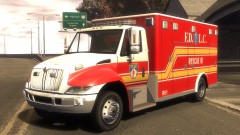 YES! Someone makes an ambulance that actually *does* look like the ones where I live!
 -
Bojan: What settings do you use for it?
-
Mirrored here: Also: The individual car config files go in the ELS folder in your game folder. Then, in ELS.ini, you find the slot you installed that car to and change File from default_config to the appropriate thing. For example, if I wanted to install a car with the config file lcpd_taurus.ini to police2, I'd put the file in my police2 slot, then go into ELS.ini, find [POLICE2], and change "File = default_config" to "File = lcpd_taurus". That's the whole point of vehicle config files - it makes it easy for modders to distribute settings for their cars, and for you to install those configs.
-
-
No, I think what that means is "if you want ELS to work *at all* in MP, Els_Ai_Mp MUST be on". The issue is a few things: * Extras sync slowly (I assume), so ELS on the other person's computer won't work to show the lights on your computer. Instead, to get the necessary rapid spawning/despawning of extras, you need to have ELS on your computer detect that they have their lights on, and run the lights on your end. Basically, YOUR ELS needs to turn THEIR lights on. * Environmental lighting doesn't sync. Again ELS needs to detect that they have the lights running, so it can turn on their lights. * Syncing in MP is hard; the best you can do here is use the siren, and detect that they have their siren on, and use *that* to know when to turn the lights on. So, unless you set that option to On, ELS won't really work much at all in MP. If you turn it to On, it still only really works if they have their siren on. Keeping it off won't make ELS work when their lights are on and their sirens off; rather, it will make ELS not work even when their sirens ARE on. TL;DR: Set that to On if you want ELS to work at all in MP. You can't get "lights working whether or not the siren is on".
-
It was made for testing, I think for the MARQ SECL mode.
-
You can also hit Ctrl and *then* M - the keypresses are "sticky".

