


A Stranger
Members
-
Joined
-
Last visited
Everything posted by A Stranger
-
Remove Arrest Manager.
-
Try reinstalling LSPD:Fr 0.47 manual. Once you did that; add those lines to your LSPDFR.ini, located in GTA/LSPDFR: WorldEvents.MaxNumberOfEvents = 0 AmbientSpawn.MaxSpawnedCopsInArea = 0 WorldEvents.IntervalMultiplier = 0
-
Never replace .meta files. Especially the vehicles.meta one. Try renaming mods to _mods.
-
Delete startup.rphs in your GTA V folder. Also; Change the plugin timeout threshold from 10000 to 60000 in the RagePluginHook.ini file and change Main.PreloadAllModel in GTAV/LSPDFR -> LSPDFR.ini to false.
-
Please send your RagePluginHook.log.
-
The good news is that it is not LSPDFR. Did you replace the Park Ranger / its meta files?
-
Are you trying to replace the cars in Patchday22ng?
-
Either move it back to the original Location or have two folder at the same path. F.ex:
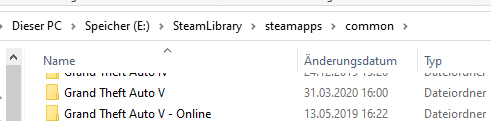
-
How big are the car files ?(.ytf mostly) If they are between 12-16Mb, you shouldn't have issues. Anything above 15-16Mb will cause issues on your system.
-
It would be RagePluginHook.ini and right below the RagePluginHook.exe file.
-
Looks like you moved or renamed your GTA V folder. You can't do that. You have to run RagePluginHook from your original installation location.
-
It's outdated. Use CompuLite instead.
-
That should be the RagePluginHook console. Did you rebind it?
-
I told you in my earlier post to use it.
-
Can you show me the killped command you executed?
-
You are missing Stealth.Common for one of your plugins. You should also remove Arrest Manager & LSPDFR+, since they are both outdated.
-
LSPDFR plugins load once you go on duty.
-
The readme usually tells you where to put them. 🙂
-
Yes, because those are LSPDFR plugins. Not RPH plugins.
-
Try either unloading LSPDFr in the console. If that doesn't work, type "killped" in the F4 console and press Enter. After that, please close your game and send a RagePluginHook.log.
-
You should respawn automatically once you get wasted.
-
Update RagePluginHook to version 1.78 and rename your LSPDFR folder in /Plugins to _LSPDFR.
-
Only if you have ELS. 🙂
-
Which is fixed by disabling preloading models. Please read.
-
Albo.Common is causing issues for you. Update it. Also; remove in /plugins/LSPDFR: Copper Callouts; Computer+ (Use CompuLite instead); Interaction+; SecurityPlus.

