


A Stranger
Members
-
Joined
-
Last visited
Everything posted by A Stranger
-
Please send your RagePluginHook.log.
-
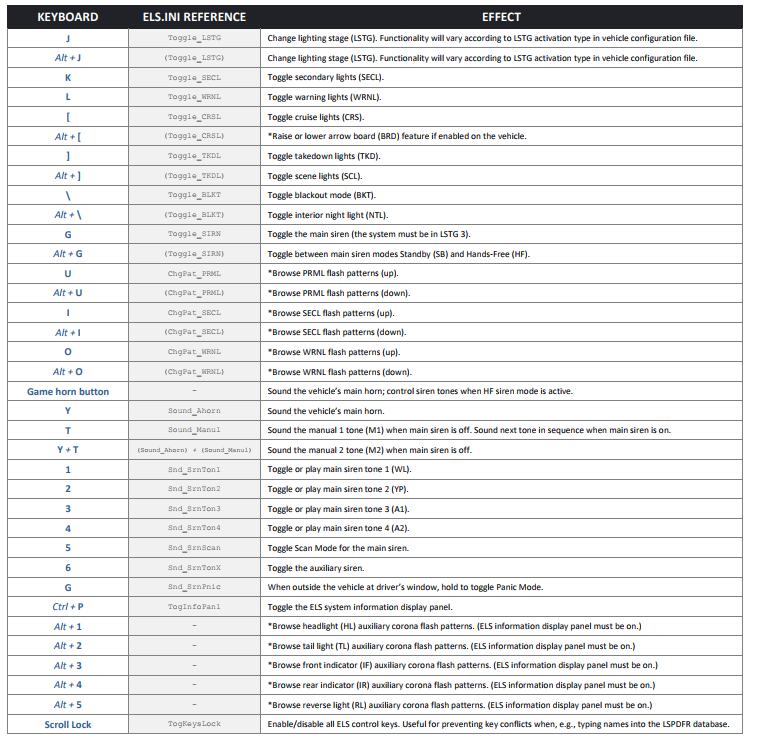
You need to accept the Callouts by pressing "Y". If you have ELS vehicles, look at this. If not, it's casually E for lights/siren:
-
Change the plugin timeout threshold from 10000 to 60000 in the RagePluginHook.ini file and change Main.PreloadAllModel in GTAV/LSPDFR -> LSPDFR.ini to false.
-
None of these Plugins are installed correctly. Create a new folder in /plugins and call it LSPDFR. Copy: ArrestManager, VocalDispatch; AssortedCallouts and Traffic Policer into it. Remove Computer+ and LSPDFR+.
-
Rename your mods folder to _mods.
-
Can you send a screenshot of your Grand Theft Auto V folder?
-
Rename mods to _mods, if you have it. Go into the Rage Settings -> Game Settings -> Command Line Switches. Look for "Force Windowed mode." Check it. Then, reinstall DirectX & restart your Computer after. If you use some kind of visual mod, delete it. Also, remove your GPU driver (nVidia or Radeon) and do a clean reinstall. That usually works.
-
Please send your RagePluginHook.log.
-
You have to put the files in your GTA V folder. Not a seperate folder in /GTAV.
-
Remove Wilderness Callouts.
-
Make sure you install the PeterU NEW INSTALL package. That should do it.
-
_LSPDFR disables that folder. That means whatever you had installed crashed your game.
-
Delete startup.rphsin your GTA V folder.
-
Remove EpicEvents; LSPDFR+; AmbientEmergencyResponse; YetAnotherPartnerMod; Traffic Control; VehicleSearch. You are also missing files for PeterU Callouts; like PedModelMeta.xml.
-
Rename your mods folder to _mods.
-
If you have EnhancedVehicleActions, remove it.
-
Update RagePluginoHook to version 1.78. Then, update StopThePed.
-
Not his issue, but replace cars go to Patchday22ng.
-
Please send your RagePluginHook.
-
Add your GTA V folder to your Antivirus exclusions & then restart your PC right after.
-
First, update RagePluginHook to version 1.78. Then, rename your LSPDFR folder in /Plugins to _LSPDFR. Try again.
-
Can you screenshot your /Plugins folder?
-
I don't see you using any LSPDFR plugins or RPH plugins besides LSPD:FR. Do you, by any chance, have a Mods / scripts folder?
-
Change the plugin timeout threshold from 10000 to 60000 in the RagePluginHook.ini file and change Main.PreloadAllModel in GTAV/LSPDFR -> LSPDFR.ini to false. That should fix it.
-
For all cars or only certain cars? If it's only for certain cars, you may wanna look at their Windows tint, and if it's set to None / white in the vehicles.meta. Also; does ELS work fine in general?

