


BlaineBug
Members
-
Joined
-
Last visited
Everything posted by BlaineBug
-
Nevermind (I think,) I believe I have traced the problem to either the carvariations OR vehicles.meta file inside of Albo's add-on models directory. I'm not sure where the fault lies, but, it lies somewhere.
-
I spent a few hours trialing different things, and it seems as if it is either the vehicles.meta or carvariations files in Albo's MODDING folders that is causing the problem. I deleted the MODS folder entirely, and installed things one by one. The only things that are installed in OpenIV are EUP Law, EUP Emergency, custom sirens, visual mods, and 30 custom vehicle models thus far. Everything is working well right now with the exception that I have to re-write the carvariations and vehicles.meta. I'm not actually sure what the problem is, though, and I'm not sure which file is causing the problem. I'm not sure why this should have mattered, as I uninstalled ASI Loader and vanilla GTAV was STILL crashing. What's up with that? I thought anything in the mods folder should have been entirely ignored at that point.
-
Well, I was able to load to GTAV Vanilla menu, but crashed upon loading a saved game. So I removed ASI loader from Open IV, now i can't even start GTAV period. I get an ERR_GEN_INVALID. There's no way it can have anything to do with modded files because this should have removed all of them from loading with GTAV. Not even using Rage Plugin or ASI loader...... And the -verify command isn't helping. I've run it about 6 times now. I don't even know what happens with GTAV, it seems to break it self!
-
I just installed 30 models in Albo's MODDING folder, 11 of which are add-ons. I just noticed that vanilla GTAV is no longer loading either, so perhaps it is an unrelated issue. -verify command is not fixing the problem like it has 99% of the time. In Albo's description of his mod, it says unlimited cars?
-
Is it possible to install TOO many vehicles in Albo's file? I'm crashing right now currently and I'm trying to figure out why...
-
Everything was just working fine, I checked all of my carvariations and vehicles.meta files, can't find anything wrong. Just installed Albo's Add-On DLC pack for adding weapon, ped, and vehicle files. Installed about 20 cars and everything was fine, added a few more and now the game crashes upon load. I tried the -verify game command which fixes this problem 9 times out of 10, but not today! Can someone help point me in the right direction to where I should look, perhaps?
-
 The strange thing is, now, it seems to be working. I have noticed all 5 of my CHP models spawning when calling for state patrol backup AND panic button with smart radio. It might seem like the bike does spawn more often, though, but it is not the sole responding vehicle. In the past I have removed the bike entirely from the backup. I'd rather see vehicular models personally :) I might do that again... By the way, no, I am not using custom backup. Should I?
- 266 comments
- 36 reviews
-
-

- 1
-
-
I have been looking for a way to organize and consolidate all of my add-on vehicles including vehicles.meta and carvariations. I think Albo's method here is AMAZING. Thus far, I have installed 5 add-on CHP vehicles, and renamed them as such, CHP, CHP2, CHP3, CHP4, and CHP5. I have all of the cars working properly, handing, audio, etc. I can spawn them manually and everything is great, the models, textures, and everything else is great. I added these file names in to LSPDFR's backup file, for when I call STATE patrol. However, only the Police Bike shows up. It seemed to me as if LSPDFR can't find the files in Albo's mods DLC, however, my Police Bike is ALSO a custom model that is in the same folder. The only difference could be that POLICEB is a default GTAV model name and CHP, CHP2, CHP3, CHP4, and CHP5 are not. However, I never had this problem before when installing add-on vehicles. For instance, LSPDFR was able to successfully load the FBI6 or Police 5 models when calling for backup. The only difference here is that these models were previously installed in one of GTAV's DLC folders, not Albo's DLC folder. By the way, I started clean - I deleted my mods folder entirely and started over, just to make sure that there would be no conflicts between previously installed models and now, Albo's organized way of installing models. Any thoughts or ideas?
- 266 comments
- 36 reviews
-
 Awesome CHP pack. I installed all 5 cars as add-on vehicles, chp, chp2, chp3, chp4, and chp5. Perfect lighting setup with proper forced ELS patterns that pertain to out-of-vehicle and yelp siren as well! A+++!
- 85 comments
- 36 reviews
-
-
- 1
-
-
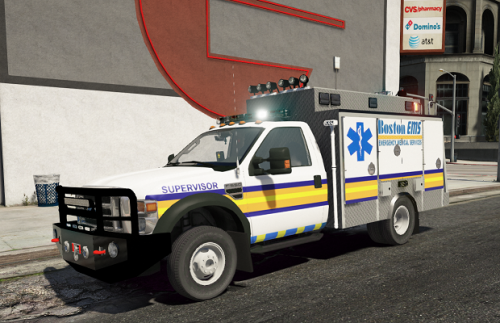 I see that. I also just figured out that the auto installer does not have the updated model with trailer hitch. I have updated my model using the files in the main folder and all is well! I set mine up by deleting some of the liveries as well, only using the state police livery, the two county police liveries, and the swat livery, so that the vehicle can auto spawn via dispatch for NOOSE or local SWAT and not look out of place with Fire Department or NASCAR skins. I also started from scratch, deleting my mods folder and starting over using Albo's DLC pack add-on, for consolidation and easier management of all custom models. Everything seems to be going smoothly, so far!
- 24 comments
- 7 reviews
-
-
- 1
-
-
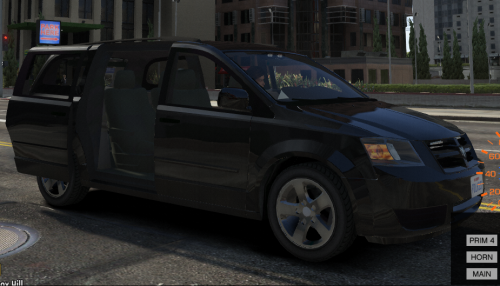 Here's the strange thing. LSPDFR identifies the van as a police vehicle, as I can blip a vehicle with the shift key to pull it over. However, when I flip on the lights, it doesn't know its a police vehicle so it never pulls over. Also, police radio's tow truck identifies it as a police vehicle because it asks me if I want to press Y or N to tow the police vehicle. But somehow traffic in the game does not know when the lights/sirens are on or off. Maybe it has to do with ELS? The more I think about it, it is not so much as the game not identifying it as a police vehicle, but the AI not knowing the ELS is in stage 3 or not.
- 26 comments
- 10 reviews
-
Is the tow hitch supposed to be visible with this new model? There is nothing visually different between the new uploaded model and the old. I have not yet tried backing up to attach a trailer.
- 24 comments
- 7 reviews
-
-
What did you change in the latest version? If it seems to be installed fine, is there any reason to reinstall the latest version? Any fixes or changes the model?
- 24 comments
- 7 reviews
-
I double checked, siren and light settings are set properly in carvariations.ymt and the law enforcement and emergency vehicle flags have been inserted in vehicles.meta. I looked inside of carcols.ymt and I am not finding minivan. What am I supposed to change in carcols.ymt? By the way, your latest version is Version 3.2 but the title says 3.1 for your "changes."
- 26 comments
- 10 reviews
-
Yes Candace, I was editing vehicles.meta. What do you mean about the right version? Do I need to edit both carcols and carvariations? I have only edited carvariations. And yes, my wheels look silver like that. A lot better than the original black wheels.
- 26 comments
- 10 reviews
-
I really like this model, got around to trying it out this afternoon. The wheels on my van look great, they aren't black like in the photos. However, maybe I should have installed it as an add-on so that it wouldn't be spawning with civilians all over the map. The lights look great too. I edited the flags, siren, and light settings for minivan in carvariations and vehicles.meta, however, people aren't pulling over to the side for this as they do other law enforcement and emergency vehicles. Did I do something wrong or did I forget something?
- 26 comments
- 10 reviews
-
LSPDFR should come with all of these departments if they have already been made as shown in the screenshots. Maybe an installation option to add them or not, sort of like RDE :)
-
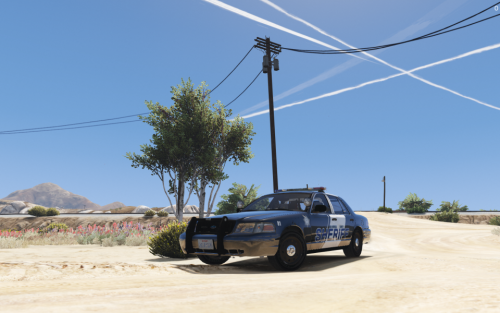 1) The Coroner's van has am amber corona in the very center of the doors where the two doors meet. It is most definitely connected to the arrow stick on the rear of the van. 2) How can I modify the civilian Stanier's texture to be a solid color? I really dislike the X on the door as well as the decal residue showing as well. Thanks!
- 24 comments
- 9 reviews
-
In response to your reply on my review, ESU1's <handlingid> is already set to gresley in vehicles.meta. However it says <handlingname>sadler in handling.meta? I seriously need a tutorial for modifying the .meta files. I can install cars no problem with OpenIV but modifying the .metas is what throws me for a loop. Considering that there are many different locations for the .metas rather than one big consolidated list. What a PITA! My brain hurts trying to figure this out. I have a couple other cars that I would like to change the audio on as well! Not your models, though...
- 24 comments
- 7 reviews
-
Maybe an easier way for installing AND THEN CHANGING custom vehicles, carvariations, handling, weapons, and sounds.............that would be great.
-
-
I always love an add-on vehicle. Pretty good, like the liveries too! Back end gets a bit slippery on turns, easy to slide out in dry weather. Overall 5/5!
- 24 comments
- 7 reviews
-
-
- 1
-
-
I apologize to dig up an old thread, but oh my, would a mods manager be great. I installed 3 packs of vehicles, and each one of them replaced cars and also added cars as well. We're talking for the full lineup of police, sheriff, fbi, tow truck, flat bed, fire truck, coroner, and ambulance. About 30 vehicles in total give or take. Now I'm wanting to change one or two of them but these packs have the handling and carvariations file all correct. If I'm going to be just changing one vehicle it is always such a nightmare to change the carvariations and handling files appropriately that I never do it. There has to be a better way for someone like myself who uses OPENIV and a MODS folder for LSPDFR in GTAV.
-
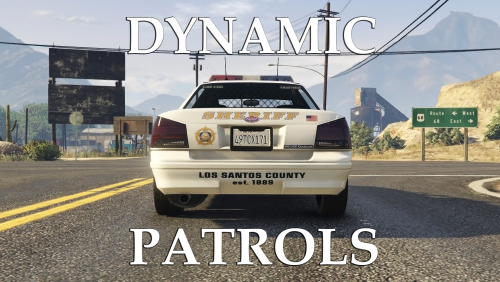 I realize that now. RDE also calls their mod 6th star response. Somewhat similar in name!
- 57 comments
- 8 reviews
-
-
- 1
-
