


BlaineBug
Members
-
Joined
-
Last visited
Everything posted by BlaineBug
-
Will do. Any idea what the first set is for?
-
Thank you, I have corrected this, and it now spawns great. I found the default carvariations for vanilla GTAV and edited the first "color" hex code for POLICE2 and now it spawns with proper black/white livery. However, I am having issues - I installed Albo's Mod Pack. I have unmarked car in Police 1, Police 5, and Police 6. I tried changing their hex codes for colors as well in their own carvariations slots and all 3 of these cars still spawn in WHITE only. Once again, changing color in trainer works but not when they spawn as backup in game, they are always white. What am I doing wrong for these add-on cars? Secondly, is there any way to choose more than ONE color for a car to randomly spawn in with? Say I wanted these unmarked cars to spawn in black, silver, midnight blue, etc.......on a random basis?
-
I am not sure, did you happen to edit the default vehicles.meta file for PRANGER at all? Is the texture showing up properly when you open up the model in your vehicles directory in OpenIV?
-
 I don't know anything about ELS and how you create lighting patterns. But, I have seen other models (such as the vintage cars with AeroDynic lightbars) that have synchronized rotator flash patterns that are different from the vanilla GTAV flash patterns. Could something like that be created for the Vision? I believe the CHP used a center-out pattern with their Vision lightbars, among other patterns that could be programmed into their SmartSiren controllers.
- 964 comments
- 158 reviews
-
Looks to me like you also need to change the diffusetint line to 0x00FFFFFF in vehicles.meta. That lightbar is black.
-
I really wish that ELS took control of the rotators. I have to say, out of all of the great vehicles in this pack, the Vision lightbar on the 2006 CVPI sucks!
- 964 comments
- 158 reviews
-
Hello, I have about 50 custom vehicle models added for emergency vehicles. I used all of the vanilla GTAV slots and then I went above and beyond, I have Police-Police10, CHP-CHP13, Sheriff-Sheriff9, etc. Everything works great. I have an LAPD skinned charger in the POLICE2 slot. This car always spawns ALL WHITE. It appears to me as if the livery/texture is only for the roof and doors. I can go in to the trainer and change the color of the vehicle to BLACK and then it will be correct as a BLACK and WHITE. What do I have to edit in order to change the car to always spawn as black instead of white? This is the only model I am having issues with. I believe the rest of the models that I have use a livery/texture that covers the entire vehicle model, not just the roof and doors. Thanks!
-
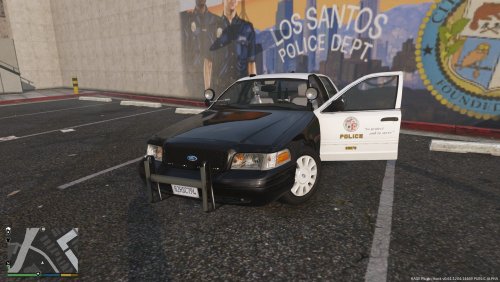 Is anyone else having an issue with the wheels disappearing at distance with this model?
- 4 comments
- 1 review
-
-

- 1
-
-
 To be honest, I never thought about Police Smart Radio's vehicle list. I always just edited backup.xml. This explains why police3 shows up so very often for transportation of arrested peds!
- 1,196 comments
- 127 reviews
-
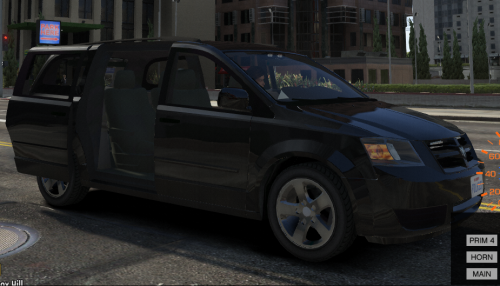 By the way, since installing this van as an add-on instead of a replacement, the AI traffic moves out of the way just as they should.
- 26 comments
- 10 reviews
-
PS - Use sirensetting 13. 14 does not work at all and suggesting it to you was my error! I meant to say 12 or 13. I use 13 personally, I'm not sure what the difference is between 12 or 13. By the way, are your lights really dim and tiny? I have a light "brighting" mod installed that works great with the exception of this lightbar. I just installed the 2006 CHP CVPI this evening to test it out since all of my other CHP cars are LED. The model is great but the lightbar's brightness sucks to be honest!
- 964 comments
- 158 reviews
-
-
-
-
Have you made any modification to LSPDFR's backup.xml file? You can add or replace vehicles in the file for your backup. By default, local SWAT uses POLICET (Van) and only NOOSE uses RIOT (Lenco Bearcat.) You can also modify how many ped models will spawn in the vehicles (there is a minimum number and maximum number) as well as alter the ped models that will spawn. Lots of configuration is at your finger tips.
- 1,196 comments
- 127 reviews
-
 I would just set your antivirus program to IGNORE this file. It's probably a false positive.
- 2,698 comments
- 239 reviews
-
That's a texture appearing on the window for some reason. You probably have to change the siren settings to 13 or 14 in the carvariations for police4. Just a guess.
- 964 comments
- 158 reviews
-
 You must be doing something wrong with your coding. I have made many mistakes that caused my game to crash.
- 267 comments
- 36 reviews
-
-
- 1
-
-
I don't know enough about it to be able to offer any suggestions. As a side tip, are you sure that you are using an updated game config for the latest version of GTAV? When I updated my game config last week, I followed a tutorial for modifying the game config and adding "100" to all sorts of these values. That way, if you follow the tutorial, you can do it yourself and make sure that you are doing it right and modifying the latest game config rather than downloading and installing a game config that someone else modified.
- 267 comments
- 36 reviews
-
Glad you got it worked out. The default vanilla location for vehicles.meta and carvariations is only for police1, police2, police3, police 4, sheriff1, sheriff2, fbi, fbi2, riot, pranger, lifeguard, firetruk, ambulance, etc. If you added this coding in carvariations and vehicles.meta in Albo's modding folder, GTAV would ignore it as the game will simply look in the vanilla location first and that file location will take priority.
- 267 comments
- 36 reviews
-
In vehicles.meta, are the texture names matched up with the model name? These are the very first lines of the vehicles.meta entry for your car. For example, whatever the .yft and .ytd files are, they need to be the same. But you already know that they are named correctly as the textures show up properly in openiv. For whatever reason, GTAV is having difficulty finding the texture files, but is finding the model files just fine. Are you adding a carvariations entry as well for the same vehicle model? That's the only reason I would think of why your add-on cars were not spawning with any texture. Are you adding a carvariations AND a vehicles.meta entry for police11? Also, are you using a trainer to spawn, or are you using the Rage console to type "spawn police11"? WITHOUT quotes, of course.
- 267 comments
- 36 reviews
-
Where are you installing these cars? For Police3 slot or for add-on? That green texture you are seeing is basically no texture. It can't find one. If you look at the vehicle model in OpenIV is the texture showing up properly there or are you also seeing the lack of a proper texture?
- 267 comments
- 36 reviews
-
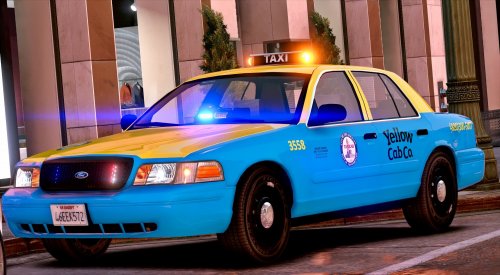 I am noticing strange red and blue coronas underneath the side view mirrors as well as a yellow corona above the Taxi sign when you are a little bit away from this model. They disappear when you come closer. Any ideas?
- 33 comments
- 8 reviews
-
-
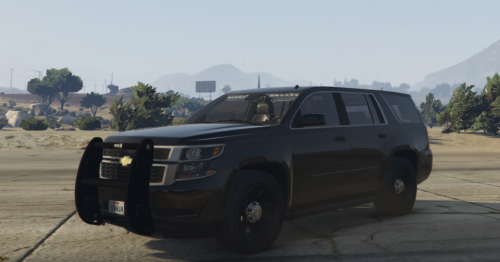 Go in to the ELS .xml configuration and change the values for the auxiliary coronas.
- 12 comments
- 10 reviews
-
-
- 1
-
