Kilyin
Members
-
Joined
-
Last visited
Everything posted by Kilyin
-
-
-
-
That's odd, to me the game looks much sharper/crisper, but I also use the ENB. I'd say you'd be fine with either mod.
-
I rotate between both. MVGA I think looks better overall, but has a bigger performance hit.
-
Look at the ELS .xml, probably has something like this: <SOUNDS> <MainHorn InterruptsSiren="true" AudioString="SIRENS_AIRHORN" /> <ManTone1 AllowUse="true" AudioString="VEHICLES_HORNS_SIREN_1" /> <ManTone2 AllowUse="true" AudioString="VEHICLES_HORNS_SIREN_2" /> <SrnTone1 AllowUse="true" AudioString="VEHICLES_HORNS_SIREN_1" /> <SrnTone2 AllowUse="true" AudioString="VEHICLES_HORNS_SIREN_2" /> <SrnTone3 AllowUse="false" AudioString="VEHICLES_HORNS_POLICE_WARNING" /> <SrnTone4 AllowUse="false" AudioString="VEHICLES_HORNS_AMBULANCE_WARNING" /> <AuxSiren AllowUse="false" AudioString="VEHICLES_HORNS_SIREN_1" /> <PanicMde AllowUse="false" AudioString="VEHICLES_HORNS_POLICE_WARNING" /> </SOUNDS> change them all to true.
-
You can extract any .oiv and install it manually. However, Redux is stolen garbage, better off using something like MVGA or even VisualV.
-
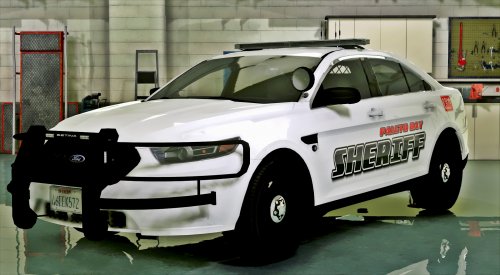 About the best I could do on the white lights without dimming them too much:
- 51 comments
- 17 reviews
-
-

- 1
-
-
-
for vocal dispatch, you also need to follow the documentation and do the windows voice recognition training stuff to teach windows how to understand you.
-
-
-
yeah, but if you also have an ELS vehicle in the police slot, you're going to need that file as well. What do you have in the police slot? My recommendation is open that policesco tahoe archive, and drag/extract the provided sheriff2.xml file from \2015 Los Santos Police Tahoe BY POLICESCO 0.2\ELS.XML\ to \Grand Theft Auto V\ELS\pack_default. Go ahead and confirm the vehicle sirens work though, and worry about that later.
-
-
Well then you need to rename that file in \Grand Theft Auto V\ELS\pack_default from police to sheriff, or sheriff2... it has to match the exact slot the vehicle is in. I'd think a tahoe would be sheriff2, but if you're sure it's sheriff, name it that. Edit: that model comes as sheriff2, and includes a sheriff2.xml file that needs to be in the folder above.
-
 Should also make the paint look better, policeold2 by default has dull paint.
- 81 comments
- 25 reviews
-
-
- 2
-
-
-
the default one is encrypted, you can just paste that wherever you make carvariations edits, like mpchristmas2 or whatever.
- 81 comments
- 25 reviews
-
-
- 1
-
-
-
-
 I'm guessing because in the .ini... OpenComputerPlusControllerButton=None OpenComputerPlusControllerModifierButton=None
- 1,742 comments
- 172 reviews
-
-
-
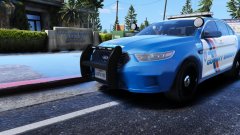 yeah there's just so goddamn many of them...
 -
Yeah, got 5 of them installed, and uhhhh about 15-16 CVPIs. Might be time to trim the fat.