


NoCountdown
Members
-
Joined
-
Last visited
Everything posted by NoCountdown
-
 That's indeed causing the problem, but you can easily work around it. Just wanted to let you guys know.
- 270 comments
- 19 reviews
-
-

- 2
-
-
Looks very promising! I've spend a good amount of time setting up patrols already and it's really fun to work with. I do however have a few suggestions, being able to let officers and/or soldiers patrol the streets on foot would be a great feature, as well as being able to select what weapon that they are wearing. Thanks once more for the great plugin and I'm looking forward to new updates! PS. This one's for you @Albo1125, when I have no jurisdictions set in the INI editor (I deleted all of them) and I try to select something from the drop down menu I get an exception. I added my error log for you to debug!
- 270 comments
- 19 reviews
-
-
- 1
-
-
You're pretty lucky as a jurisdiction script for GTA V has just been released today. I didn't have time yet to take a look at it but you should be able to do exactly what you want. http://www.lcpdfr.com/files/file/10094-law-enforcement-jurisdiction-script/
-
 Got to agree on this one, but it looks a bit funky on the map. Perfectly fine with that though
- 1,915 comments
- 242 reviews
-
LSPDFR 3.0 added a jail near the airport office. Yours does as well, any chance of seeing yours removed and the LSPDFR one added to the navigation system?
- 1,915 comments
- 242 reviews
-
It's part of CalloutsV I believe. When in a pursuit set up a waypoint, exit the map and press Shift + R.
-
I picked it up at a sale at my local games shop. Damn, I love that game. Spend dozens of hours playing and replaying all situations with various tactics and had some good fun in co-op multiplayer as well. Too bad they shut the servers down a few years ago.
-
VisualV! https://www.gta5-mods.com/misc/visualv
-
As I just redownloaded it again, I had the same issue. Luckily, the solution is very easy. Launch OpenIV and browse to mods/update/update.rpf/common/data/levels/gta5 and drag and drop vehicles.meta to your desktop. Once it's there, right click it and open it with either Notepad or another text editor. Press CTRL+F and type in the car that you edited, which is in this case Sheriff. Scroll a bit down until you find the following line </requiredExtras>. Replace this with <requiredExtras> EXTRA_2</requiredExtras> And that should do the trick, then save the file again and drop it in the OpenIV folder again. If you don't get something, don't hesitate to ask me
-
Do you have a mods folder? If so, you need to remove everything in it, and redownload all of your vehicle mods. This is because otherwise GTA V will try to load your dated update.rpf file which isn't compatible with the latest game version.
-
ScripthookV is updated! RagePluginHook is not available yet. My Mods folder still works however, so no need to install them all again!
-
Exactly what it says there. Wait until Scripthook V has been updated for the new version.
-
I can't really find anything about Error 203 on the Rockstar Forums, so I'd suggest to open a support ticket with them.
-
I have a GTX 970, which is some good bang for your bucks. If you are looking for something that you can use in the upcoming 5-10 years on ultra settings, I'd recommend to start looking at the 980 and other high-ranged cards, but for now and the foreseen future the 970 does its job well!
-
Yes indeed.
-
You should replace it in one of the dlcpacks. I believe police3 is stored as well in: Also worth mentioning, if you don't have the steam version be sure to create an OpenIV mod folder.
-
There you go! https://www.gta5-mods.com/scripts/simple-trainer-for-gtav
-
This one replaces the Stanier I believe. Based on @F5544's model. https://www.gta5-mods.com/vehicles/civilian-crown-vic-jerry9090
-
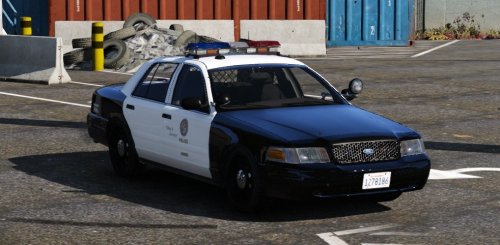 Pictures look very nice, wonderful enhancements. Love the ANPR scanners on the back and what a sublime lightbar and spotlight. I absolutely love it!
- 49 comments
- 19 reviews
-
-
- 1
-
-
-
I am experiencing a crash on the latest version after going on duty. Both Arrest Manager and Traffic Policer are up to date. I attached a log as well. RagePluginHook.log
- 1,915 comments
- 242 reviews
-
-
- 1
-
-
Try installing the .NET Framework again. CouthInk4 has linked it in his post.
-
I believe I know the origin of the issue. Do you have both DSOUND.dll and XLIVE.dll installed? You can only use one of them at a time.
-
Hello, next time please use the search bar as this has been asked a couple of times already. To solve this problem, you will need to download and install the following files: https://www.microsoft.com/en-us/download/details.aspx?id=5555 https://www.microsoft.com/en-us/download/details.aspx?id=30679
-
Playing using my backup of GTA V.

