Albo1125
Insiders
-
Joined
Everything posted by Albo1125
-
 I don't like your attitude. If you're going to ask for support 5 times a day, do so in a respectful manner. I don't get paid for this and I don't recall you having donated to me. As for your INI file, you didn't do what the installation instructions say. To fix this, DELETE your current INI file, COPY the ini file from the Traffic Policer 6.6.0.2 download to your Plugins/LSPDFR folder and start again. Yes, you'll have to redo it all.
- 3,646 comments
- 306 reviews
-
-

- 2
-
-
 I'm not into that kind of stuff, sorry. Ive just added instructions to the ini as I was told. Check the credits for the model authors - you can ask them.
- 59 comments
- 18 reviews
-
-
- 1
-
-
Post your RagePluginHook.log file. You'd better be bloody sure you're om really on the latest version of everything ;)
- 3,646 comments
- 306 reviews
-
-
- 1
-
-
-
-
May be possible, but probably really hard to combine that view with driving. I don't think it would be very practical, but I do like the idea.
- 59 comments
- 18 reviews
-
-
- 3
-
-
Development of the solicitation call is not dead! Here's the latest progress, excited about this! #notonmypatch
-
if (Vector3.Distance(Game.LocalPlayer.Character.Position, veh.GetOffsetPosition(Vector3.RelativeLeft * 2f) < Vector3.Distance(Game.LocalPlayer.Character.Position, veh.GetOffsetPosition(Vector3.RelativeRight* 2f)) { //player is on the left } else { //player is on the right } That's what I use
-
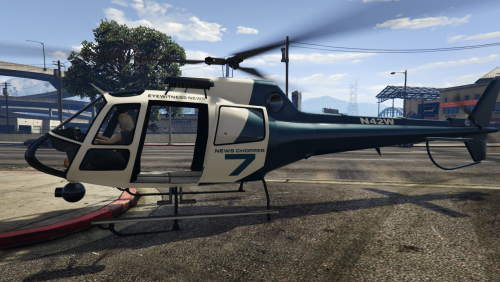
NewsHeliPursuit is a script modification that allows you to have a news helicopter follow your pursuits. After a certain time period (configurable in the INI file) a news helicopter is dispatched and will follow the pursuit you are engaged in. NewsHeliPursuit allows you to customise the model and the livery of the helicopter that is dispatched to your pursuit in the INI file. The download contains a pre-built news helicopter livery that you can install. The default INI file is set to accommodate this by default. Prefer a slightly more colourful news helicopter skin? Check out this texture by @koudai919! Installation Instructions are provided in the readme. Requires RPH 0.36 or higher. Please read the credits for full acknowledgements.
- 59 comments
- 18 reviews
-
-
- 25
-
-
 This is caused by Basic Vehicle Actions. Either delete it or change its keybindings
- 1,915 comments
- 242 reviews
-
Yea, probably. Trial and error is going to be your best bet here, I'm not sure myself what the limit is.
-
-
I've never actually really pushed it to the limit - my bank heist is pretty intensive though. I think there are roughly 30-40 peds that are all being controlled via custom built AI. Low specced pcs seem JUST to be able to handle that.
-
1. Use a for() loop. 2. The number of peds that can be spawned without crashing varies per computer, depending on specs. 3. Yes, simply add an if () check to see if the ped model matches the model you don't want and delete it again.
-
No problem...
-
The way the texture drawing works, it may not show up in OBS's game capture due to DirectX issues. As bacon said, try 'screen capture' or 'monitor capture'. Setting your game to borderless may help too.
-
 Excellent! For the stuff you need help with feel free to create a topic in the API development forums so I and other Devs can help you out.
- 528 comments
- 42 reviews
-
-
- 5
-
-
This means you have 2 instances of lspdfr running or have gone on duty twice.
- 1,915 comments
- 242 reviews
-
MyBlip.IsRouteEnabled = true; You must be in a vehicle for routes to display on the minimap.
-
It's not ELS I think. Probably just a siren sound activation edit through OpenIV. I really like it though
-
Budget cuts mate
-
The green blips are not tied to the drugs - they're just dropped whenever you press 9. It could well be you didn't see any drugs being dropped after all. Does this issue occur all the time? Thanks for the report.
- 3,646 comments
- 306 reviews
-
Which plugin is this? If you are experiencing problems with a modification I suggest posting a comment on the specific download page as this isn't helping anyone. My review has been fully motivated and contain numerous valuable tips for improvement (and even an offer for help). Instead of dismissing it as 'unfair criticism' and acting like a poor guy who only gets complained or bashed at (which is not true at all) to gain sympathy in such an absurd way, try using the constructive criticism to improve your work - nothing's perfect right off the bat, same goes for my plugins. Again, as I mentioned in my review, everyone here is more than willing to help if you respect and listen to them.
- 528 comments
- 42 reviews
-
-
- 6
-
-
-