


c13
Friends of LSPDFR
-
Joined
Everything posted by c13
-
 Look at what happened to the other people that have tried to release CVPIs: Luke, RGXlegends, and Yakadafi.
 -
If only a certain person in the IV police modding community wasn't such a dick.
-
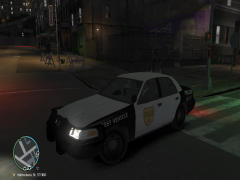
Save the image, then download this car. After you download it, open the file with winrar, and extract it to a location you can remember. Open SparkIV and import the car. Then click on the wtd file in SparkIV and hit Edit. Move to the skins for the car (police_sign_ 1-4). Click each one individually and hit import. Now select the skin you saved. Hit saves and close, then hit save, then rebuiled. Close SparkIV, and start the game. You will also need ELS for it to work.
-
From the article I read, it says he gave himself up to armed officers.
-
Just found out because of Norway's laws, the sick POS will get 21 years max. The SWAT team should've shot him on sight.
-
Hopefully the death penalty (if they have it in Norway).
-
http://www.gtapolicemods.com/index.php?/files/file/14-ford-crown-vic-canine-unit-cvpi-v32s-els-k-9-unit/ It has a different skin though, contact unr3al for the skin.
-
Now they're saying as many as 30 dead at the Youth Camp Shooting and 7 dead from the blast.
-
Found out the attack is beleived to have been carried out by Islamic Extremist from Yemen over cartoons depicting their prophet.
-
A gunman dressed as a cop has opened fire at a Labor Party Youth Camp just outside Oslo.
-
It's been saying that since the crime statistics went down.
-
Anybody they feel has contributed and who will be able to test.
-
From my threads: Pursuits: -Noose should come in FIB Buffalo or Noose Cruiser -Suspects should know what type of car their driving and use it to their advantage. A suspect in an infernus should stick to highways while a suspect in a crappy car should try to stick to the side streets. -If in a residential area, some suspects should try to bail out, and maybe jump over fences with backup that is smart enough to do that also. -Possibly give some people that choose to bail out a gun, and they can do one of the following: jump out and start shooting, run and eventually start shooting, or just not shoot and drop the gun along the way. -Make some passengers bail out after the driver slows down enough in a residential area, and somehow make it so that one or two units will stay behind and arrest them. Weapons- -We should be able to choose what weapons backup officers can have in the INI file. Toggle whether backup cops can have shotguns or M4s. In the United States, most police departments have at least some patrol officers with AR-15's (Semi-Automatic M4), with a lot of departments having AR-15's on standard issue with 1 in each car. -Loui^GF's post on weapons. Other suggestions: -Traffic light at intersections ahead of you will turn green giving you the right of way when sirens are on,ending retarded AI stopping in the middle of the street.
-
If you would've clicked the link (I think it was milestone), you would've found out what the countdown was for, but I'm keeping that a secret. EDIT: Hey, look, the countdown is back to just over 2 days.
-
Before Alpha Testing began, there was a forums for code edits. but only devs could view it and it was taken down.
-
Be sure to tell us what it is.
-
Officers are allowed to fire if they believe an armed suspect is moving to a cover position, which the suspect fleeing would fall under. Hopefully it will be fixed in time for .95
-
Look through Flyer2359's videos on youtube, he has some pretty good sirens, my favorite is the Whelen 295,
-
Install Xliveless and go to gtagarage. Theres a save file with every individual mission in it on there. Just follow the instruction to install.
-
More powerful guns, headshot=deadshot for you, only takes a few hits to die if your hit anywhere below the head. Suspects your pursuing don't show up on the radar. Best used on the Holland Nights mission with non-els cars for this effect: Olanov's video, not mine.
-
Heres the best line for it made by Sgt. Kanyo: 2505.0 0.363 85 0.0 0.7 -0.35 0.5 4 0.16 5.0 240.0 0.48 0.65 0.6 33.0 1.5 0.90 12.0 0.12 0.4800 3.0 1.7 1.7 0.15 -0.08 0.0 0.50 2.0 1.0 2.2 2.4 0.0 50000 440010 0 0
-
This also happens with Preachers.
-
1. Open ELS.ini in the GTA 4 directory 2. Scroll tO the settings about the keys. 3. Delete the numbers next to toggle siren. 4. If you follow these right, you should use the default sirens instead of the ELS ones. Sorry if this isn't specific enough, but I'm not near my mAin pc.
-
1. Open up ELS.ini in the main root folder 2. Scroll down to the line about Halogen on the model you replaced with the toronto police car. 3. Change "0" to "1" (without quotes of course) 4. Close the file after saving it. 5. If you follow these instructions, then it should work.
-
One of the main things I want is realistic weapons, with virtually every AI USMC soldier given an ACOG scope on top that looks realistic with the gun being 3-round burst and semi-auto. Also, a huge thing is modding support, but I think the devs at project reality will focus on ARMA 2 instead of Battlefield 3 and on finishing BF2 (Currently at .95 after several years)

