


Gerhart67
Members
-
Joined
-
Last visited
Everything posted by Gerhart67
-
Yes jasonw there is better, at least in my opinion. I use to use fraps but have moved to mirillis action and glad I did. My YT channel if you want to see it in https://www.youtube.com/user/GerhartRTFO Dragon as far as lag while using Action, I have no lag at all. I noticed that you are playing from and recording to the same hard drive and that will definitely cause lag. The strange thing is you say you don't get it using bandi. I have my recording settings at: Video quality High, Input range 0-255 ( the 16-235 makes my videos dark ), make sure "Use multicore recording" is checked. Action has been the most user friendly and easy on the system recorder I have ever used.
-
The only thing I don't like is the ability of controlling a vehicle while it's in the air. Really quite silly
-
Play the market. Investing your hard stolen cash wisely will profit you more than a heist.
-
1. Male 2. 45 3. I'm going to say 10 but it really depends on the situation. If a scenario was given you would get better responses or more accurate replies. 4. I've grown up around law enforcement and know that they are only another human being. I have many friends/associates that are in law enforcement. One of my friends just became a deputy sheriff a few months ago, really proud of him. He's about 20 years younger than me and has a great career ahead of him and he's going to be a Dad for the first time. People generalize it by the profession and I separate it by the individual because that is exactly who they are, an individual. Now don't think that I've never been in trouble because that is the total opposite. I've been cuffed-n-stuffed and I have been to jail. Break the law pay the price 5. 10 I feel nothing different than I would anyone else behind me. 6. Why would I not?
-
Just google "how to add cars to gta iv without replacing", it's a longer process. I also think there may be a mod to do this but I'm not positive on that. Good luck and remember to always make backups of anything you modify.
-
First make sure GTAIV plays on your system before attempting any modifications. Patch it to the latest patch, if it's a Steam version this will be done automatically. If you are going to attempt to play around with any files I very highly suggest you make a backup copy of your game. If not you will be re-installing the game when things go wrong.
-
Your monitor doesn't support a 16:9 ratio and you're trying to force it to record in that. Just record in the 4:3 and I believe that will take care of it, that or a new monitor.
-
I know this may sound silly but what is your monitor and does it support 16:9 ? Asking because I only switched over from a CRT about a year ago and I know many that still use it.
-
Press Ctrl + v, I believe that's the correct one, and they will stand down.
-
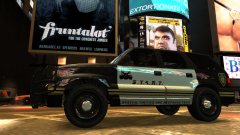
From the album: Gerhart67's custom textures
One more shot -
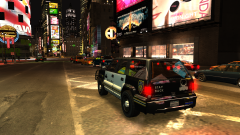
From the album: Gerhart67's custom textures
Only one skin so far but K-9 in the works for S.T.A.R.T. and Police -
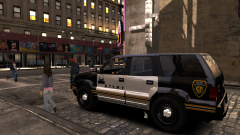
From the album: Gerhart67's custom textures
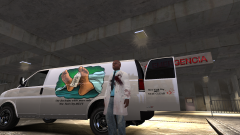
S.T.A.R.T. got a new vehicle -
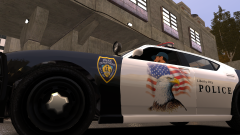
From the album: Gerhart67's custom textures
Don't know if you can see it in this shot but the LCPD logo has been modified. Instead of two cops dragging a suspect it's three cops arresting a suspect. -
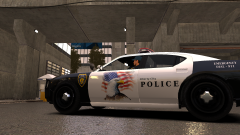
From the album: Gerhart67's custom textures
New one for the buffalo -
-
 You're welcome, I hope you like it.
 -
Ok well i was just wondering because in my game I do not have that other that reads LCPDFR 0.95 RC2 on the bottom.
-
Did you install the right one? There is .91 and .95 RC2. The later is the version you want .95
-
Yup either Winrar http://www.rarlab.com/ or 7zip http://www.7-zip.org/
-
If you bought it off Steam then the location is Local Disk ( C )/Program Files (x86)/Steam/SteamApps/common/Grand Theft Auto IV. If you're not on a 64 bit system then its just Program Files without the x86. If you installed Steam on a different drive then go to that drive.
-
From the album: Gerhart67's custom textures
Here is the speedo for the METT/Coroner mod as a New York City version. Files have been uploaded for both versions just waiting for approval. :) -
-
Hi sterling_Silver, you should really check out this thread. This is the go to area for people requesting skins and such. '?do=embed' frameborder='0' data-embedContent>>
-
**** Decal/skin made By Gerhart67 **please keep this at www.LCPDFR.com** and not anywhere else. I would really appreciate it. **** This is a decal ( I call it a decal ) for Rockstar's speedo ( model not included, it's in the game silly ) to go along with Abraxas's METT/Coroner mod located here **** using this without the mod is really pointless so download it. Believe me it's worth it. While you're at it you might as well grab his other mods and I know you'll want to give me a hug after you do. **** There are two versions, one for Liberty City and one for New York City **** -------------------------------------------------------------------------------------------------------------- !!!!!!RULE NUMBER ONE WHEN MODDING ANYTHING---MAKE A BACKUP COPY!!!!!! <--This is a commandment and THE commandment no other shall come before it. *********How to install using OpenIV**** ***please note this is to replace speedo_sign_1 as that is what the mod METT/Coroner uses*** 1. MAKE A BACKUP COPY ( remember modders commandment ) of the vehicles.img file located in: Grand Theft Auto/GTAIV/pc/models/cdimages 2. Extract the files using your archiver of choice to a location you will remember. I use Winrar but 7zip will work fine and it's free. 3. Start OpenIV, go to pc/models and double click the vehicles.img. 4. Now either press F6 or click on Edit mode at the top. This will give you a warning about making changes, press YES. 5. Scroll down until you find the speedo, we want the textures so we specifically want speedo.wtd. Right-click the speedo.wtd and choose EDIT. 6. Highlight the speedo_sign_1 by clicking once on it, then choose REPLACE located at the upper right area of the window. 7. Another window will pop up. Locate your desired version of the decal/skin at the location you extracted to. SpeedoLC is for the Liberty City version and SpeedoNYC is for the New York City version. 8. Choose either speedo_sign_1lc ( for Liberty City ) or speedo_sign_1nyc ( for New York City ) and then press ok. Don't worry about the name, since you are replacing and not importing it will automatically keep the same speedo_sign_1 name. 9. You should see that the decal/skin has changed. Now with speedo_sign_1 still highlighted go to PROPERTIES located up by the REPLACE you just used and click on it. A little window will pop up and we want to change the MipMaps to 4. Click on the little down arrow and choose the number 4 then click OK. 10. Now choose SAVE located down in the lower right corner. 11. ********This next part I'm not sure is necessary but I do it to be safe.******** 12. Now click on "File" located at the upper left corner and choose "Rebuild". Another window will pop up so choose the vehicles.img and click "Rebuild" and wait. After it rebuilds choose either yes or no, depending on what you want to do next I choose no. Now I double click on the vehicles.img file again and notice it will automatically go to Edit mode so to make sure I'm out of Edit mode I click Edit mode again or hit F6. If you get a Fatal error when loading up after this is installed ( or any skin ) just open up OpenIV again, find the vehicles.img and click on Edit mode. Choose yes then click Edit again to disable it. We're just making sure it closes out of Edit mode. If you find that your scripts aren't loading then, while in game, double check by trying to bring up the console with the tilde key ( this key "~" located above the TAB key ) . If the console isn't coming up reload your save in the Game menu. If it does come up then type "reloadscripts" without the quotes. Wait because it will freeze for a few seconds. When the console shows back up hit the tilde ~ again to remove the console. Now go have some fun!! That's another modders commandment. Stay Safe. Gerhart67
- 6 comments
- 4 reviews
-


