



YoshePlays
Members
-
Joined
-
Last visited
Everything posted by YoshePlays
-
Loved the editing dude, some of the camera work and editing such as the tracing shots or transitions were sloppy at times, but it's still creative and amazing regardless, I can see the effort put into it. Keep up the good work!
-
台灣人?
-
You can just install regular sirens and port "archive fix" to make it FiveM compatible.
-
-
 Haven't been on the 0.4 lspdfr much lately but here are some point I want to point out. 1. This mod was last updated on December 5, 2018, therefore if it's incompatible with 0.4 then it's sad. 2. This mod is not a LSPDFR Addon, but a RPH plugin, therefore it shouldn't conflict in the first place. 3. As a beta tester for this mod, this mods seems fine when I tested the latest version. 4. This works on any type of vehicle, just that the supported vehicle will have the rifles/shotguns(as an extra) remove/added on in the central divider of the vehicle. 5. Make sure the modifier key is pressed as well, unless if you don't want it then set it to none. 6. Define "Not working" 7. I've never seen a sniper rifle in a patrol vehicle, stop asking for it, it will not be added. 8. Visual armour is not part of the functionality of this mod, it may be considered, but it's not the main point of this mod. 9. It should load when you type it in the console/the start of the game, not when you're on duty. If it does load during the moment you go on duty, then you're probably referring to other mods, as it would not load under the lspdfr folder. Perhaps you were referring to a mod called "HoldUp"?
- 135 comments
- 22 reviews
-
You're using the updated version of audio encryption, revert to an older backup file with these audio hashes to allow it to use these instead of the newer file names.
-
-
Perhaps it's due to the amount of LSPDFR add-ons, causing RPH to freeze and block the plugin, try opening the RPH settings, and set the "Plugin timeout threshold" to "60000".
- 135 comments
- 22 reviews
-
Neither should it be conflicting with STP. Please state what problems you're facing with the plugins for me to understand the situation. Also make sure you have installed these plugins correctly.
- 135 comments
- 22 reviews
-
-
.thumb.png.28aa0963faa0c6b7fe8ec683d28ec677.png) Damn budget cuts be real with this shit mobile 11/10 Realistic in terms of police budget these days 10/10 Livery 0/10 Not Small Enough
Damn budget cuts be real with this shit mobile 11/10 Realistic in terms of police budget these days 10/10 Livery 0/10 Not Small Enough- 17 comments
- 5 reviews
-
-

- 1
-
-
Np, I feel like it'd more realistic to have a visible vest than just magically having an armoured body, that's why I usually have 2 premade uniforms in the EUP Menu, one with a vest and one without, so that I can swap between the 2 uniforms when I put on/remove the vest.
- 135 comments
- 22 reviews
-
That's just video editing really, I recorded the part where I put on the invisible armour vest and medkit and then put on a premade uniform I've created in the EUP Menu, but it was cut from the gif so that it would appear as if he really did put on a vest.
- 135 comments
- 22 reviews
-
-
- 1
-
-
-
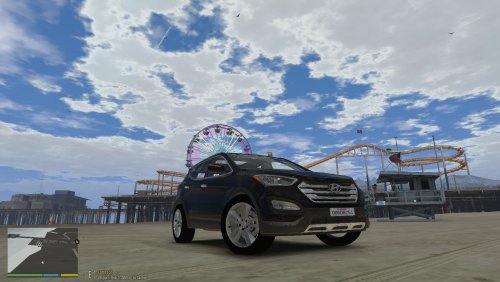 You should add a preview in your file to assist others in understanding what your audio mod sounds like, before they download it. This can allow people to determine whether they want to or don't want to download your file.
 -
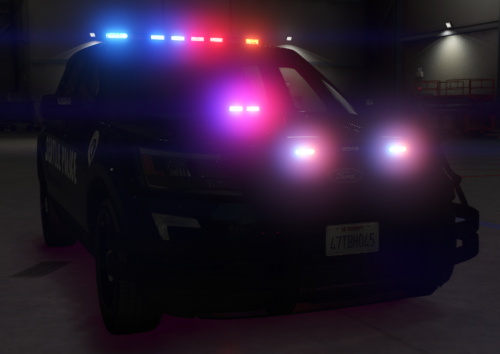 Not really a fan of the liveries, but the car model and the lighting on it is absolutely amazing, rating it a 5 star.
- 14 comments
- 7 reviews
-
-
Thanks! Found out the problem asi files are EnableMPCars.asi[It was stated in the download site], either NorthYankton.asi or openCameraV.asi[Didn't bother to further narrow it down since I don't use both of them that much].
-
-
Ah, thanks! But question, how do you know they're the ones causing problems?
-
Picture says it all.

-
GTA V Folder: https://imgur.com/8y2TG9P Scripts: https://imgur.com/39MLql6 Plugins: https://imgur.com/vriaucK LSPDFR Add-ons: https://imgur.com/NxcE7Pp For your information.
-
So, it's update season again, and so are the crashes that come along with it. I've currently updated Ragehook, Scripthook, all those fancy stuff, copied the new update.rpf to the mods folder, reinstalled what I had in it, but of course, as expected, GTA V starts crashing at the last stage of loading it in. I've already updated the gameconfig to the newest update. Well, in an attempt to see what the problem is, I tried for like 3 hours to reinstall and reinstall, trying to see what the problem is, but to no avail. Then I just tried to use the vanilla update.rpf, and somehow, it still crashes the game. I've even tried to remove the whole mods folder, and yet, it still crashes. Note that I do not have RPH plugins running, so it's definitely not the problem here. Here is the RPH Log: https://pastebin.com/HJWXqD6w
-
It's actually a program and not a plugin, I just edited in for realism sakes. http://www.aleir.com/ You have to host your own online/local server though, I'd recommend hosting a local server only if you're the only person who will use it. For something similar in game, use computer+.
-
.thumb.png.28aa0963faa0c6b7fe8ec683d28ec677.png)


