


Hystery
Members
-
Joined
-
Last visited
Everything posted by Hystery
-
Either the files wrongly installed, or you messed up te carvariation/vehicles.meta files. Reinstall everything properly, on a fresh setup.
-
Yeah, I have that too and I don't think it can be fixed.
-
Alternatively, look for your trainer .ini file at the root of your GTA, open it, press Control+F at the same time to open the search bar and type 'keybind', once you've found a line looking like 'Enable Keybinding=1' or similar, replace the '1' by '0', and save.
-
Why were you doing a diagnostic tool check in the first place?
-
$250. k.
-
Yes, many of them. Use the search bar on the top right.
-
vehicles.meta file in update/update.rpf/common/data/level/gta5 Look for the slot you want to modify, once found scroll down to the <handlingID> line, and change the name of it. Alternatively, I believe this question has already been asked in the past, so you could try using that little thing on the top right called a search bar, it'd give you all the answers you need.
-
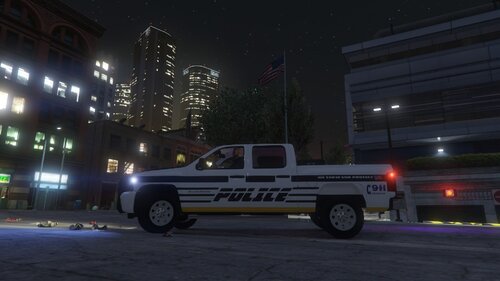 I'll try to be constructive. The font: it's clearly not the best you could find around IMO. There are many, better fonts for police liveries. The colors: the mix of red and blue for the 'POLICE' is... simply not working. It's not easily readable, especially when the blue is rather pale while the red is so overbright and saturated. Try to stick with one color for one word The livery itself: A motto would be nice, as well as a 'Call 911' of some sort somewhere on the car. It's lacking this kind of detail to make it stand out and look decent. A badge of some sort would also be nice.
- 2 comments
- 1 review
-
If you know what you're doing, no, the update can't happen without your consent. This guy most likely didn't pay attention to Microsoft policies, or even to the THOUSAND of news articles about W10 upgrades and forgot to untick the automatic upgrade/update. Not the OS' fault if he's dumb. Besides, I call HUGE bullshit on that. When the computer shuts down to upgrade to W10, it shuts down every other single program. Everything. So his livestream should have been shut down as well even before the restarting screen was shown. His game would have been forcefully closed, then all his programs, then his computer.
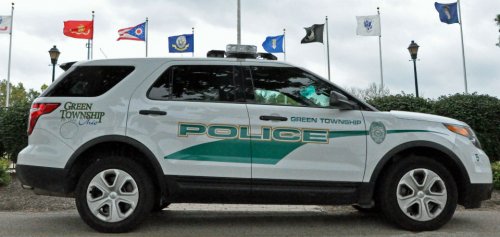 It depends on the model. Some models have their license plates on the template, some have their license plates automatically spawned from the vehshare.ytd file. There's nothing you can do about that.
- 4 comments
- 1 review
-
-

- 1
-
You'd be better off asking that on computer related forums, they'll be able to direct you much better than we can.It's indeed very much less evident IRL, but it's still easily noticable.That's how the headlights are. Even IRL. The right headlight lights up further away to enlighten the side of the road, in case of a pedestrian, cyclist or animal, or any danger coming from the side of the road.That comic strip is about baseball. Anything is better than baseball. As for your question, no. Nothing will ever replace the real thing, because it's two different experiences.I suggest you use that little thing on the top right, called a search bar. I've seen many people creating thread for this very problem, and I'm preeetty sure they've fixed it. So off you go, little Derek!I'm pretty sure he made in terms of mechanics, and not in terms of direct, actual gameplay.Might be possible, but considering LSPDFR is not configurated for North Yankton, you might encounter bugs and the like. Most callout plugins won't work either I assume, as they wouldn't have been configurated to spawn in this area. But I might be wrong.A quick search on Google can give anyone the various ways to disable automatic updates on Windows 10. Like here, or here, or here, or there. It just requires 5 seconds typing and 5 minutes following the various tutorials blooming all over the internet. Really, people complaining about automatic updating are just following a common belief without checking for themselves if it's true or not. In 6 months of using Windows, never my computer restarted by itself for updates. Like, never. I don't know what people are doing for it to happen, but it's certainly more of their fault and less of the OS fault. As for the cases of unwanted upgrade, well... it's not like no news feed mentioned it. Many people, journalists and experts called out that thing, that they should untick that update thingy on their Windows 7/8. If they didn't listen, inform themselves or just show some care, it's on them. I don't mind calling out the bad things about Windows 10 when they are actually truly on the OS side, but if the supposed problems are just caused by the user, I find it a bit too much.I've noted very few differences between Windows 7 and 10, so I don't know exactly what you're saying by that. Sure some people got some problems with their files when they upgraded, but that's the risk of upgrading, it'd be the same for any OS really, it's not particularly Windows 10's fault. Besides, the great, great, GREAT majority of people had 0 problem once they upgraded, so those are minor cases that might also be related to how they configurated their Windows 7 before the upgrade and what they did with it. That's a common popular (and biased) belief, which is actually... well, false. First, you can turn off automatic updating, and second, well... they never tried to take control of people's computers. And the supposed 'data' Microsoft is collecting from Windows 10 users are exactly the same as they were collecting from Windows 7 users. And they're all pretty harmless, since it's hardware and OS data.I've Windows 10 since december and I had 0 problem running all my games. Like, all of them. And I've a Steam library of 93 games. I suspect the people you talked to to not be able to configure their computer and OS correctly. Windows 10 uses less resources overall than 7. It boots faster, runs faster, so there's no reason any game would have less frames than it did with Windows 7, left alone Windows 8.Pretty sure (like 101%) that the problem you have have already been fixed in the past by other people, so I'd suggest you use that little thing up the page called 'search bar', and you'll find what you need.You most likely forgot to change a specific line somewhere, I used many vans to replace the police transport and they all worked. Make sure to install everything correctly, and if it still doesn't work, try replacing ONLY the model, and not the vehicle lines. In the Arrest Manager .ini file.If I recall correctly, Skin Control has to be installed at the root of your GTA V, where your gta5.exe is. Make sure it's installed at the right location.

