



sjain
Members
-
Joined
-
Last visited
Everything posted by sjain
-
-
Go to C:\Program Files (x86)\Steam\steamapps\common\Grand Theft Auto IV\GTA IV\ELS and open _SLOTCONTROL.ini Delete everything in it. Replace it with this: // ELS VEHICLE SLOT CONTROL FILE (ELS-IV V8.5) [ AMBULANCE ] Status = on File = default_config [ FBI ] Status = on File = default_config [ FIRETRUCK ] Status = on File = default_config [ NOOSE ] Status = on File = default_config [ NSTOCKADE ] Status = on File = default_config [ POLICE ] Status = on File = default_config [ POLICE2 ] Status = on File = default_config [ POLICE3 ] Status = off File = default_config [ POLICE4 ] Status = off File = default_config [ POLICEB ] Status = off File = default_config [ POLPATRIOT ] Status = on File = default_config [ PSTOCKADE ] Status = on File = default_config If that doesn't work get back to me :D
-
you can reset the admin password if that's fine by any means
-
make sure you have "Ai_Els_Sp" (no quotes) set to 0. make sure you don't have FinKone's Police Orders installed, seems to cause crashes now. rip :( When you uninstall GTA IV make sure to delete the folder! Retail: C:\Program Files (x86)\Rockstar Games\Grand Theft Auto IV Steam: C:\Program Files (x86)\Steam\steamapps\common\Grand Theft Auto IV If you have the steam edition follow the shortcut part of my guide:
-
Next time always backup save games even if it seems stupid... it pays! Try getting a vanilla vehicles.img and then re adding them in. A known issue is that some of Dave's old mods don't like LCPDFR 1.0 and above :( You should use lcpdfr 0.95 for that.
-
@mr911matt my findings helped me a lot. I made a guide:
-
DM me if you have further issues. Follow the guide above.
-
yes it is the dirt level.
-
also, if you have FinKone's Police Orders Mod installed, remove it.
-
Re-install is the only solution if you did not backup visualSettings and the Shaderoverdax1 folder EDIT: DM me
-
Sounds great! Will try when I finally get back to V. Where can I download the sirens?
- 4 comments
- 1 review
-
Thanks for this! I agree, we got some very nice content this month :D
-
Sam's mod made my childhood, and in my eyes turned GTA 4 into one the biggest modding community highlights Imhave seen in a game ever. I love GTA 4, it feels like you are in a real city, no constant update, modding is easy and the mods have increidble detail, range, quality and effort in them. It was the best combination of everything. And lcpdfr's creation took full advantage of this, as a result LCPDFR is the most realisitc experience I can ever find. And it is all for free. it's a real rollercoaster ride in IV, the missions are great, you really feel for the characters and sometimes hate them, the modding community is great, huge range of mods, all detailed, and loads of effort put into them. And the lcpdfr.com community, is amazing. As a result It's the best feeling ever to boot up the game and go on a patrol. Because of Sam, I discovered GTA 4, modded and played it for a few years (thoroughly enjoyed it) and still play it today, and it's a game I will always treasure. Sam showed me what it's really like to be a police officer of America. HAPPY BIRTHDAY LCPDFR WITH LOVE!
-
Dude check your cpu and gpu temps now with OpenHardwareMonitor, and open it up it's full of dust. It could die man!
-
 Thanks! I remember him emailing this to me, and it was a great piece of work that would end up at the bottom of gtapolicemods.com, thanks for changing that :D
- 17 comments
- 2 reviews
-
.thumb.png.89d479af631653fefb1c508c84b8ea55.png) Been using this for so long. Found it in the depths of YouTube - very high quality models and textures but no texture loss. A saviour to the community, never seen this much effort all for free...
Been using this for so long. Found it in the depths of YouTube - very high quality models and textures but no texture loss. A saviour to the community, never seen this much effort all for free...- 35 comments
- 8 reviews
-
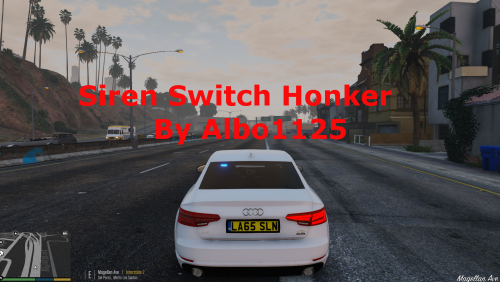 Mod works like a dream @Albo1125. I was looking at the private GTA 4 version of this mod on Double Doppler's channel just yesterday and I felt sad that it wasn't in GTA 5. I'm genuinely not joking. There's something in this guy's mind. No joke.
- 48 comments
- 18 reviews
-
-

- 1
-
-
Great idea but crashes my game in pursuits, shots fired callout, and homeless people callout, and I have spent 3 hours determining the cause and I know for a fact it's this. My PC can handle the game perfectly fine etc.
- 48 comments
- 5 reviews
-
Thank you so much bro, you're a star, so friendly and helpful to this community. I noticed it yesterday :)
-
Thanks! I genuinely never knew that, I always learnt to use tags when we had the old website. Thanks for clarifying! Will edit accordingly. Yes, I did hit the delete key, so I might have hit insert. Also never knew that. Will keep in mind. That's the type of reply I expected, because I has a small feeling that it was some feature I didn't know about. Thanks for the heads up! I do apologise, I actually really love this site and it's community. But as usual, I was roasting in my room because of computer heat and I was tired, and wasn't thinking straight. That's the reason for my signature. It happens. I've done it a lot of times, but maybe it's something never found yet?
-
1. The text insertion point. Seems (at least to me) to occur when you put a spoiler in a post then edit it, and sticks, even after you refresh the page. when you select somewhere to type when this bug has occured, and type in something, it replaces the text ahead of it, like in Command Prompt! https://www.youtube.com/watch?v=0Brj7BwUZCI EDIT: Community Replies - Some suggested that it is caused by hitting the Insert key, which I may have done (I pressed delete and have clusmy fingers) and some mentioned that it is a real bug. Site admin confirmation would be widely appreciated :) 2. The spoiler bug Doing spoiler_bug.txt seems to put all the content under the first spoiler, including spoilers and their content, into the first spoiler. Unfortunately everything inside seems to be trapped there, and I can copy it but it messes up the font, even when it's the same. I will assume it's something on my end for now. EDIT: Community Replies - Just like 'bug or not bug' number 1; some people suggest it is BBCode which causes this, and some suggest that using the main spoiler button (not BBCode) still causes the issue. I can't confirm if the bug exists or not when not using BBCode, so would really appreciate an site admin's confirmation.
-
I have the same issue. I just made this!!! Use that and my commandline if you want to -nomemrestrict -norestrictions -availablevidmem 10.0 -percentvidmem 100 -shadowquality 3
-
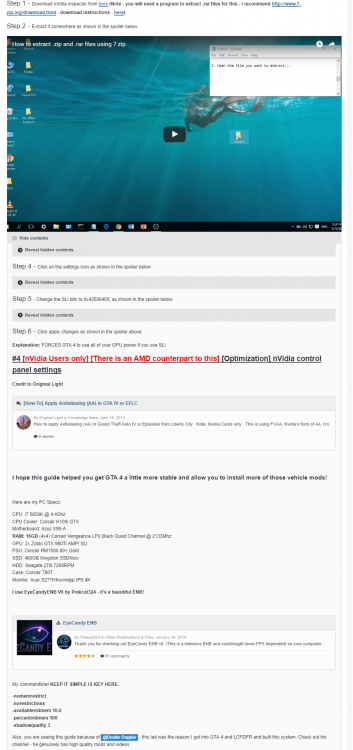
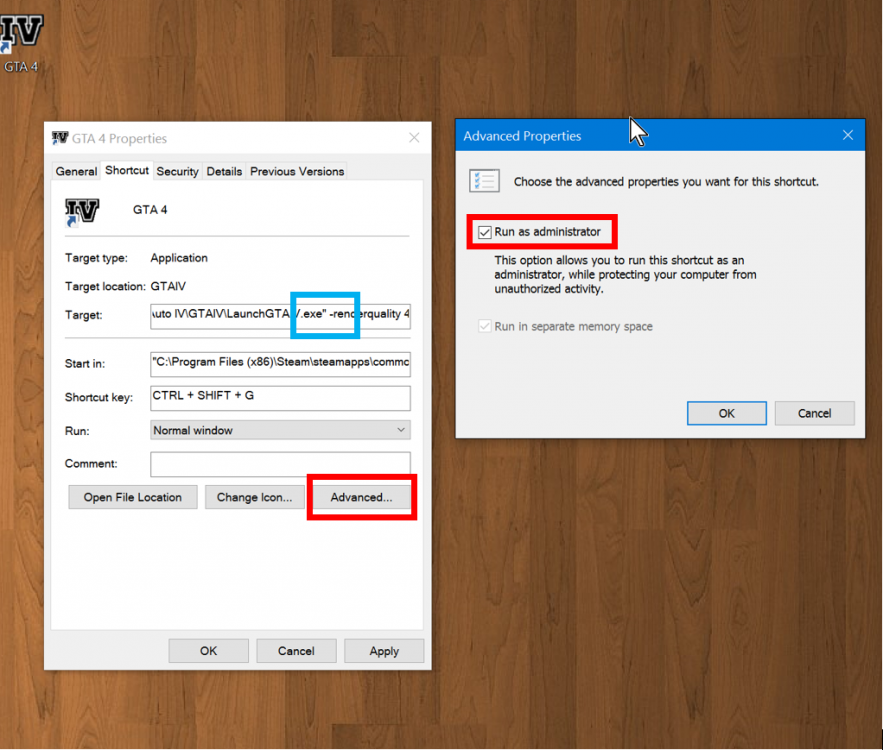
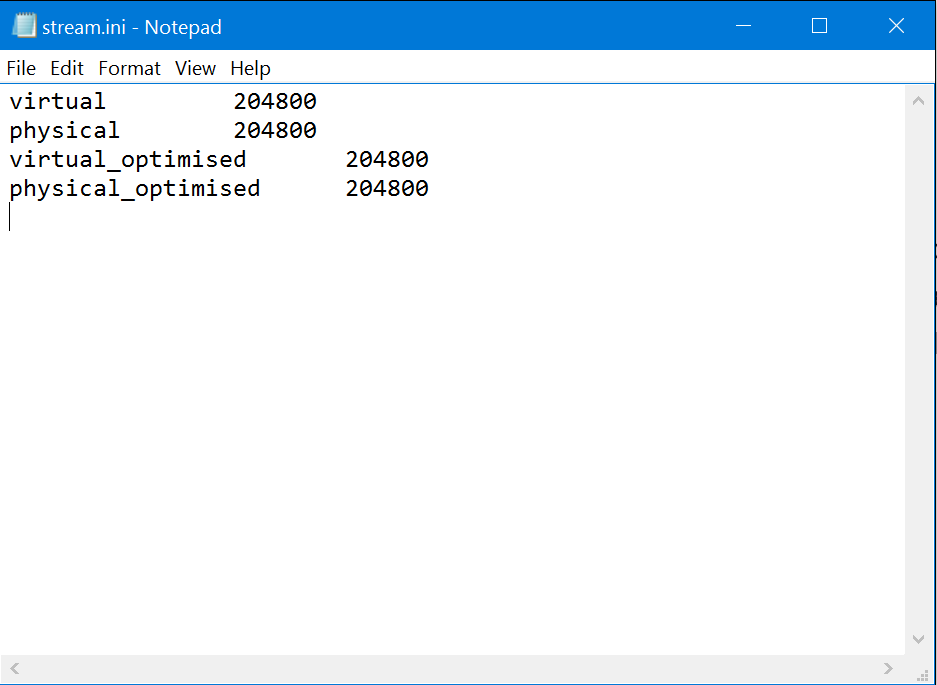
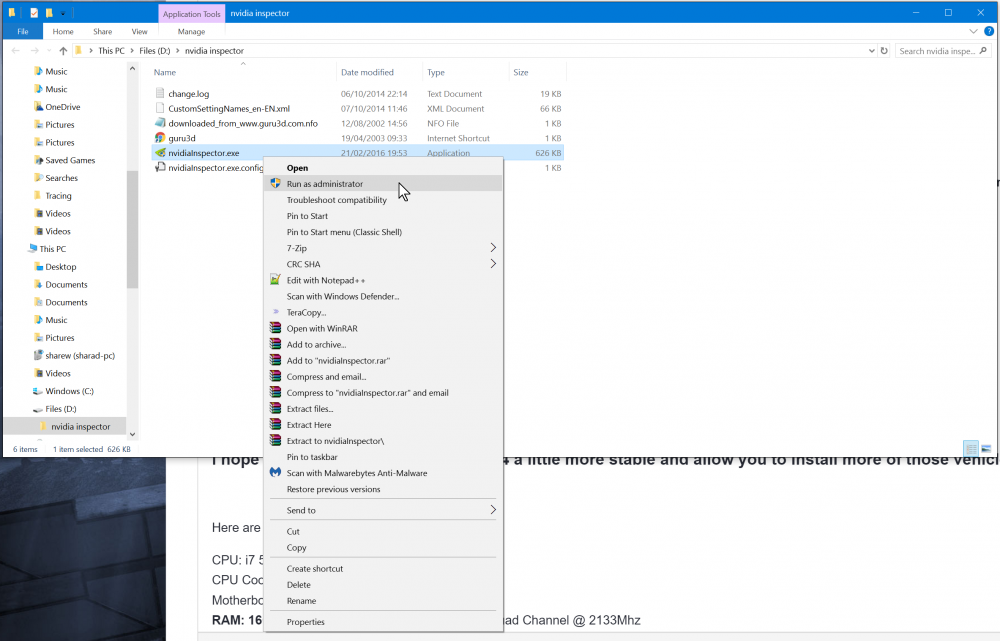
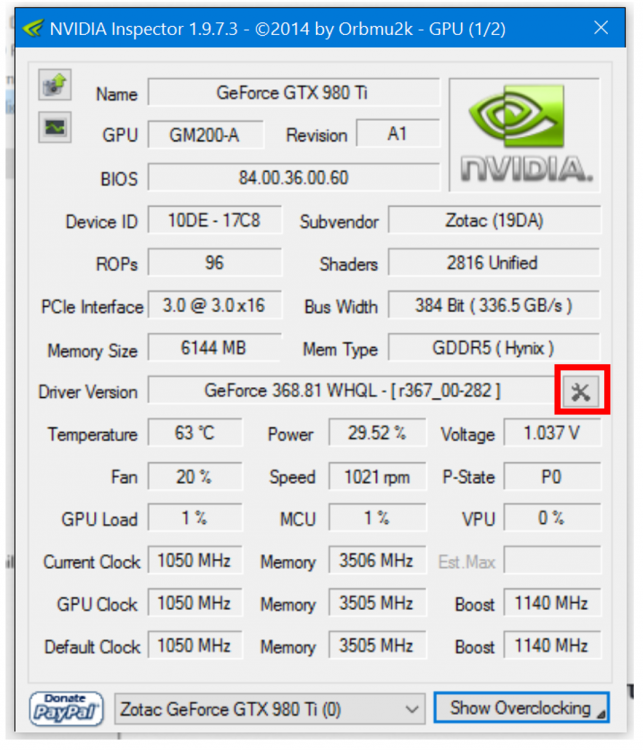
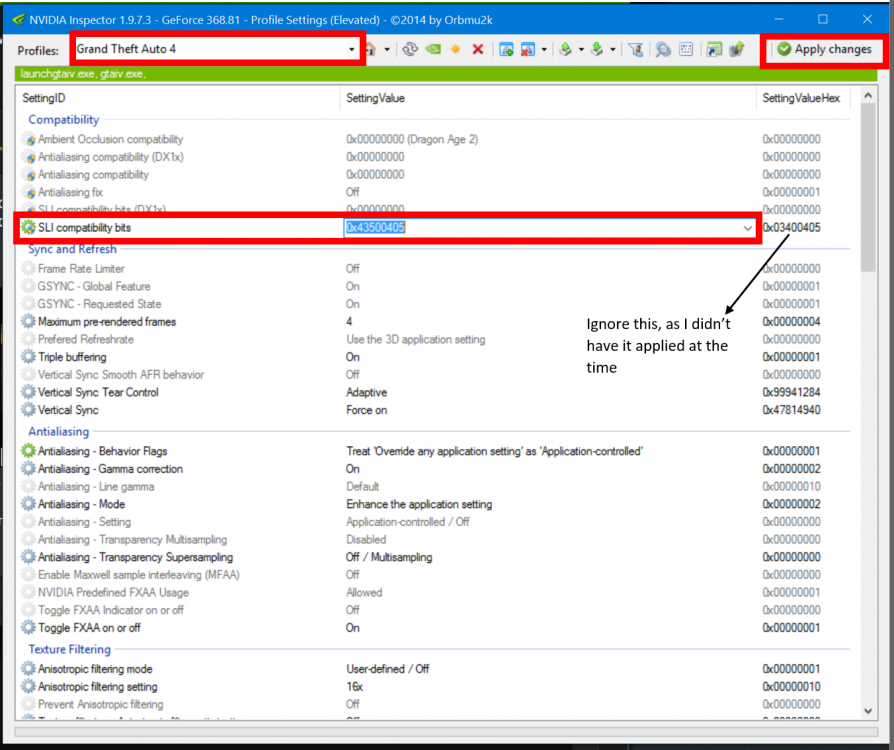
Fixes that will improve your experience in GTA IV and LCPDFR! This will take at least 20 to 30 minutes, depending on your computer skills. #1 (Steam only) Screenshot spam bug. What is it? If you noticed, launching GTA 4 from the Steam client and using an Xbox controller causes it to spam screenshots, killing FPS and filling up your hard drive unnecessarily. Solution? (Retail users do this as well!): Create a shortcut. How do I do that? Step 1 - Go to C:\Program Files (x86)\Steam\steamapps\common\Grand Theft Auto IV\GTAIV for steam users, or C:\Program Files (x86)\Rockstar Games\Grand Theft Auto IV\GTAIV (If that folder exists) and right click on LaunchGTAIV.exe. Click on Create shortcut. It will either place a shortcut on the desktop or in the game folder. Step 2 - Rename the shortcut to what you want. If the shortcut was placed in your GTA folder, be sure to move it desktop for easy access. Step 3 - Right click on the shortcut. Click on Advanced, and make sure the red box areas match the screenshot below: Click OK on the box on the right, then Apply then OK on the box on the left. That's it! Now always launch the game from this shortcut! Explanation: Just launching the game from Steam, despite having the overlay disabled, causes the screenshot spam bug, and means that you can't run the game as administrator, also meaning that sometimes scripts can't access the right resources. I also recommend forcing your command line as launch options as well, for good measure. Paste your command line into the 'Target' box like in the Shortcut properties box above. Be sure to paste it like in the blue box above, leaving a space after the ". Separate your commandline variables with a space in the shortcut only! This doesn't happen by default! #2 Stream.ini editing NOTE: For this to work, you must complete this guide first: What is it? It's a file that tells the game how much RAM it is allowed to use, and editing this reduced texture loss for me. Note: Editing the file just removes the limit, it doesn't force GTA IV to use all of your RAM. The game will usually use 2GB of RAM on the ground in a car. How do I edit this? Step 1 - Go to: C:\Program Files (x86)\Steam\steamapps\common\Grand Theft Auto IV\GTAIV\pc for steam users, or C:\Program Files (x86)\Rockstar Games\Grand Theft Auto IV\GTAIV (If that folder exists)\pc and find the file named "stream.ini". Right click on it, and select "Open with". Then click on "Notepad" (I recommend ticking "always use this program to open these file types") You will see this: These numbers are the amount of RAM that GTA 4 uses. Options: 1. The game can use up to 3GB of RAM, for vehicles, scripts and rendering. (Recommended if you have 4 to 6GB of RAM) 2. The game can use up to 4GB of RAM, for vehicles, scripts and rendering. (Recommended if you have 8GB of RAM) 3. The game can use up to 8GB of RAM, for vehicles, scripts and rendering. (I use this because I can, and my PC can handle it - example) For all of the above, make sure you select everything in the spoiler and replace the full contents of stream.ini Explanation: Improves memory usage of the game. #3 ProcessTamer (Pasted and edited from here - Credit to ObsessedWithGTA4 at gtaforums.com) What is it? It's a program that forces the affinity of programs based on the user's rule - this means that GTA 4 can take full advantage of our computer's resources. How do I do it? Step 1 - Download Process Tamer - here Step 2 - Install Process Tamer Step 3 - Load Process Tamer Step 4 - Go to Configuration and ENABLE "Start with Windows". Step 5 - Go to Configuration and DISABLE "Tame applications based on CPU Usage". Step 6 - Load GTA IV PC Step 7 - After the game has loaded and is at the Main Menu press ALT+TAB minimizing the game. Step 8 - Load up Process Tamer (There will be a icon near your clock) Step 9 - You will now see a few things in the Processes section of Process Tamer: GTAIV.exe gta4Browser.exe RSC.exe Step 10 - Under the Priority section set GTAIV.exe to HIGH Step 11 - Under the Explicit Rule set GTAIV.exe to FORCE HIGH Step 12 - He (and I) also set gta4Browser.exe (loads GTA IV files while you are playing) and LaunchGTAIV.exe to the same settings as GTAIV.exe but it's probably not necessary. Step 13 -Close the game and restart it. After the game has loaded to the Main Menu for the second time, ALT+TAB again. Step 14 - At Windows desktop, right click on your start bar and select "Task Manager". Step 15 - In the Windows Task Manager click on the Processes tab. Step 16 - Locate GTAIV.exe and right click on it and select "Set Priority", it should now say HIGH. Explanation: Allows GTA 4 to take full advantage of your computer's resources. #3 SLI bits (Nvidia SLI Users only) (Idea from here - Credit to Kingping1 at forums.geforce.com) What is it? It's a small driver modification for make GTA 4 use both of your graphics card the way they should. How do I do it? Step 1 - Download Nvdia inspector from here (Note - you will need a program to extract .rar files for this - I recommend 7Zip - download instructions - here) Step 2 - Extract it somewhere. Guide here. Step 3 - Run nvidiaInspector.exe as administrator as shown here. Step 4 - Click on the settings icon as shown here Step 5 - Change the SLI bits to 0x43500405 as shown here Step 6 - Click Apply changes as shown here Explanation: Allows GTA 4 to use all of your GPU power if you use SLI #4 Nvidia control panel settings (Nvidia users only) (There is an AMD counterpart to this) Credit to Original Light: End Hope this guide helped. I recommend EyeCandyENB V6 by Polecat324. My commandline: -nomemrestrict -norestrictions -availablevidmem 10.0 -percentvidmem 100 -shadowquality 3 This guide can be found on steam here Images I can't remove (ignore):
-
What are your pc specs? The text cutoff is caused by windows scaling, in control panel. Try lowering it.
-
Cheers man. Will do.

.thumb.png.89d479af631653fefb1c508c84b8ea55.png)


