
sjain
Members
-
Joined
-
Last visited
Everything posted by sjain
-
Nice to hear! Can't like your post because I have already given 30 likes today...
-
Try re-installing the ragehook files @elliotferenc and make sure u have all of the dependencies installed
-
Re-install all of the taser files. I said that cause I can't think of anything else :(
-
I have the exact same problem @hellfire343! I think it might be simple native trainer or something, only started after I messed about with it. The spawn 6 of them on cavcade jeeps, all with carbines and there are hundreds (literally) spawning and killing me, not a callout at all, never changed any ini files or installed new ones :(((
-
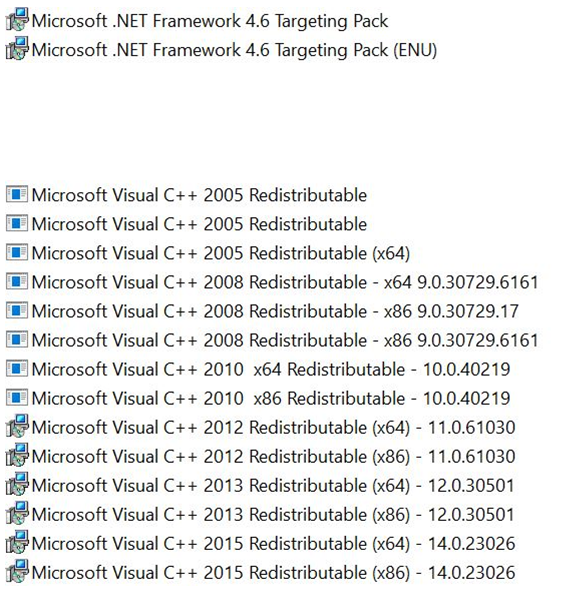
@gamer516 @DefconGalaxy I have the same problem... missing dependency? Maybe, I have attached a FULL list of them. I HAD THE SAME PROBLEM: But @Kilyin here fixed it. Quoted from Kilyin: If you haven't figured this out yet - You can't run RPH from a copied folder. You'll have to rename the original folder to "Grand Theft Auto V - Vanilla" or something similar, and rename the copied (modded) folder to "Grand Theft Auto V". Dependencies:
-
Yes, it is the car variations file. I tried re-assigning another slot but it just crashes... idk why. Make sure there are not empty lines in-between the file. But I can definitely say it is the carvariations file.
-
Have you installed the drivers? https://support.xbox.com/en-GB/xbox-on-windows/accessories/xbox-controller-for-windows-setup
-
Aw man feel so bad for you. At this point I do not know what to do... I did a google search, linking some topics for you: Try re-installing the graphics card driver? Try taking out the graphics card and putting it back in? (Don't forget the PCIe screws and power cable) https://steamcommunity.com/app/271590/discussions/0/451850849193565142/
-
What are your computer specs? Use Speccy (https://www.piriform.com/speccy/download/standard)
-
oh... Try a restart? :P Sometimes frees up a little RAM... how much actual RAM do you have free (task manager)
-
try re-installing the taser? Don't know about this, it should work :(
-
Which vehicle mods do you have installed, and in which slots? Your specs seem way more than enough for 1080p. Nice rig :D
-
Ikr... But mods mean that rockstar isn't making money off original ideas, so they completely fuck them. Then they'll release loads of overpriced DLCs, also breaking more installs.
-
I feel really sorry for you. Yeah, Rockstar made such an amazing game but completely wiped out half of the community by making modding so FUCKING HARD!
-
Yes my hero!!! Exactly what I wanted - a google drive link.
-
Guys shut the FUCK up. STOP ARGUING! all I want is the gta launcher and gta exe files for the old patch... I don't have any backups :(
-
@Play3r2 @Izhevsk Seriously??? You just start a flamewar?!?!?!? I saw your post @TheDude my backup don't seem to work can you PM me the files? I can re-install mods etc... I really need the files :( I have no working backups :(
-
My GTA 5 Install auto updated - now I've lost ALL of my mods. I have a backup of update.rpf, but not my sound or weapon files, and I pasted in my old GTAVLauncher.exe and GTAV.exe and steam hangs on 'Preparing to launch GTA 5' and Ragehook doesn't work... Any help for downgrading? Very annoyed :@
-
Haha sorry I am a bit of a nub here xD. @Sam
-
You'll have to talk to somone fro, G17 Media as they made this video. The skins are custom made and I can't see them online... So go to Sam or Iconography's profile and click on the message icon to PM them
-
It's illegal to reupload it, but just look for it on google, so many have done it.
-
Sorry bro, I just got onto my PC and remembered I had MSI Afterburner, which comes with RivaTuner... Thanks for your time - I will try and see if killing the process works. Meanwhile I will miss the hype train... 10pm in England is when the LSPDFR stream starts :(
-
It wasn't that - thanks for the help though. Basically when I launch ragehook, the game itself works great, but when I go to my steam profile it does not show the hours I have played at all. To explain the overlay - I had to disable that because while sprinting (Shift) I have to change weapons (Tab) and these keys together bring up the steam overlay :/
-
My modded game works perfect - I love it. Really fun. But the steam fps counter, steam overlay and my in-game hours don't show up anywhere on steam or ingame, I did disable the steam overlay in steam settings, cause it gets in the way of the GTA 5 keyboard controls, but shouldn't it leave everything else alone? Thanks :D
-