Creators: Due to background reprocessing of files, approvals and file security checks may be delayed. Thanks for your patience.

sjain
Members
-
Joined
-
Last visited
Everything posted by sjain
-
Can't help you then sorry. All I can say is while you are in-game hikd the Left Alt Key and tap Enter - you will get a bluw box in the top left. Keep scrolling in it until you get to reflections and play around with some settings. If it goes wrong, just restart the game. If you find nice settings, then scroll to the top of the menu and click 'SAVE CONIGURATION' and close it. You can find the mouse by moving it around until you see a spinning arrow thing... Hope you understand this.
-
Sorry don't have skype... Lmao don't ask. I am also busy now, my replies with be delayed sorry man :(
-
Download it for a start, then copy and paste all of the files from he downloaded ZIP file into your GTA 4 folder. GTA 4 Folder Location: C:\Program Files (x86)\Rockstar Games\Grand Theft Auto IV (note there may be a 'GTAIV' folder in there, put the ENB files in there) GTA 4 Folder Location (Steam): C:\Program Files (x86)\Steam\steamapps\common\Grand Theft Auto IV\GTAIV When installing any ENB for GTA IV, I also highly recommend applying this to your GTAIV.exe in your GTA 4 folder:
-
@Kilyin I have fixed the problem!!! :D It was a missing C++ Dependency. Now everything works great. Mods - close this topic if you like, it was a unique problem.
-
I tried, no luck. Maybe a second restart may fix it. Also I forgot to attach my .NET dependencies...but I'm getting to bed now lol. Will report back later.
-
Very nice picture shown, particularly like the last one by AlexVonShep
-
-
Damn, sorry. I was blinded by my desire to play it! But @Stevetrackboyz managed to do it, have messaged him on youtube but I guess it won't work
-
@Kilyin I really should've done that. Not in-game now but I am assuming N will work. I have no ScriptHookV.log! Means it never ran, which means I definitely have some missing dependency. Thank you very much for you reply asiloader.log: Seems to have failed to load everything.
-
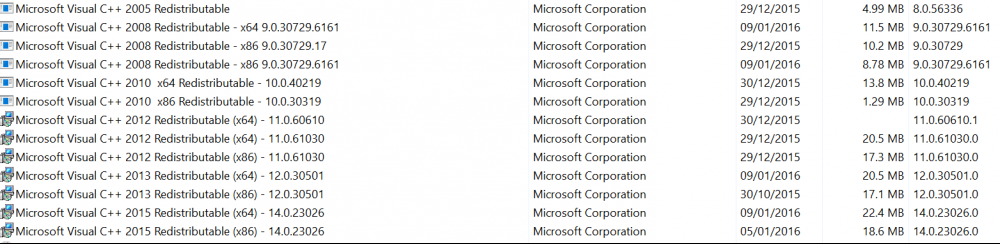
Hi everyone, Literally every single ASI mod I have tried to install has not done anything at all in game. I suspect it is because of my dependencies, they were always messed up in Windows 10 for me. I have attached an image of all my dependencies, but I would love it if someone could link me to a full list of them. Or is it my ScriptHookV? I have re-installed multiple times, unblocked all files, and of course ran the game as administrator. All help is welcome :) Also, whenever I press the 'i' key in LSPDFR, nothing happens, no interaction menu or anything. The rest of LSPDFR is fine. Running LSPDFR 0.2b, GTA 5 1.31, Ragehook 0.29 (tried 0.30, 0.31, 0.32 but doesn't like LSPDFR) My installed dependencies:
-
happens to everyone if you want bright els lights, you will have this as well. Follow what majorpaine2015 said, you can change it by modifying the actual car.
-
bump!
-
Cheers man, I have three options which I will do Reinstall all LSPDFR plugins Reinstall LSPDFR first, check dependancies. I had a few missing, and .NET 4.6 doesn't like Windows 10 thank you so much, I think I've realised how to be precious it is for someone to take out their time to solve support threads. Will inform you if I get LSPDFR working.Um excuse me, Kilyin, you are a fucking hero!!! YOU FIXED MY GAME! Do you even know how hyperactive I am now?!?!!?!?!?!?!??!?!?! Excuse my hyperactivity, but I hAvE MoDs WoRkInG! 2;! !!!! <3 Ah - not so easy! LSPDFR Crashes on startup, but I have a shitload of plugins. Changing that now.I know right, but there must be some commandline setting somewhere... :(Unfortunately yes, doesn't get rid of the first message. I think it's just GTA 5 updating or something - really disappointed :( *buys a 4K gaming PC for GTA 5* *Mods don't work*Windows 10 Home 64-bit - don't know about service packs...what's funny is i had the same problem in gta iv xDThere is no 64-bit installer, just the web version. Thanks for your reply. @TheUniT http://i.imgur.com/3RDU168.pngHi, I made a copy of my GTA 5 folder, and installed mods in there. I installed LSPDFR, plugins for LSPDFR, weapon sounds, weather sounds, a CVPI, trainer, and sirens. I launch RPH as administrator and in game, I click story mode, and nothing in the game has changed. No RPH Watermark, sounds, police car, trainer or LSPDFR. It never changes the game at all. I am using Ragehook 0.29, and I used Albo's install checker and it doesn't detect anything... I also use scripthook and scripthook dot net, any help? I have installed all dependencies but .NET 4.6 says 'this installer does not apply to your system'. I have no logs to attach as they have never run their respective scripts. I hit F5 (changed the RPH console key to that) and it never does a thing. Quite puzzled All help is welcome... commandline.txt RagePluginHook.iniI really wanted to play with NYPD cars and an ENB in LC again, but I guess it's time to move to V. But I strill am waiting for an answer. Thanks for your advice mate.Hi all, First of all, I had a laptop with Intel HD Graphics 3000 and I had no texture loss at all. Now that I have my new PC, I want to play it with a nice enb. However, I get completely random texture loss for no apparent reason, and I am using the same vehicles.img file as the one on my laptop. I do not know how to fix this, and I have tried every commandline I can think of, but the game runs at 60fps, putting the game on an SSD does nothing. Aside from this, LCPDFR randomly crashes when I get into a vehicle. Attached are all my logs and a few screenshots of what it is like. Stats about my game: Have applied Large Address aware and the 4GB_Patch. Vehicle.img size 116MB, added vehicles 9MB Modded cars: All police cars, with police3, police4, burrito, comet and chavos. Have applied the SLI bits config from https://forums.geforce.com/default/topic/563164/sli/grand-theft-auto-iv-sli-profile/ VSync is off I have all cop peds modded Weapons and cars do not spawn from trainer. Using CryENB V3 High Enb preset, enbseries.ini from Eyecandy ENB V6 I am also unsure of which AdvancedHook and Scripthook version I should be using, I can't remember if I should use the one from LCPDFR or the ELS installs. PC Specs: CPU: i7 5820K @ 3.3Ghz CPU Cooler: Corsair H100i GTX Motherboard: Asus X99-A RAM: Kingston HyperX Fury Black DDR4 OC @ 2133Mhz GPU: 2x Zotac GTX 980Ti AMP! SLI PSU: Corsair RM1000 80+ Gold SSD: 480GB Kingston SSDNow HDD: Seagate 2TB 7200RPM Case: Corsair 780T Monitor: Acer S277HKwmidpp IPS 4K Logs: AdvancedHook.log AdvancedHookInit.log commandline.txt LCPDFR.log log.log ScriptHook.log ScriptHookDotNet.log vdh_Errors.log Screenshots: All help is widely welcome, leave your thoughts below. P.S. Sorry for the long post, the spoiler tags don't seem to work
.thumb.jpg.fd4765391fb4fe6743ee4e3e5e138538.jpg)
.thumb.jpg.42ead96d8f74b8a97307c3d04fdd168c.jpg)
.thumb.jpg.5426cb44e80b001d4df7f607d4c90ab1.jpg)
.thumb.jpg.9d0674b4eafe84a518874d3cc2c3d40c.jpg)
.thumb.jpg.07ab3b5fdc8f81a3b61b439e9d68e58c.jpg)
.thumb.jpg.8fd6cdbd4905f12b97e948c3c94a0f45.jpg)
.thumb.jpg.0493302dd123b6e2162772946320d2bd.jpg)
.thumb.jpg.d7c6b009a1963097d59538e53473fe24.jpg)
.thumb.jpg.e338a7919b64425001c1a5ac9648cc60.jpg) Nice build! I can't get GTA IV running... Loved it for a year on my shitty Intel HD Graphics laptop, managed 30fps with ELS, tons of texture mods... Now the laptop is dead. Put it on my new PC, completely forgot how to make a good commandline and now I get texture loss everywhere. Sad, but GTA 5 makes it all fine. BTW My PC Specs: CPU: i7 5820K @ 4.4Ghz CPU Cooler: Corsair H100i GTX Motherboard: Asus X99-A RAM: Kingston HyperX Fury Black DDR4 OC @ 2666Mhz GPU: 2x Zotac GTX 980Ti SLI PSU: Corsair RM1000 80+ Gold SSD: 480GB Kingston SSDNow HDD: Seagate 2TB 7200RPM Case: Corsair 780T Monitor: Acer S277HKwmidpp IPS 4K
Nice build! I can't get GTA IV running... Loved it for a year on my shitty Intel HD Graphics laptop, managed 30fps with ELS, tons of texture mods... Now the laptop is dead. Put it on my new PC, completely forgot how to make a good commandline and now I get texture loss everywhere. Sad, but GTA 5 makes it all fine. BTW My PC Specs: CPU: i7 5820K @ 4.4Ghz CPU Cooler: Corsair H100i GTX Motherboard: Asus X99-A RAM: Kingston HyperX Fury Black DDR4 OC @ 2666Mhz GPU: 2x Zotac GTX 980Ti SLI PSU: Corsair RM1000 80+ Gold SSD: 480GB Kingston SSDNow HDD: Seagate 2TB 7200RPM Case: Corsair 780T Monitor: Acer S277HKwmidpp IPS 4K


.jpg.4cb702faff4fa452958d46fc4ada1c28.jpg)
.jpg.b2663b2d679c388c4c9e7f4733015516.jpg)
.jpg.326afd8a11b340c16e8fd1bd19bc3ea8.jpg)
.jpg.e6c44544ec4c41828a5fdfab32796c25.jpg)
.jpg.16ae9a917f1bdc07734570d55265f5cd.jpg)
.jpg.40e3f2249af0ecdde85c5a0fc368bc18.jpg)
.jpg.98da41a1a843dbda34cdfac92b20a754.jpg)
.jpg.f137d4df0a319844e5703a39fbef2f84.jpg)
.jpg.68264a868fc8deb03caf0e52c85a1478.jpg)